
Description
MailSentra logs WordPress email attempts and provides email statistics, weekly and monthly reports, source-based diagnostics, search and filtering, CSV export, configurable retention, and Standard, Privacy-focused, and Custom logging modes.
New to MailSentra? Follow the Getting Started guide to install the plugin, configure logging, and review your first email attempt.
On licensed MailSentra Pro sites, open tracking is automatic while MailSentra email logging is enabled. It adds a small image to outgoing HTML emails and records its first request. Email privacy proxies can request the image automatically, and some clients block images, so open counts are estimates rather than proof that a person read an email. Tracking does not store request IP addresses or user agents and should be disclosed in the site’s privacy policy.
Standard diagnostics records recipients, subject, the full email message, status, mailer, source label, call-stack details, associated WordPress user ID, and available mail error text. It does not record email headers, attachment paths/names, or request IP addresses. Custom mode lets Pro users choose which of these fields to record. MailSentra does not copy or store attached files. Logged data is stored in the site database and is not sent to an external service.
Standard diagnostics is the default and stores the full email message while omitting headers, attachment paths, and request IP addresses. Privacy-focused mode omits recipient and sender details, subject, message content, headers, attachment paths, error text, IP address, user ID, and call-stack details from new logs. Custom mode lets Pro users select which of these fields to record. All modes preserve status, mailer, source label, and timestamp. Changing modes does not alter existing logs. Use Delete All Logs on the dashboard to erase all existing log history.
A « Sent » status means WordPress reported the send attempt as completed without a mail exception. It does not confirm acceptance by the recipient mail server or delivery to the inbox. Check your SMTP provider or mail service for delivery and bounce status.
Features
Free Version
- Logs wp_mail() send attempts.
- Records sent/failed result from WordPress mail hooks.
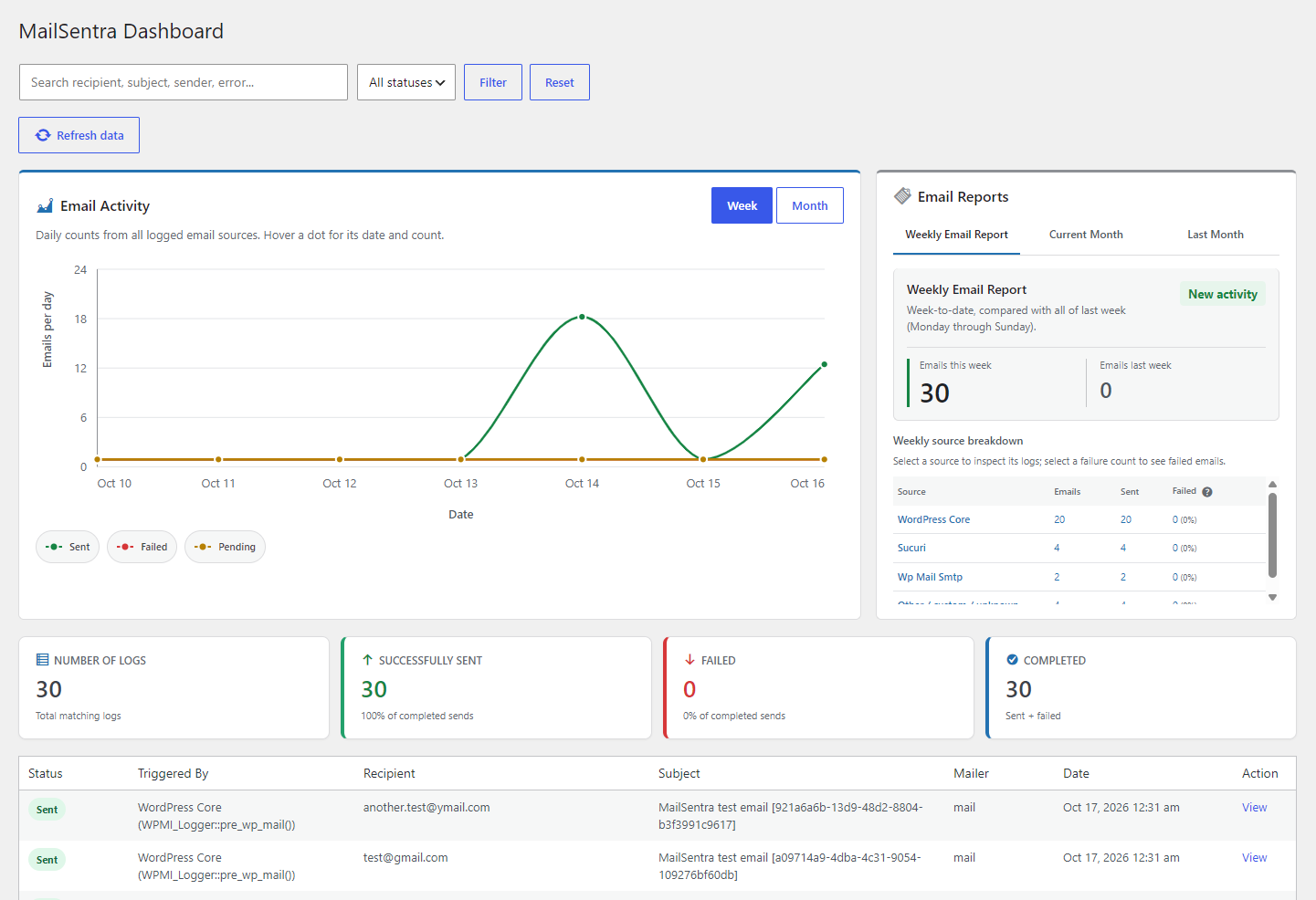
- Dashboard statistics, weekly and monthly reports, and a seven-day activity chart.
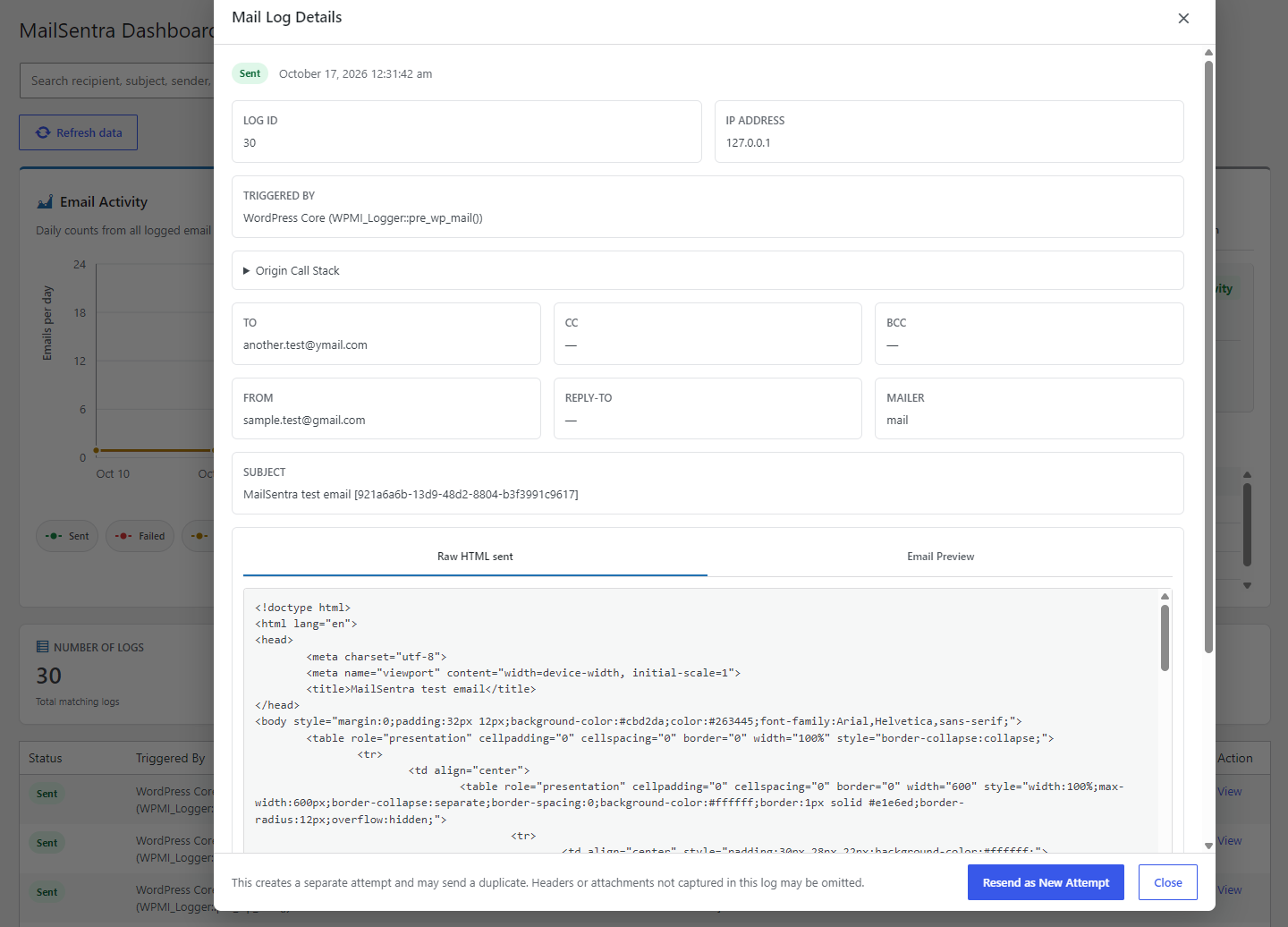
- Search and status filtering, with detailed individual log views.
- Failure Insights report with recent failure rates, broad error categories, and suggested checks grouped by source. Category guidance is not a confirmed root-cause diagnosis.
- Manual resend as a new attempt from log details when the original message body was captured.
- CSV export.
- Standard diagnostics stores email bodies while omitting headers, attachment paths, and request IP addresses. Privacy-focused logging is also available.
- Configurable retention period and optional maximum log count.
- Optional database cleanup on uninstall.
Pro Version (requires an eligible license)
- Custom logging mode with per-field capture controls.
- Six-week email activity history with week-over-week changes and activity rates.
- Configurable failure alerts and weekly email health summaries, including recipient lists.
- Retry Queue for eligible failed email logs, with manual queueing and retries, optional automatic retries, attempt history, and cancellation. Configure the automatic retry interval from 5 to 60 minutes.
- Scheduled Email reports for WP-Cron and Action Scheduler activity.
- WooCommerce email reporting, including email types, order counts, and product quantities.
- Email open tracking for eligible HTML messages while MailSentra logging is enabled. Opens are estimates, not proof that a person read an email.
The Retry Queue helps recover eligible attempts recorded as Failed without creating a second full email log. It keeps a separate copy of the captured message payload needed for retries; that may include recipients, content, headers, and attachment paths, including data omitted by Privacy-focused logging. Automatic retries are optional, disabled by default, and use one shared WP-Cron worker with a configurable 5-to-60-minute interval and a per-run batch limit. Keep MailSentra logging enabled; WP-Cron needs site traffic unless a system cron is configured. Retry attempts and outcomes appear in the queue. When a retry succeeds, the original Email Logs entry changes to Sent, its retry payload is cleared, and the successful queue record is kept for one day. Cancelling also clears the retry payload. A transport timeout can have an ambiguous delivery outcome, so retrying may send a duplicate.
Important
A « Sent » status means WordPress invoked its mail-success hook or a pre-send integration returned true. WordPress invokes the mail-success hook after PHPMailer returns normally, even if its send result is false, so this status does not guarantee successful transport or final inbox delivery. Check your mail provider’s logs for delivery confirmation.
MailSentra writes each log to the WordPress database before the mail attempt and updates its status from WordPress mail hooks. If a log write fails, email sending continues and MailSentra records a generic diagnostic in the PHP error log. Logging depends on the site’s database being available; a database outage or interrupted request can still prevent a log from being stored or leave it pending.
Expired logs are scheduled for cleanup when the site receives traffic. Each WP-Cron run removes up to 500 rows and stops starting database work after about two seconds; an individual database query may take longer. Follow-up batches resume with the oldest remaining rows, without OFFSET scans. A nonblocking claim prevents overlapping cleanup runs, and failed work is retried with exponential backoff. An optional maximum log count removes the oldest records in these batches; new mail activity schedules a deduplicated follow-up check, but the limit is not enforced synchronously on each email send. WP-Cron requires site traffic unless a system cron is configured. Set retention days and maximum log count to 0 to disable both automatic deletion limits.
Captures d’écrans

Installation
- Upload the plugin ZIP through Plugins > Add New > Upload Plugin.
- Activate the plugin.
- Go to MailSentra > Settings.
- Configure logging options.
FAQ
-
Does a Sent status confirm inbox delivery?
-
No. It means WordPress and PHPMailer reported a successful send operation. It does not confirm final delivery or rule out a later bounce.
-
What does Pending mean?
-
The email attempt was logged, but MailSentra has not recorded a sent or failed result yet. This can happen while sending or if the result hook does not run.
-
How does email log search work?
-
Normal word searches use indexed word-prefix matching. Short or punctuated searches, such as partial email addresses, use substring matching.
-
Where are email logs stored?
-
Logs are stored in this site’s WordPress database. MailSentra does not send logged data to an external service. Configure the logged fields and retention period in MailSentra > Settings.
Avis
Il n’y a aucun avis pour cette extension.
Contributeurs/contributrices & développeurs/développeuses
« MailSentra: Email Logging & Diagnostics » est un logiciel libre. Les personnes suivantes ont contribué à cette extension.
Contributeurs
Traduisez « MailSentra: Email Logging & Diagnostics » dans votre langue.
Le développement vous intéresse ?
Parcourir le code, consulter le SVN dépôt, ou s’inscrire au journal de développement par RSS.
Journal des modifications
2.1.6
- Fixed a compatibility issue where a missing Freemius SDK entry point could cause a fatal error; Free email logging now remains available and administrators are advised to reinstall the complete package.
- Added Free and Pro archive checks to ensure the Freemius SDK entry point is included in release packages.
2.1.5
- Added the Retry Queue as a Pro feature for eligible failed email logs, with manual queueing, retry, cancellation, and optional automatic retries.
- Added a configurable automatic retry interval from 5 to 60 minutes and optimized Failure Insights and Retry Queue dashboard performance.
- Added in-place Retry Queue actions with the shared loading indicator, keeping the dashboard in view while queueing, retrying, or cancelling.
- Successful retries now change the original Email Logs status to Sent; the successful retry record remains in the queue for one day.
2.1.4
- Added Failure Insights with recent failure counts, rates, broad error categories, and suggested checks by source.
- Added per-notification recipient lists for failure alerts and weekly email health summaries, with the site administration email as the fallback.
- Added Pro Scheduled Email reporting for observed WP-Cron and Action Scheduler email attempts, with context, send outcome, hook search, and Action Scheduler details.
- Added a Scheduled Jobs view for upcoming WP-Cron events and pending Action Scheduler actions, including recurrence, due/upcoming status, and a 30-second refresh while the view is visible.
- Added in-place refresh controls, scheduler explanations, timezone labels, and clearer empty states to the scheduled reports.
- Added an index-backed word-prefix search path with substring-search fallback for short or punctuated terms; the database schema migration adds the full-text index automatically.
- Improved log-list performance by loading full email details only when an individual log is opened.
- Updated the database schema version to add scheduled email context, hook, Action Scheduler ID, and full-text search index fields so existing logs migrate automatically.
- Improved the Tools test-email report layout and long-text wrapping.
2.1.3
- Added automatic Pro email open tracking for eligible HTML emails when MailSentra logging is enabled. Tracking records the first image request without storing request IP addresses or user agents.
- Added a Pro-only six-week Email Logs report with week-over-week gains and losses, activity rates, and accessible metric explanations.
- Added a loading indicator when changing the Email Logs dashboard period.
- Updated dashboard Pro cards and WooCommerce navigation so Free users can see Pro-gated previews while report data remains license-protected.
- Added tracking-token hash and first-open timestamp columns; the database version update applies the schema change automatically.
2.1.2
- Added Pro WooCommerce email reporting with per-type attempt statuses, distinct order counts, and de-duplicated product quantities.
- WooCommerce order and email identifiers are captured through WooCommerce email hooks without storing message content for this feature.
- Added WooCommerce email metadata to the log schema.
2.1.1
- Added source-specific failure alerts for WordPress Core, plugins, and other/custom sources.
- Added per-source failure counts and cooldowns, with dashboard links filtered to the affected source.
- Included the latest error detail only when the log confirms that error details were captured.
- No database schema migration is required.
2.1.0
- Added Pro email health features with Freemius entitlement checks.
- Added configurable failure alerts with threshold, time-window, and cooldown settings.
- Added a weekly email health summary with status totals and source breakdowns.
- Added a branded HTML layout for email health notifications.
- Organized Settings into Logging and Pro Email Health tabs.
- No database schema migration is required.
2.0.3
- Added Standard, Privacy-focused, and Custom logging modes, with per-field capture controls in Custom mode.
- Added a Settings overview of recorded data and clarified that attachment contents are not copied or stored.
- Hardened output escaping for disabled-field indicators in email log details.
- Verified scheduled cleanup batches against a 100,000-row staging dataset, removing up to 500 rows per run.
- Added per-log capture-state flags so log details can show when Custom-mode fields were disabled.
- Fixed database insert formats so captured email bodies retain their HTML content.
2.0.2
- Added scheduled retention cleanup with nonblocking overlap protection, oldest-first resumable batches, a two-second work budget, and exponential retry backoff.
- Added an optional maximum log-entry count to retention settings.
2.0.1
- Optimized admin JavaScript loading for improved efficiency across MailSentra screens.
2.0.0
- Added a protected test-email tool with PHPMailer diagnostics, transport details, and troubleshooting guidance.
- Added raw email and sandboxed HTML preview views for captured messages.
- Separated the plugin release version from its database schema version to avoid unnecessary database upgrades.
1.5.8
- Added a sandboxed HTML preview for captured email-log messages. Remote content remains blocked by default.
1.5.7
- Added a protected resend action that creates a new attempt without changing the original log status.
- Improved log correlation for nested mail calls and added diagnostics when log writes fail.
1.5.6
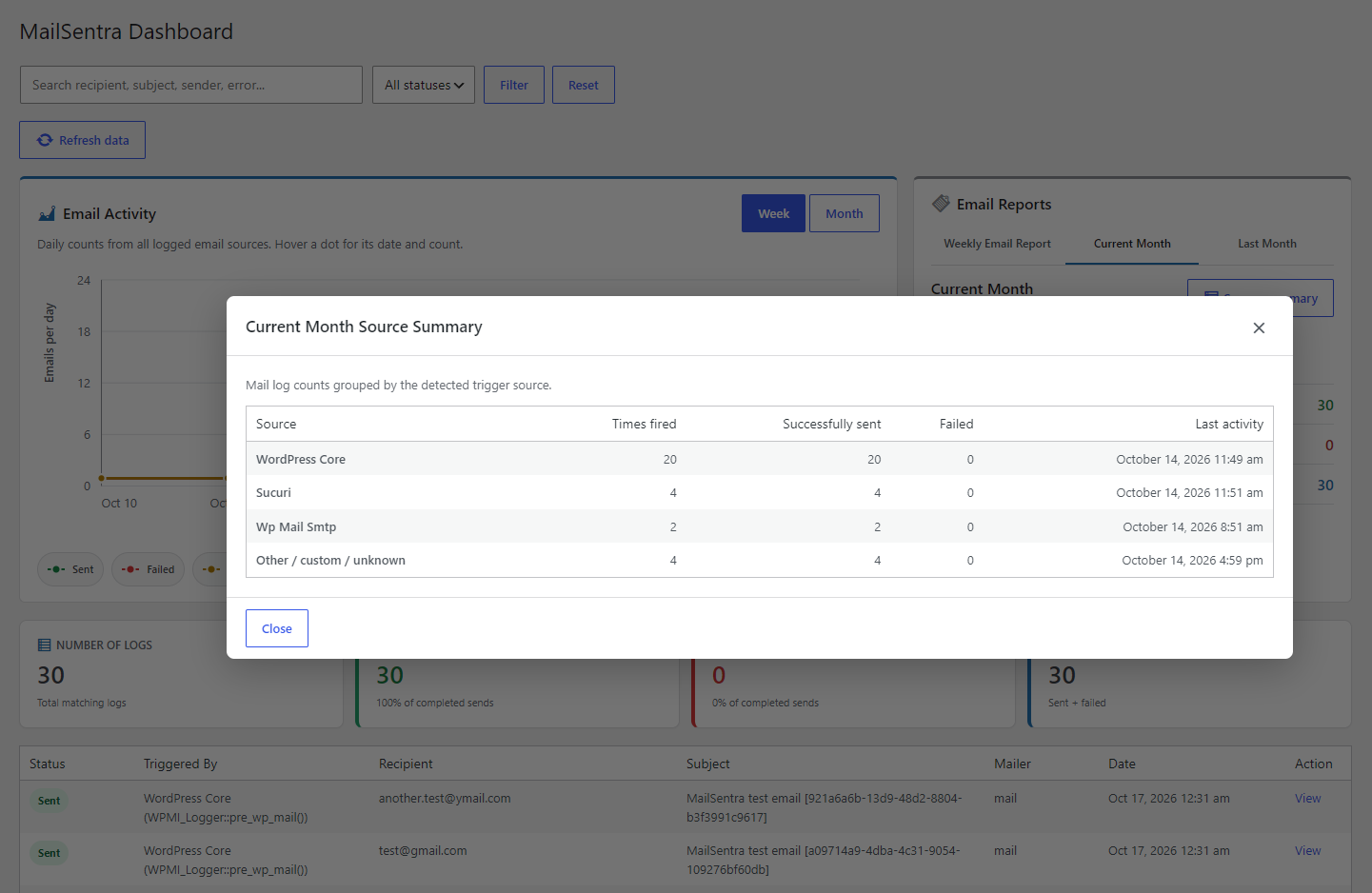
- Added weekly, current-month, and previous-month reports with source breakdowns.
1.5.3
- Added source-based AJAX filters for email log counts and statuses.
1.5.0
- Added weekly diagnostics by email source, including source totals, failure rates, and drill-down filters.
1.3.0
- Added AJAX refresh and filtering for email statistics, charts, and log results.
1.2.7
- Protected CSV exports from spreadsheet formula injection.
- Added per-field privacy controls, optional IP logging, and suggested privacy-policy content.
1.2.6
- Declared the minimum supported WordPress and PHP versions in the plugin metadata.
1.2.0
- Added trigger-source detection and call-stack diagnostics for wp_mail() attempts.
1.1.0
- Added log statistics and a detailed log-view interface.