

Description
Schnieders AI Media Labels helps you comply with the transparency obligations of the EU AI Act (Article 50), which require AI-generated media to be disclosed.
Open any image in the Media Library, tick « This image is AI-generated » (and optionally note the tool used, e.g. Midjourney), and the plugin displays a clear, configurable label wherever that image appears on your site.
Features
- A simple checkbox in the Media Library to flag any image, video or audio file as AI-generated.
- Optional field to record the AI tool or model used.
- Automatic front-end labelling of flagged files — no theme edits required.
- Auto-detection: uploads that already declare AI provenance (IPTC/XMP « Digital Source Type ») are flagged automatically.
- Media Library column, AI-status filter and bulk mark/unmark actions.
- Optional machine-readable marking: writes the IPTC « Digital Source Type » (trainedAlgorithmicMedia) into the image file (JPEG/PNG) so the AI status travels with the file.
- Works with images in post content, Gutenberg blocks, featured images, theme templates, and video/audio blocks.
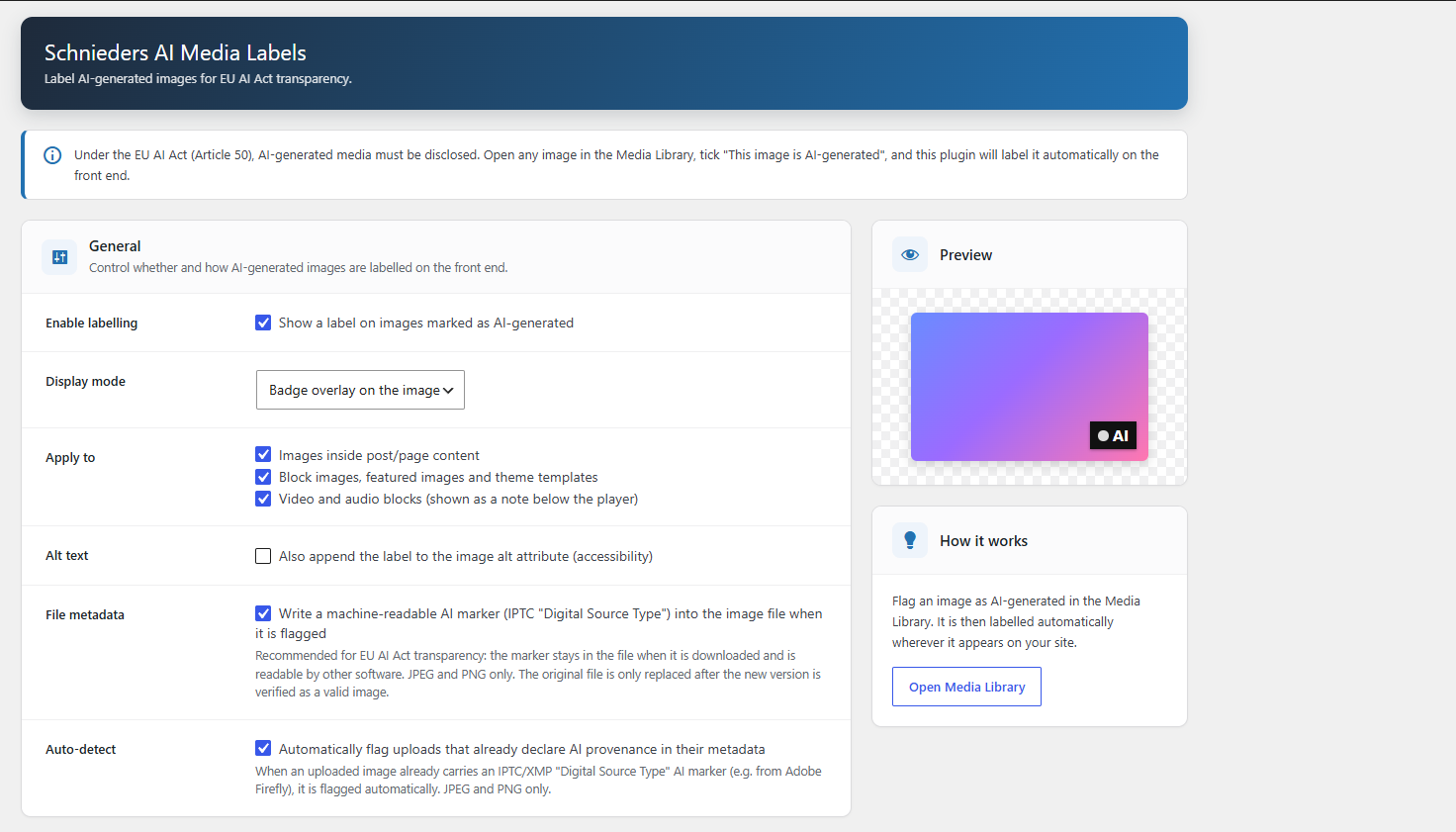
- Settings page to control:
- Whether labelling is enabled.
- Display mode: badge overlay, caption, or both.
- Badge position (all four corners).
- Badge shape: square, rounded, pill or circle.
- Font size and distance from the corner (in pixels).
- Indicator inside the badge: none, a dot, or a custom symbol (e.g. « ! »).
- Short badge text and full label text.
- Badge background and text colour.
- Whether to append the label to the image alt attribute (accessibility).
- Fully translation ready — translations are provided through translate.wordpress.org.
- No tracking, no external requests, no database tables.
Disclaimer: this plugin is a tool to help with disclosure. It does not constitute legal advice; please verify your obligations under the EU AI Act.
Captures d’écrans
Installation
- Upload the
schnieders-ai-media-labelsfolder to/wp-content/plugins/, or install it through the Plugins screen. - Activate the plugin through the « Plugins » screen in WordPress.
- Go to Settings > Schnieders AI Media Labels to configure how labels appear.
- In the Media Library, open an image and tick « This image is AI-generated ».
FAQ
-
Does this modify my images?
-
Only if you leave the « File metadata » option enabled. In that case, when you flag an image, the plugin writes a small machine-readable IPTC/XMP marker into the JPEG/PNG file (and its generated sizes). The pixels are not re-compressed, and the file is only replaced after the new version has been verified as a valid image. If you turn that option off, your files are never touched — the plugin then only stores a flag and displays a label on the front end.
We strongly recommend testing on a staging site and keeping backups before enabling file-metadata writing on a large existing library.
-
What is the machine-readable marker?
-
It is the IPTC « Digital Source Type » property with the value « trainedAlgorithmicMedia », stored as XMP inside the file. This is the same standard used by Google, Adobe and others to indicate AI-generated media.
-
Which images get labelled?
-
Only images you explicitly flag as AI-generated in the Media Library.
-
Does it work with page builders?
-
It labels images rendered through the standard WordPress functions (post content, blocks, featured images,
wp_get_attachment_image). Some page builders output custom markup that may not be covered. -
Does the plugin send data anywhere?
-
No. It makes no external requests and stores nothing outside your own database.
Avis
Il n’y a aucun avis pour cette extension.
Contributeurs/contributrices & développeurs/développeuses
« Schnieders AI Media Labels » est un logiciel libre. Les personnes suivantes ont contribué à cette extension.
Contributeurs
Traduisez « Schnieders AI Media Labels » dans votre langue.
Le développement vous intéresse ?
Parcourir le code, consulter le SVN dépôt, ou s’inscrire au journal de développement par RSS.
Journal des modifications
1.0.1
- Tested against WordPress 7.1.
1.0.0
- Initial release.