
Description
ONE REMINDER ISN’T A REPEAT-PURCHASE STRATEGY.
A customer buys today. You send one reminder months later—but what if they still don’t reorder? A single follow-up can be missed. Tom Volz Repeat Purchase Reminders for WooCommerce lets you go further: Free gives you unlimited reminder campaigns, while Pro lets you build recurring follow-ups instead of stopping after one email.
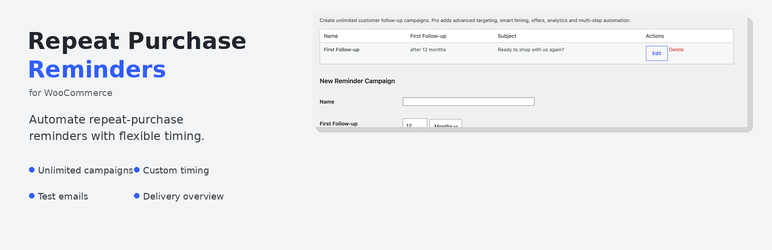
FREE: Start bringing customers back. Create unlimited campaigns, choose a delay in days or months after a completed order, customize your email, and let WordPress schedule the reminder automatically.
PRO: Keep the follow-up going—and learn what works. Schedule recurring reminders at defined intervals, build multi-step campaigns, test email variations with A/B testing, and measure clicks, conversions, and attributed revenue. Product targeting and customer segmentation help make follow-ups more relevant.
The difference: don’t rely on one chance to win the next order. Build a repeat-purchase process you can test and improve.
- Start without a campaign cap: Free includes unlimited reminder campaigns, so you can build reminders around your products and reorder cycles.
- Control the timing and message: Choose when a reminder should go out and customize its subject and content.
- Check before customers see it: Send a test email before activating your campaign.
- Know what happened: Review scheduled, sent, and failed reminders in WordPress.
- Scale beyond a single follow-up: Pro adds recurring reminders and multi-step campaigns.
- Improve instead of guessing: Pro adds A/B testing, click/conversion tracking, and revenue attribution.
If your main goal is to bring existing WooCommerce customers back—not to run every kind of newsletter, popup, or abandoned-cart campaign—this focused workflow keeps the job clear and manageable.
Start free — no campaign limit
The free version includes the core reminder workflow:
- Unlimited customer reminder campaigns.
- Custom delay in days or months after a completed order.
- Custom email subject and content.
- Automatic reminder scheduling after completed orders.
- Test emails before sending to customers.
- Synchronization of existing completed orders.
- Overview of scheduled, sent, and failed reminder emails.
- Customer unsubscribe link.
- Customizable email placeholders, including {first_name}, {order_number}, {order_date}, {site_name}, and {unsubscribe_url}.
You can start with straightforward reminders and keep using the free version for as many campaigns as your store needs.
Pro: go beyond the first reminder
Move from one reminder to a repeat-purchase process you can refine. Pro is for stores that want more follow-up opportunities and clearer evidence of what works.
- Recurring reminders: Schedule additional reminders at defined intervals instead of stopping after one email.
- A/B testing: Compare email variations to learn which subject lines or messages perform better.
- Product targeting: Focus reminders on relevant products customers have purchased.
- Customer segmentation: Adapt follow-ups for different customer groups.
- Smart timing: Use advanced timing options to make follow-ups more relevant.
- Multi-step campaigns: Build a sequence of follow-ups rather than relying on a single message.
- Cross-selling: Introduce relevant additional products in follow-up emails.
- Coupons and offers: Add incentives to selected campaigns.
- Click and conversion tracking: Measure how customers respond to your reminders.
- Revenue attribution: Track revenue attributed to reminder campaigns.
Free removes the campaign-count barrier. Pro adds the repeat sequence, audience controls, testing, and measurement to develop that workflow further.
Explore Repeat Purchase Reminders Pro
Features
- Unlimited reminder campaigns in Free.
- Custom reminder delay in days or months.
- Custom email subject and content.
- Automatic scheduling after completed WooCommerce orders.
- Test email function.
- Synchronization of existing completed orders.
- Overview of scheduled, sent, and failed emails.
- Customer unsubscribe link.
- Customizable email placeholders.
- Email delivery through WordPress wp_mail() and scheduling through WordPress Cron.
How it works
- Create a reminder campaign.
- Choose how long after a completed order the reminder should be sent.
- Customize the email subject and message.
- Send a test email to check the content.
- Save the campaign. WordPress schedules the reminder automatically.
- Review scheduled, sent, and failed emails in the delivery overview.
Privacy
The plugin stores reminder-related information in the WordPress database, including order ID, customer ID, email address, scheduled time, and delivery status. Email delivery uses WordPress wp_mail() and your site’s mail configuration.
Captures d’écrans


Installation
- Install and activate WooCommerce.
- Go to Plugins > Add New Plugin and upload the plugin ZIP, or install the plugin through the WordPress Plugins screen.
- Activate Tom Volz Repeat Purchase Reminders for WooCommerce.
- Open Repeat Purchase Reminders in the WordPress admin.
- Create a campaign, customize the email, and save it.
FAQ
-
Does it require WooCommerce?
-
Yes. WooCommerce must be installed and active.
-
Are there limits on the number of free campaigns?
-
No. The free version supports unlimited reminder campaigns.
-
When are reminders scheduled?
-
Reminders are scheduled automatically when an order reaches the completed status. Existing completed orders can be synchronized manually.
-
Can I test an email before sending it to customers?
-
Yes. Use the test email function to check your message before relying on a live campaign.
-
Can I send recurring reminders?
-
Recurring reminders are a Pro feature. They allow follow-ups to continue at defined intervals instead of ending after one reminder.
-
Does Pro include A/B testing?
-
Yes. Pro includes A/B testing to compare email variations and identify which messages perform better.
-
How are emails sent?
-
Emails are sent through WordPress wp_mail(). Actual delivery depends on your site’s mail configuration. A correctly configured SMTP or transactional email service can improve deliverability.
-
Does the plugin send customer data to an external service?
-
The plugin stores reminder-related data in the WordPress database and uses WordPress mail delivery. Your site’s mail configuration determines how emails are delivered.
Avis
Il n’y a aucun avis pour cette extension.
Contributeurs/contributrices & développeurs/développeuses
« Tom Volz Repeat Purchase Reminders for WooCommerce » est un logiciel libre. Les personnes suivantes ont contribué à cette extension.
Contributeurs
Traduisez « Tom Volz Repeat Purchase Reminders for WooCommerce » dans votre langue.
Le développement vous intéresse ?
Parcourir le code, consulter le SVN dépôt, ou s’inscrire au journal de développement par RSS.
Journal des modifications
1.3.1
- Current WordPress.org release.
1.3.0
- Renamed the plugin to Tom Volz Repeat Purchase Reminders for WooCommerce.
- Updated the plugin slug and text domain for the new directory name.
- Removed the built-in campaign limit so the free plugin remains fully functional.
- Replaced the plugin prefix with a distinct RPRWC prefix.
- Refined the Free and Pro positioning around advanced retention features.
1.2.6
- Refined Free edition messaging around customer retention and repeat purchases.
- Clarified the Free vs. Pro positioning in the admin and documentation.
- Updated onboarding copy without changing Free edition functionality.
1.2.5
- Improved Plugin Check compatibility for admin request handling and custom database queries.
- Shortened the plugin directory short description.
- Kept deleted source orders from being treated as send failures.
1.2.3
- Improved WordPress.org Plugin Check compatibility.
- Aligned the plugin slug and text domain with WordPress.org requirements.
- Added Donate link and Tested up to metadata.
- Cancelled scheduled reminders when the source WooCommerce order no longer exists.
1.2.0
- Refreshed the Free edition to align with the current Pro feature set.
- Added clearer Free vs. Pro upgrade messaging in the admin.
- Standardized remaining backend messages to English.
- Updated version metadata and documentation.
1.1.1
- Set English as the default backend language.
- Updated the translation text domain.
- Updated default email text to English.