

Description
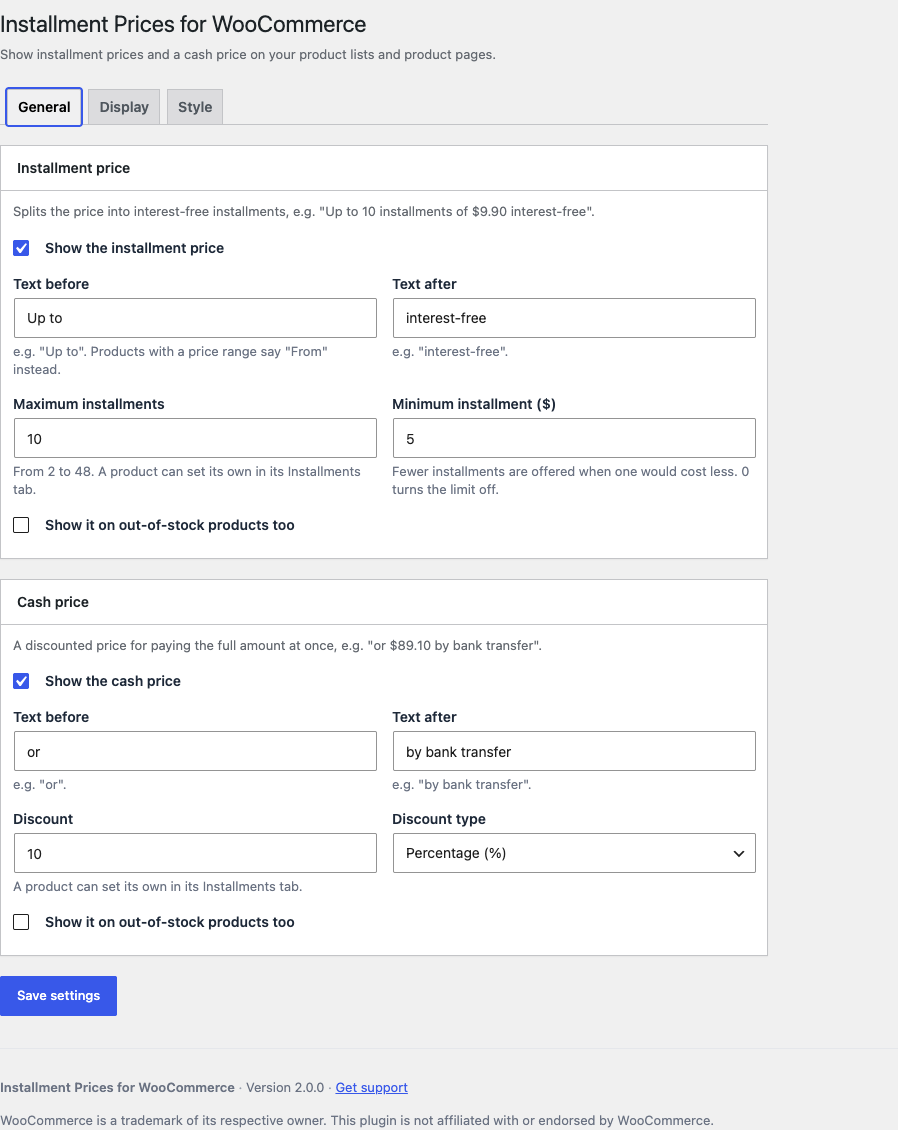
Installment Prices for WooCommerce shows shoppers what each installment would cost, and what they’d pay upfront, right under your prices:
Up to 10 installments of $9.90 interest-free
or $89.10 by bank transfer
It only displays prices. It doesn’t process payments or change what customers are charged: your payment methods still decide how they pay.
Installment price
- Split the price into as many installments as you choose, up to 48, with your own text before and after it.
- Set a minimum installment amount: fewer installments are offered when one would cost less.
Cash price
- Take a percentage or a fixed amount off for paying the full amount at once.
Placement and style
- Choose where each line appears in product lists and on the product page, in what order, and how it’s aligned.
- Set the color, weight and size of each part of each line, separately for product lists and product pages.
Per product
- Hide either line, or give a product its own maximum installments and cash discount, in its Installments tab.
And also
- Variable products show « From » figures, and the chosen variation’s own figures under its price.
- Grouped products show « From » figures.
- Out-of-stock products show the lines only if you want them to.
- Amounts follow your store’s tax display setting and price format.
- Translation-ready, with Brazilian Portuguese (pt_BR) included.
Source code & build
The compiled admin assets in public/build/ are minified. The complete, human-readable source (front-end included) and the build steps live in the plugin’s public repository: https://github.com/filipecsweb/wp-plugin-woocommerce-parcelas
Disclaimer
WooCommerce is a trademark of its respective owner. This plugin is not affiliated with or endorsed by WooCommerce.
Captures d’écrans


Installation
- Install the plugin from Plugins Add New, or upload it to
/wp-content/plugins/woocommerce-parcelas/. WooCommerce must be installed and active. - Activate it through the Plugins screen.
- Go to WooCommerce Installment Prices, switch on the installment price, the cash price or both, and click Save settings.
FAQ
-
Does it charge customers in installments?
-
No. It only shows prices; your payment methods decide how customers pay.
-
Which price are the figures based on?
-
The price your store shows, including or excluding tax as set in WooCommerce Settings Tax. Variable and grouped products use their lowest price and say « From ».
-
Can a product have its own settings?
-
Yes. Edit the product, and open the Installments tab in the Product data box: you can hide either line there, or set the product’s own maximum installments and cash discount.
-
Does it work with block themes?
-
Yes. It uses WooCommerce’s product-list and product-page positions, which WooCommerce also provides in its block templates.
-
Can amounts use a decimal comma?
-
Yes. Amounts accept either a decimal comma or a decimal point.
-
Can I add interest to the installments?
-
Not yet.
-
How do I change the output with code?
-
Two filters receive each line’s HTML, the product, and the context (
loopin product lists,singleon the product page):installment_prices_for_woocommerce_installments_html installment_prices_for_woocommerce_cash_html -
I’m upgrading from 1.x. What changes?
-
Your settings and every product’s own settings carry over. The words between your text and the amount (« 10 installments of », « 10x de » in Portuguese) now follow your site language, as English is the plugin’s source language. The output’s HTML classes and developer hooks changed, so custom CSS or code written for 1.x needs updating: the lines now use
installment-prices-for-woocommerceclasses and the two filters above.
Avis


Contributeurs/contributrices & développeurs/développeuses
« Installment Prices for WooCommerce » est un logiciel libre. Les personnes suivantes ont contribué à cette extension.
Contributeurs
Traduisez « Installment Prices for WooCommerce » dans votre langue.
Le développement vous intéresse ?
Parcourir le code, consulter le SVN dépôt, ou s’inscrire au journal de développement par RSS.
Journal des modifications
2.0.0
- The plugin has a new name: Installment Prices for WooCommerce.
- Rebuilt from the ground up, with a new settings screen under WooCommerce Installment Prices. English is now the source language, and Brazilian Portuguese is included.
- A product’s own settings move to an Installments tab in the Product data box.
- A variable product’s chosen variation now shows its own figures under its price, computed by your store instead of read off the page.
- Amounts now follow your store’s tax display setting.
- Shop managers can now change the settings.
- Custom styles are now printed with the page instead of loaded from a separate generated stylesheet.
- Fixed: a fixed cash discount written with a decimal comma showed « NaN » on variable products.
- Changed: the output’s HTML classes and developer hooks were renamed.
- Changed: the maximum installments now range from 2 to 48.
- Requires PHP 8.2, WordPress 7.0 and WooCommerce 9.0 or later.
1.3.5
- Fixed custom styles (colors and more) not being applied.
1.3.4
- The scripts loaded on variable products now carry the version in their URL, to avoid stale caches.
- Added an option to show the prices on out-of-stock products.
1.3.3
- Fixed a JavaScript error on variable products whose variations had the same price.
1.3.2
- A product can now override the number of installments and the cash price.
1.2.9
- CSS declarations now use
!important. - Replaced the deprecated
get_product()withwc_get_product(). - Changed the text domain from
woocommerce-parcelastowc-parcelas.
1.2.8
- Fixed the cash price not showing on variable products with different prices when installments were off.
- Added an option to hide the installment price on specific products.
- Added an option to align the prices.
- Added options to style the prices.
- Fixed the « Bugs and suggestions » link.
1.2.7
- Added an option to hide the cash price on specific products.
1.2.6
- Fixed grouped products. Added options to position the installment and cash prices, and a discount for paying in cash.
1.2.5.3
- Fixed the Settings link below the plugin name.
1.2.5.1
- A minimum amount with a decimal comma now works on variable products.
1.2.5
- Code improvements.
1.2.4
- Bug fixes. Added actions, a filter and better CSS classes.
1.2.3
- Fixed the JavaScript for stores that use a point as the decimal separator.
1.2.2
- Full support for variable products.
1.2.1
- Translated to English.
1.2
- Added the minimum installment amount.
1.1
- Added the prefix and suffix fields.
1.0
- First release.