
Description
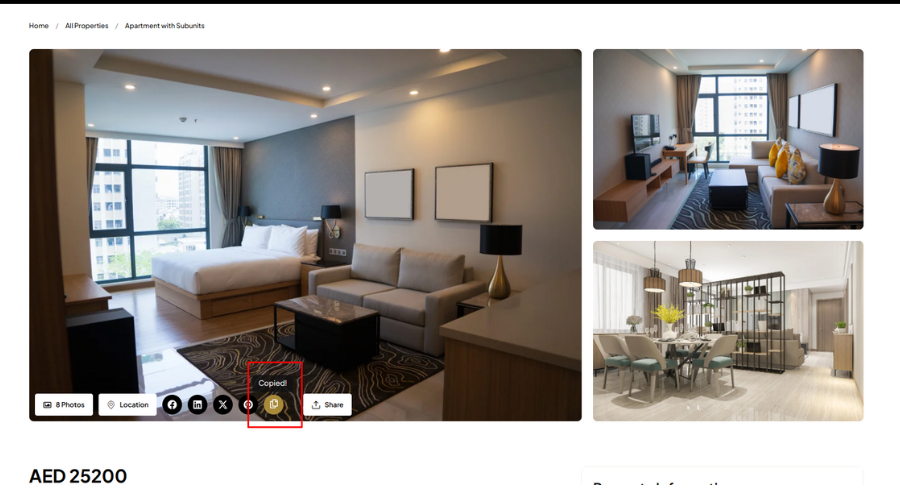
This lightweight plugin adds a copy button that copies the current page URL and shows a tooltip saying « Copied! ».
Features:
- Shortcode:
[copy_url_button] - Lightweight and fast
- Stylish tooltip that fades in/out
- No configuration required
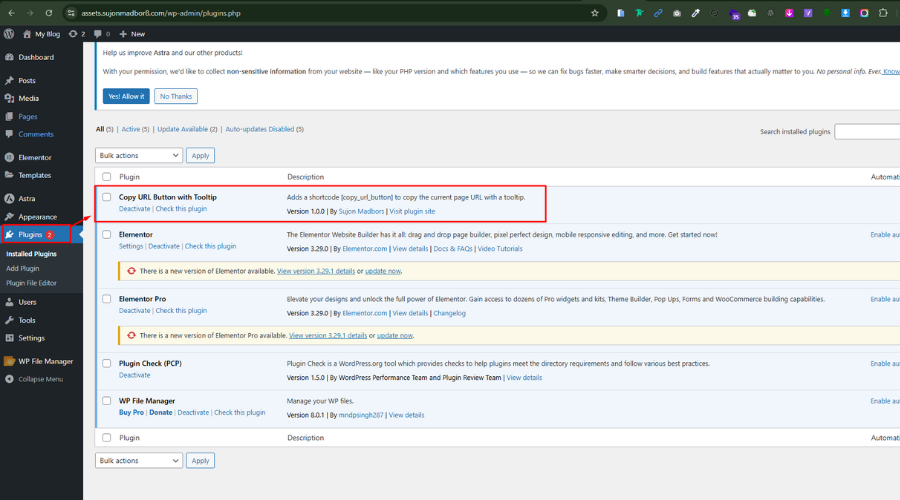
Captures d’écrans
Installation
- Upload the plugin files to the
/wp-content/plugins/copy-url-button-with-tooltipdirectory, or install the plugin through the WordPress admin area. - Activate the plugin through the ‘Plugins’ menu in WordPress.
- Use the
[copy_url_button]shortcode anywhere on your site.
FAQ
-
Can I use it anywhere?
-
Yes, the shortcode
[copy_url_button]can be used in posts, pages, widgets, or templates usingdo_shortcode().
Avis

31 mai 2025
Simple and effective! The « Copy URL Button with Tooltip » plugin does exactly what it promises—adds a clean copy-to-clipboard button with a helpful tooltip. Lightweight, easy to use, and perfect for quickly copying a URL and sharing.
Contributeurs/contributrices & développeurs/développeuses
« Copy URL Button with Tooltip » est un logiciel libre. Les personnes suivantes ont contribué à cette extension.
Contributeurs
Traduisez « Copy URL Button with Tooltip » dans votre langue.
Le développement vous intéresse ?
Parcourir le code, consulter le SVN dépôt, ou s’inscrire au journal de développement par RSS.
Journal des modifications
5.2.2
- Initial release