Description
AI Provider for Azure AI Foundry registers an AI provider with the WordPress 7.0 AI Client, enabling text generation, image generation, embeddings, and text-to-speech via the Azure AI Foundry Model Inference API.
Features
- AI Client integration — usable via
wp_ai_client_prompt()and the Settings Connectors page. - OpenAI-compatible — uses the Azure AI Foundry
/chat/completionsendpoint. - Capability detection — auto-detects deployed models and capabilities (text generation, chat history, image generation, embeddings, text-to-speech) by probing the Azure endpoint.
- Multiple endpoint types — supports Azure AI Services, Azure OpenAI, and Cognitive Services endpoints.
- Auto-detection — discovers all deployed models via POST-based probing. No manual model name or API version configuration needed.
- Custom authentication — sends the
api-keyheader required by Azure. - Endpoint validation — validates Azure endpoint URLs with inline error messages.
- Environment variable fallback — every setting can be overridden via environment variables or
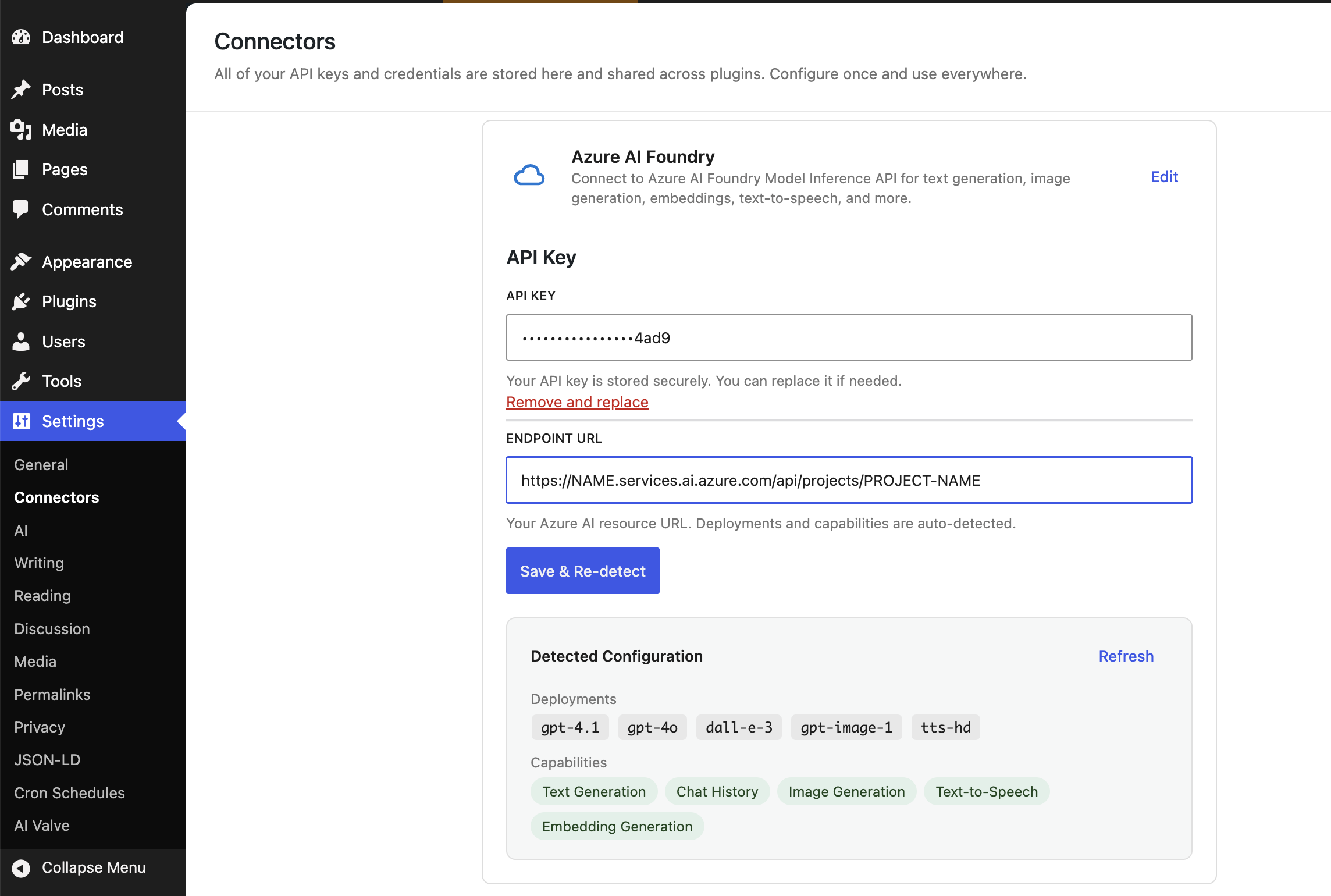
wp-config.phpconstants. - Connectors page UI — custom connector with fields for API key and endpoint URL. Detected deployments and capabilities displayed as read-only chips.
Requirements
- WordPress 7.0 or later
- PHP 8.3+
- An Azure AI Foundry resource with a deployed model
Documentation
- Building an AI Provider Plugin for WordPress 7, a deep-dive into provider registration, settings, authentication, and the Connectors page UI.
Captures d’écrans
Installation
From WordPress.org
- Go to Plugins Add New in your WordPress admin.
- Search for « AI Provider for Azure AI Foundry ».
- Click Install Now, then Activate.
Manual Installation
- Download the plugin from WordPress.org.
- Upload the
ai-provider-for-azure-ai-foundryfolder to/wp-content/plugins/. - Activate the plugin through the Plugins menu.
Configuration
- Go to Settings Connectors.
- Find « Azure AI Foundry » and click Set Up.
- Enter your API Key and Endpoint URL.
- Click Connect & Detect — the plugin probes your endpoint, discovers deployed models, and saves the configuration automatically.
FAQ
-
Where do I get an API key?
-
Sign in to Azure AI Foundry and create or select a project. Deploy a model and copy the API key from the endpoint details.
-
What is the Endpoint URL?
-
The plugin supports three Azure endpoint types:
https://{resource}.services.ai.azure.com/api/projects/PROJECT-NAME(Azure AI Services)https://{resource}.openai.azure.com(Azure OpenAI)https://{resource}.cognitiveservices.azure.com(Cognitive Services)
You can find your endpoint in the Azure AI Foundry portal under your model deployment.
-
Do I need to specify a model name?
-
No. The plugin auto-detects all deployed models by probing your Azure endpoint. Model names and capabilities are saved automatically when you click « Connect & Detect ».
-
Can I configure settings without the admin UI?
-
Yes. Set any of these environment variables or define them as constants in
wp-config.php:AZURE_AI_FOUNDRY_API_KEYAZURE_AI_FOUNDRY_ENDPOINTAZURE_AI_FOUNDRY_MODEL(comma-separated deployment names)AZURE_AI_FOUNDRY_CAPABILITIES(comma-separated, e.g.text_generation,chat_history)
-
What capabilities are supported?
-
The plugin supports five capabilities:
text_generation,chat_history,image_generation,embedding_generation, andtext_to_speech_conversion. By default,text_generationandchat_historyare enabled. Use « Connect & Detect » to discover capabilities automatically. -
What API version is used?
-
The plugin uses
2025-04-01-previewfor the Azure OpenAI surface. This is hardcoded and not user-configurable.
Avis
Il n’y a aucun avis pour cette extension.
Contributeurs/contributrices & développeurs/développeuses
« AI Provider for Azure AI Foundry » est un logiciel libre. Les personnes suivantes ont contribué à cette extension.
Contributeurs
“AI Provider for Azure AI Foundry” a été traduit dans 1 locale. Remerciez l’équipe de traduction pour ses contributions.
Traduisez « AI Provider for Azure AI Foundry » dans votre langue.
Le développement vous intéresse ?
Parcourir le code, consulter le SVN dépôt, ou s’inscrire au journal de développement par RSS.
Journal des modifications
1.2.4
- Update npm development dependencies and resolve npm audit findings.
1.2.3
- Fix AI plugin connector detection on WordPress 7.0 RC3 by pointing the hidden sentinel connector at its synced setting.
1.2.2
- Added
wpai_preferred_text_modelsfilter to prepend Azure text-generation models to the AI plugin preferred list.
1.2.1
- Fixed PHP syntax compatibility with WordPress.org SVN linter (removed typed constants).
- Added PHPUnit tests with Brain Monkey.
1.2.0
- Added plugin icon for WordPress.org.
- Updated installation instructions for WordPress.org plugin directory.
1.1.1
- Renamed plugin from « Azure AI Foundry Connector » to « AI Provider for Azure AI Foundry » to avoid confusion with official Microsoft products.
- Fixed GitHub Actions release workflow content-length mismatch error.
1.1.0
- Renamed main plugin file to
ai-provider-for-azure-ai-foundry.phpto comply with WordPress plugin naming guidelines. - Changed text domain to
ai-provider-for-azure-ai-foundry. - GitHub release artifact renamed to
ai-provider-for-azure-ai-foundry.zip. - Added internationalization (i18n) support with npm scripts for generating translation files.
- Added Norwegian Bokmål (nb_NO) translation.
- Added
.distignorefile to exclude development files from distribution packages. - Removed GitHub Updater support to comply with WordPress plugin naming guidelines.
1.0.0
- Added embedding generation model — supports text-embedding-ada-002, text-embedding-3-small/large deployments.
- Added text-to-speech model — supports tts-1 and tts-1-hd deployments.
- Auto-detection now resolves separate deployment names for text, image, embedding, and TTS models.
- Added audio input modality for text generation models (vision + audio support).
- Added topK supported option for text generation models.
- Added AI client conflict detection — warns when the « AI Experiments » plugin overrides the built-in AI client.
- Fixed TTS response parsing — uses raw body instead of JSON-decoded data to correctly capture audio binary output.
0.3.3
- Fixed the Connect & Detect flow so it saves the API key and endpoint before deployment detection.
- Fixed WordPress AI plugin compatibility so configured Azure AI Foundry credentials are recognized as a valid AI Connector.
0.3.2
- Escaped output in exception message (WordPress Plugin Check compliance).
- Added direct file access protection to autoload.php and ConnectorSettings.php.
0.3.1
- Fixed connector description to list all supported capabilities instead of only text generation.
0.3.0
- Simplified settings to API Key and Endpoint URL only — model names and capabilities are auto-detected.
- « Connect & Detect » probes deployments via POST and saves detected configuration directly.
- Detects all deployed models (text and image), not just the first match.
- Added candidateCount support for title generation.
- Removed API Version and Model Name input fields.
- Removed capability checkboxes (auto-detected as read-only chips).
0.2.0
- Capabilities setting with 5 options: text generation, chat history, image generation, embedding generation, text-to-speech.
- « Detect from Endpoint » button auto-detects capabilities from Azure endpoint.
- Endpoint URL validation with inline error message.
- Capabilities displayed as read-only chips.
- Save Settings button shows loading spinner and success/error feedback.
0.1.0
- Initial release.
- AI Client provider for Azure AI Foundry Model Inference API.
- Text generation via OpenAI-compatible chat/completions endpoint.
- Auto-detection of deployed model via /info endpoint.
- Custom api-key header authentication.
- Connectors page UI with API key, endpoint, model name, and API version fields.
- Environment variable and wp-config.php constant fallbacks.
- API key masking in REST API responses.