

Description
BPOTech Text Formatter with TinyMCE is a lightweight WordPress plugin that extends text styling in both the Classic Editor and the Gutenberg Block Editor — no other plugins required.
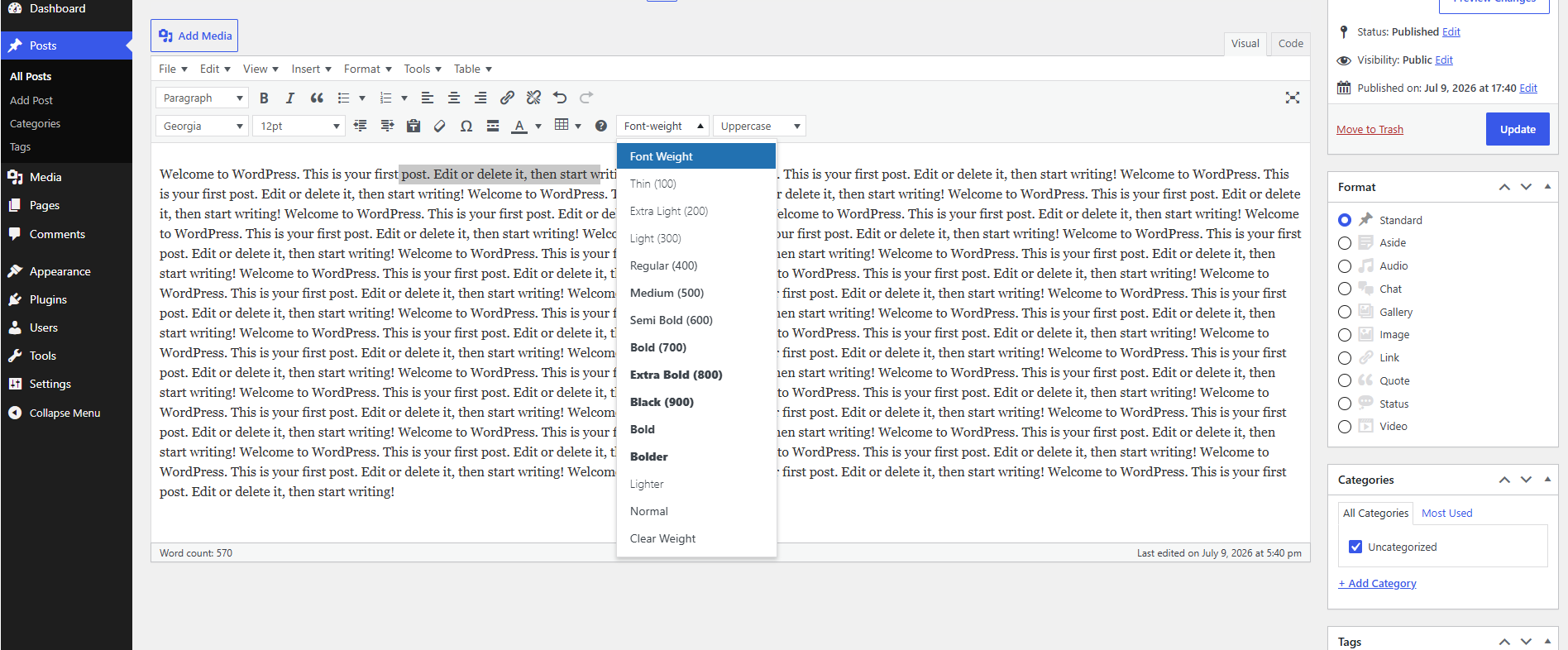
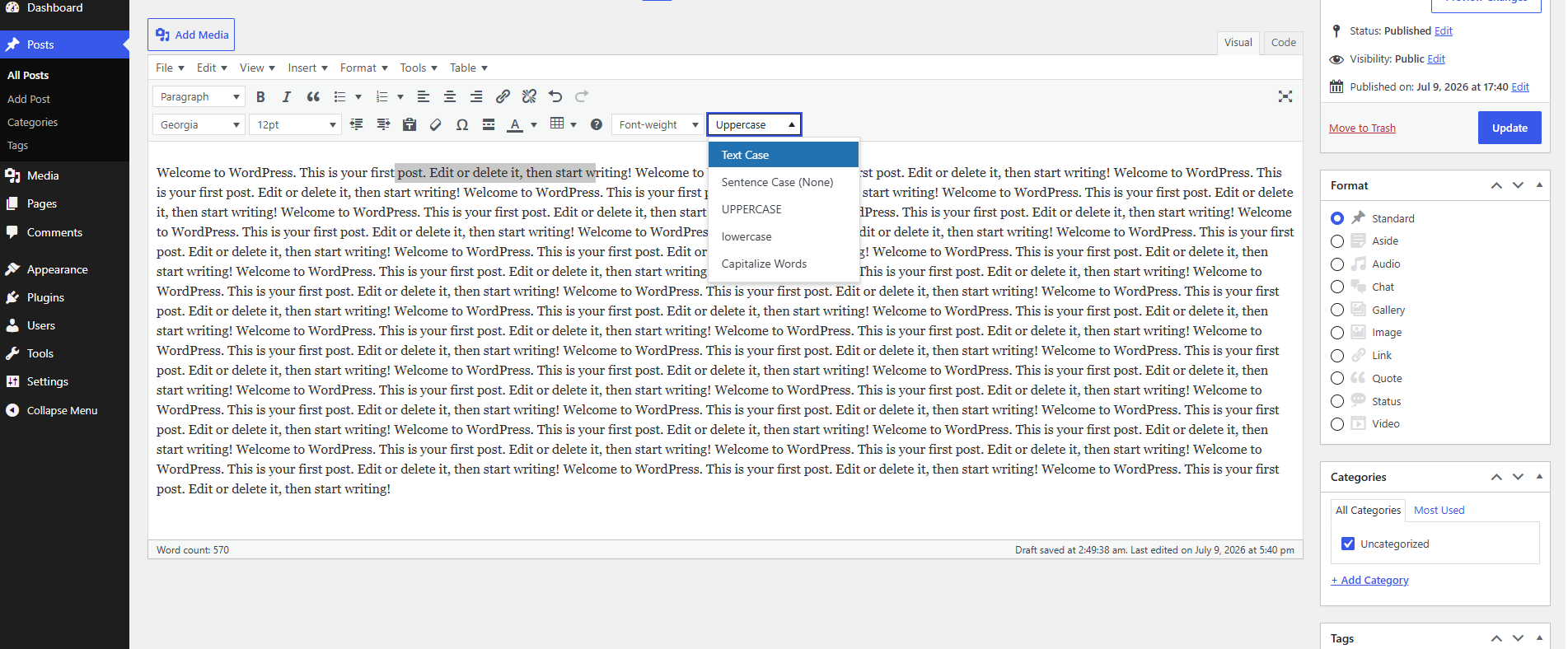
It adds custom Font-weight and Uppercase controls directly to the editor toolbar, giving users granular control over typography without touching any code.
Features
- Deep Font Weight Selection: Apply numeric weights (
100Thin,200Extra Light,300Light,400Regular,500Medium,600Semi Bold,700Bold,800Extra Bold,900Black) as well as CSS keywords (bold,bolder,lighter,normal). - Text Transform Options: Easily apply case rules like UPPERCASE, lowercase, and Capitalize Words on selected text.
- Gutenberg Block Editor Support: Works natively inside Gutenberg blocks (Paragraph, Heading, etc.) via
registerFormatType— no Classic Block required. - Google Fonts Integration: Load fully-weighted Google Fonts (e.g. Inter, Roboto, Outfit, Montserrat) in both the editor and site front-end.
- Post Type Targeting: Enable the toolbar controls only for specific post types (e.g. Posts, Pages, or custom types).
- Premium Options Screen: A modern dashboard with visual toggles, checkbox grids, and a live font-weight preview.
- Compatible: Works standalone. Optionally compatible with Advanced Editor Tools (TinyMCE Advanced).
Third-Party Services
This plugin optionally connects to the Google Fonts API to load web fonts in the editor and on the front-end of your site. This feature is disabled by default to ensure GDPR/privacy compliance, and can be enabled at any time from Settings BPOTech Text Formatter by checking « Load Google Font stylesheet ».
When enabled, your site visitors’ browsers will make requests to Google’s servers to download font files. This means visitor IP addresses are transmitted to Google.
- Service: Google Fonts
- Terms of Service: https://developers.google.com/fonts/terms
- Privacy Policy: https://policies.google.com/privacy
If you need to comply with GDPR or similar privacy regulations, keep this feature disabled and self-host your fonts instead.
Captures d’écrans
Installation
- Upload the plugin files to the
/wp-content/plugins/bpotech-text-formatter-with-tinymcedirectory, or install the plugin through the WordPress plugins screen directly. - Activate the plugin through the ‘Plugins’ screen in WordPress.
- Use the Settings BPOTech Text Formatter menu to configure options, toggle active font weights, and choose toolbar rows.
FAQ
-
Does it support Gutenberg?
-
Yes! The plugin supports Gutenberg natively. It registers custom inline format types (
Font-weightandUppercase) directly inside the Block Editor toolbar using theregisterFormatTypeAPI — no Classic Block required. -
Does it support the Classic Editor?
-
Yes. The plugin adds Font-weight and Uppercase dropdown buttons to the TinyMCE toolbar when using the Classic Editor plugin.
-
Do I need Advanced Editor Tools (TinyMCE Advanced)?
-
No. The plugin works completely standalone. If you have Advanced Editor Tools installed, the buttons will also appear there and can be repositioned through its settings panel.
-
Yes. In Settings BPOTech Text Formatter, you can select exactly which post types (Posts, Pages, or any custom post type) should display the formatting controls.
Avis
Il n’y a aucun avis pour cette extension.
Contributeurs/contributrices & développeurs/développeuses
« BPOTech Text Formatter with TinyMCE » est un logiciel libre. Les personnes suivantes ont contribué à cette extension.
Contributeurs
Traduisez « BPOTech Text Formatter with TinyMCE » dans votre langue.
Le développement vous intéresse ?
Parcourir le code, consulter le SVN dépôt, ou s’inscrire au journal de développement par RSS.
Journal des modifications
1.1.0
- Fixed Gutenberg Block Editor formatting registration conflicts.
- Migrated custom formats to render directly on the main Gutenberg Block toolbar using BlockControls and ToolbarDropdownMenu.
- Added a new configuration toggle to replace WordPress’s default Bold format button with the custom Font Weight dropdown in both editors.
- Implemented overriding of default bold shortcuts and commands to trigger the plugin’s font-weight formatting instead.
1.0.1
- Updated plugin description to reflect standalone Gutenberg support.
- Added native Gutenberg Block Editor integration via
registerFormatType. - Added Post Type targeting — enable controls per post type.
- Fixed Active Font Weight Levels not saving correctly due to PHP integer key casting.
- Added
uninstall.phpto clean up all plugin data on deletion. - Fixed admin notice contrast (white-on-white) on settings screen.
- Renamed toolbar buttons: « Weight » « Font-weight », « Case » « Uppercase ».
- Updated tested up to WordPress 7.0.
- Extracted inline JavaScript to external enqueued file for CSP compliance.
- Added Third-Party Services disclosure for Google Fonts API.
1.0.0
- Initial Release.
- Added custom Font Weight and Text Transform dropdowns.
- Added standard keywords support (bold, bolder, lighter, normal).
- Implemented secure input sanitization and option validation for WordPress Store guidelines.