

Description
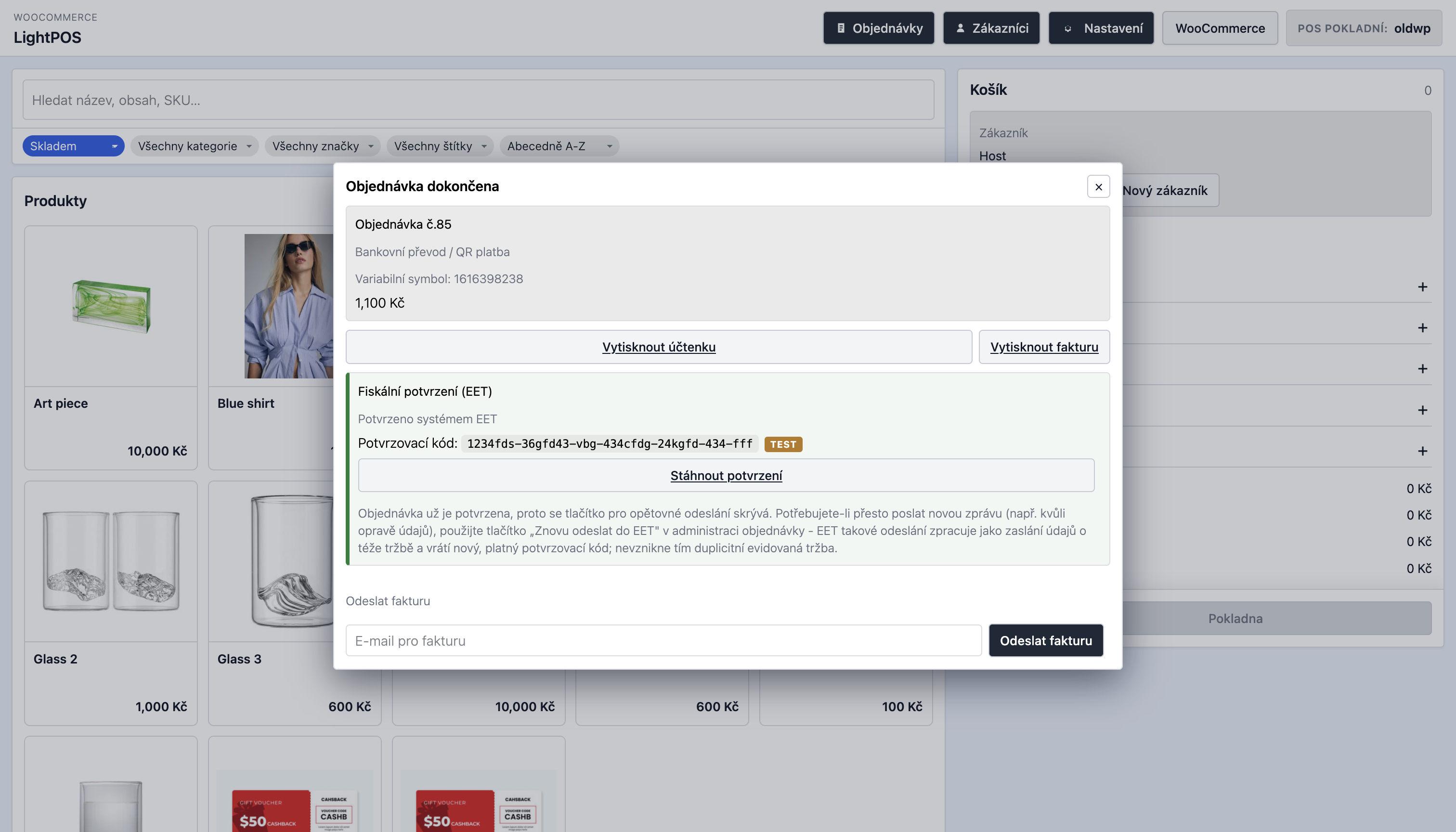
LightPOS je pokladní systém pro rychlý prodej: podporuje QR platby v CZK a EUR, multiccreuncy, správu zákazníků a práci s existujícími objednávkami přímo v POS. Obsahuje integraci s pluginem PDF Invoices & Packing Slips for WooCommerce pro tisk a odesílání faktur a s pluginem EET 2.0 pro WooCommerce pro elektronickou evidenci tržeb. LightPOS může po dokončení prodeje odeslat tržbu do EET 2.0, zobrazit stav evidence přímo v POS a zpřístupnit fiskální potvrzení.
V LightPOS můžete také přímo definovat vlastní zákaznická meta pole (např. IČ, DIČ), která lze programově využít ve vlastních pracovních postupech, například ve fakturách, e-mailových šablonách nebo jiných integracích na míru.
Hlavní funkce
- Samostatná responzivní pokladna s nastavitelnou URL adresou, zobrazením produktů a přehlednými ovládacími prvky pro obsluhu.
- Rychlé vyhledávání produktů a nastavitelné filtrování podle skladu, kategorií, značek, štítků, jazyka a klíčových slov.
- Volba filtrů produktů, které uvidí obsluha pokladny.
- Podpora variantních produktů, detailu produktu v dialogu a přidávání do košíku s kontrolou skladu.
- Přidávání vlastních položek s vlastním názvem, SKU, DPH a cenou.
- Sbalitelné nástroje košíku pro kupóny, ruční poplatky, slevy a dopravu.
- Platba v hotovosti se zadanou přijatou částkou a automatickým výpočtem vrácené hotovosti.
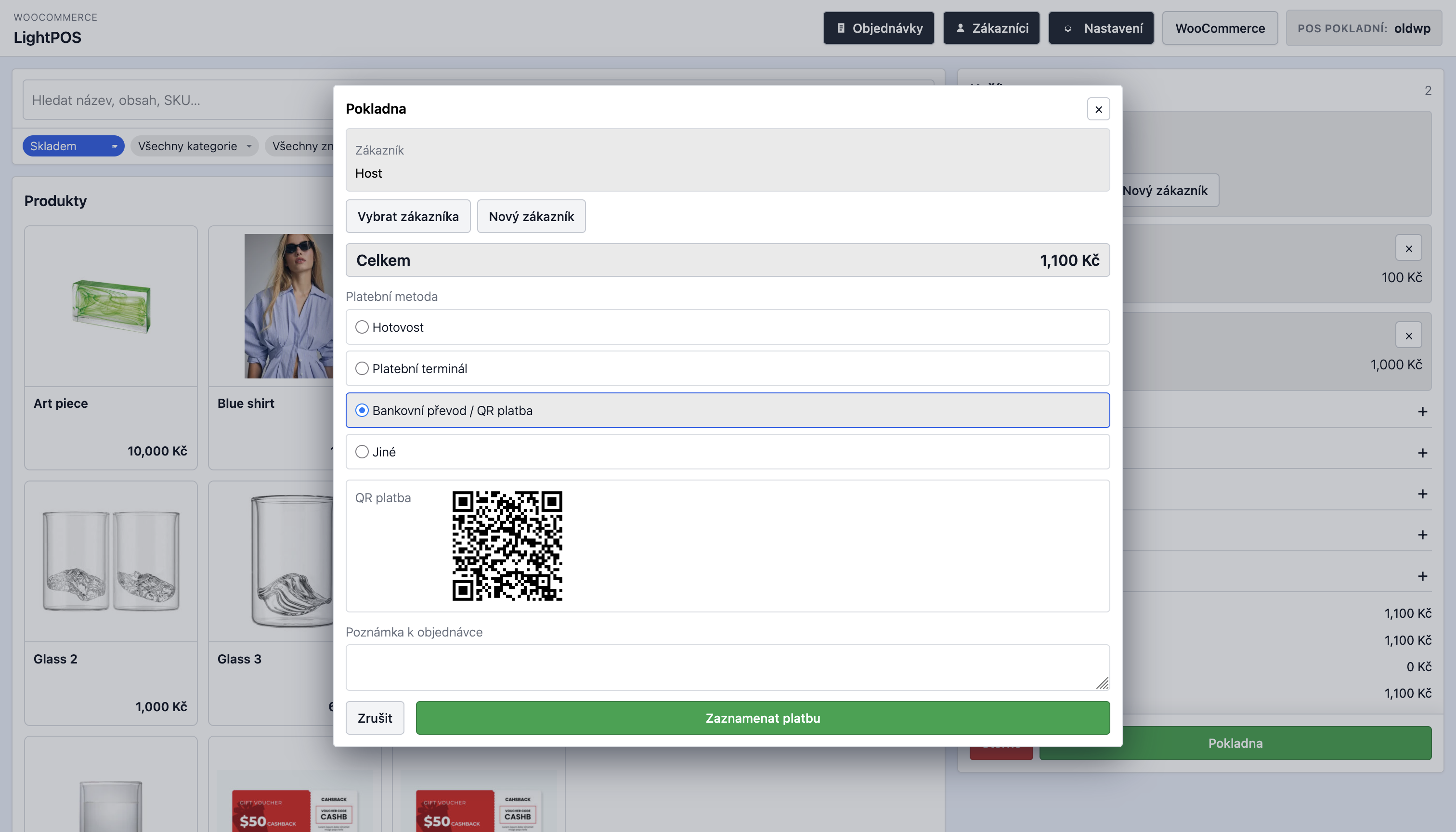
- QR platby pro CZK (SPAYD) a EUR (EPC) s ověřením bankovních údajů bez služby třetí strany.
- Storno aktuálního prodeje z košíku.
- Vyhledávání, vytváření, úprava a přiřazení zákazníků během platby.
- Nastavitelná vlastní zákaznická pole s popisky připravenými pro Polylang a WPML.
- Možnost programově znovu použít vlastní zákaznická pole ve fakturách, e-mailech a dalších integracích na míru.
- Nastavitelné platební metody POS s mapováním stavů objednávek.
- Nastavitelný jazyk rozhraní POS s češtinou a angličtinou.
- Kompatibilita s WooCommerce HPOS a práce s objednávkami přes WooCommerce CRUD API.
- Multicurrency integrace s CURCY a FOX Currency Switcher.
Objednávky, stavy a e-maily
- Plugin označuje objednávky vytvořené v POS, aby je bylo možné spravovat odděleně od běžných objednávek e-shopu.
- Přidává vlastní stav WooCommerce pro dokončené POS objednávky.
- Registruje vlastní e-mailovou šablonu účtenky pro POS objednávky.
- Volitelně přikládá účtenku LightPOS jako HTML soubor k e-mailu s účtenkou.
- Umožňuje přepsat šablonu účtenky v child šabloně pro potřeby konkrétního obchodu nebo legislativy.
- Integruje se s pluginem WooCommerce PDF Invoices & Packing Slips od WP Overnight pro tisk a odeslání PDF faktur.
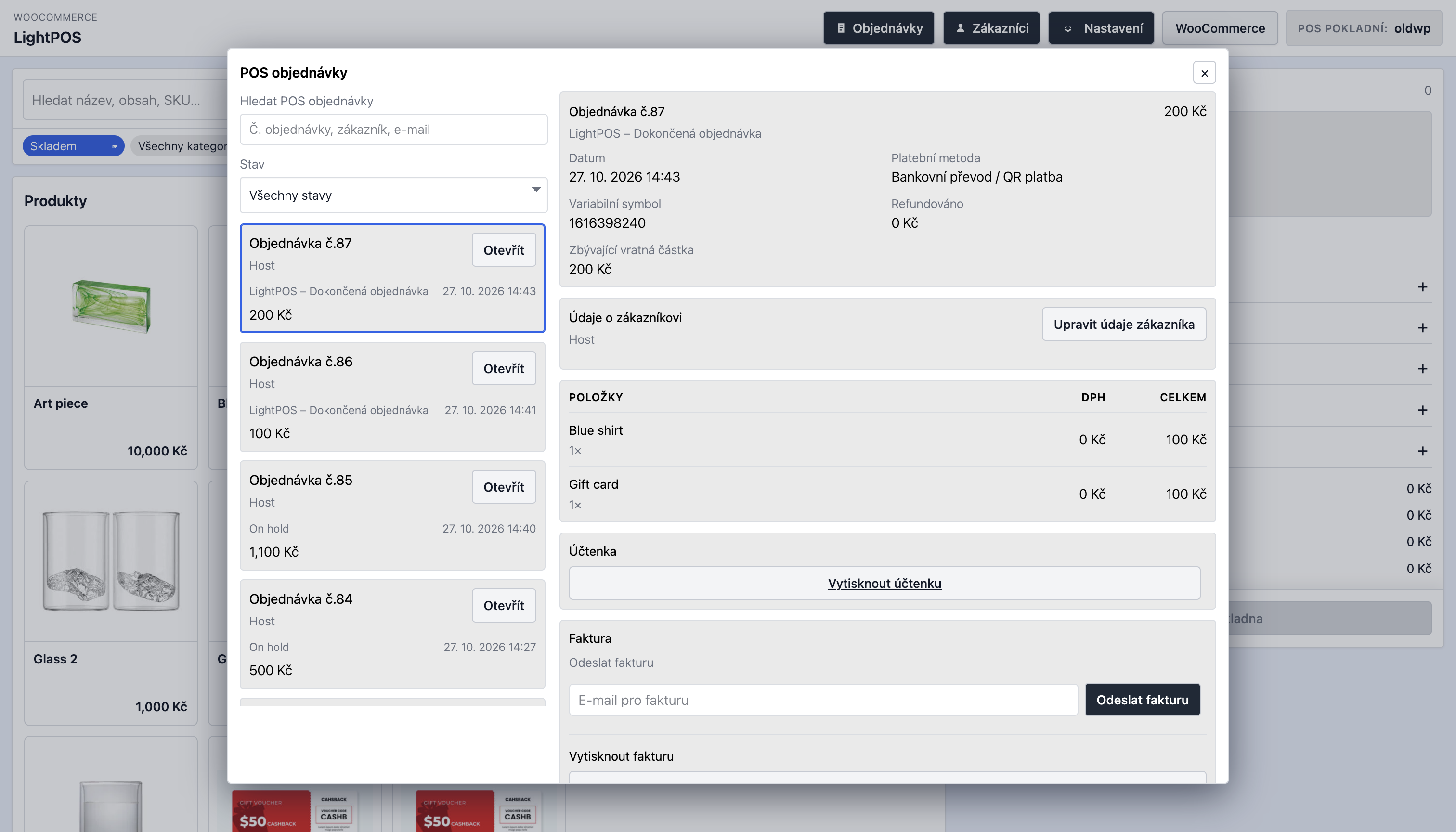
- Pozdější ruční odeslání faktury nebo účtenky z detailu objednávky.
- Akce pro zobrazení detailu a úpravu údajů zákazníka, zrušení objednávky a vytvoření vratky s volitelným naskladněním.
Captures d’écrans

Installation
- Nahrajte plugin do
/wp-content/plugins/nebo jej nainstalujte do lokálního projektu. - Aktivujte WooCommerce.
- Aktivujte LightPOS – Pokladní systém (POS) pro WooCommerce.
- Otevřete
LightPOS > Nastavenía nastavte odkaz POS, filtry, měny, platební metody a zákaznická pole. - Otevřete pokladnu přes
LightPOS > Otevřít POS.
FAQ
-
Podporuje HPOS?
-
Ano. Plugin podporuje kompatibilitu s HPOS a pro práci s objednávkami i zákazníky používá WooCommerce CRUD API.
-
Mohu upravit účtenku v child šabloně?
-
Ano. Zkopírujte šablonu účtenky do child šablony a upravte ji tam. LightPOS podporuje přepsání v
lightpos/i starší cestuminimal-pos/pro zpětnou kompatibilitu.
Avis
Il n’y a aucun avis pour cette extension.
Contributeurs/contributrices & développeurs/développeuses
« LightPOS – Pokladní systém (POS) pro WooCommerce » est un logiciel libre. Les personnes suivantes ont contribué à cette extension.
Contributeurs
“LightPOS – Pokladní systém (POS) pro WooCommerce” a été traduit dans 1 locale. Remerciez l’équipe de traduction pour ses contributions.
Traduisez « LightPOS – Pokladní systém (POS) pro WooCommerce » dans votre langue.
Le développement vous intéresse ?
Parcourir le code, consulter le SVN dépôt, ou s’inscrire au journal de développement par RSS.
Journal des modifications
0.1.24
- Added configurable QR bank payments for CZK and EUR, including Czech account, IBAN and SWIFT/BIC validation.
- Added locally generated SPAYD and EPC QR codes, with a unique server-generated payment reference. Czech QR payments use this value as the variable symbol; completed bank-transfer orders retain it in WooCommerce order metadata and display it in LightPOS and WooCommerce order details.
- Fixed REST cart-session restoration and immediate session persistence for all POS cart changes, preventing products and cart adjustments from disappearing between requests.
- Added organized Czech LightPOS settings tabs, QR-payment settings, PDF invoice guidance, and English translations for new POS labels.
- Refined checkout, product imagery, dialogs, receipt customization guidance, and POS toolbar controls.
- Hardened the POS inline configuration and QR payload handling.
0.1.23
- Added content-based asset cache busting and early no-cache handling for the POS route.
- Added compatibility with current and legacy CURCY / Woo Multi Currency releases.
- Ensured WooCommerce administrator cancellation notices are sent when eligible LightPOS orders are cancelled.
0.1.22
- Refined the order-items table header styling.
0.1.21
- Removed padding from the order-items table header.
0.1.20
- Restored the order-items header to a normal background with black text and removed temporary cart calculation error logging.
0.1.19
- Simplified the order-items card and styled its column header as a black table header.
0.1.18
- Made the manual-discount amount field span the full form width.
0.1.17
- Added a “Print invoice” section heading above the invoice print action in the POS order detail.
0.1.16
- Simplified invoice-send wording and use “Send invoice” instead of “Resend invoice” in the order detail.
0.1.15
- Combined invoice sending and printing into one invoice card in the POS order detail, with email sending shown before printing.
0.1.14
- Simplified refund wording in Czech and English, and hide the “Create refund” opener after the itemised refund form is opened.
0.1.13
- Removed the manual-discount title field. Discounts use the localized default name automatically.
0.1.12
- Fixed zero-decimal currency rounding for VAT-inclusive manual delivery. The stored delivery amount now matches the whole-currency amount shown in the POS and no longer creates a one-koruna total difference.
0.1.11
- Improved diagnostic logging for POS cart-calculation discrepancies.
0.1.10
- Fixed manual VAT-inclusive discounts combined with a coupon: their VAT allocation now follows WooCommerce’s post-coupon calculation order.
- Product prices in the POS are rounded to the active currency’s configured precision before VAT calculation, so visible and charged amounts agree.
- An unnamed manual discount now defaults to “Discount” (“Sleva” in Czech), and fee, discount, and shipping panels close after their line is added.
0.1.9
- Fixed VAT allocation for VAT-inclusive POS discounts after coupon discounts, preventing whole-koruna total discrepancies.
- Manual delivery rows now display the calculated gross amount used by the WooCommerce cart total.
0.1.8
- Improved the POS order refund workflow with itemised product, fee, and shipping refunds, VAT-inclusive refund amounts, and clearer refund controls.
- Cancelling an invoiced POS order now creates a full WooCommerce refund so compatible invoice plugins can generate a credit note.
- Improved the checkout, order-detail, and refund UI, including VAT and total displays.
0.1.7
- Updated the WC Multi-Stock integration for WCMS 1.0.7: stock is allocated before checkout completes; shortages leave the cart intact and do not create an invoice.
- Cashier-selected locations remain fixed. Stock display and validation subtract online reservations, and location inventory cannot be oversold using a confirmation override.
- Refunds use explicit WooCommerce item lines with per-item quantities and refund amounts. Returned quantities are validated against prior refunds, and restocking can be selected separately.
- Deploy both LightPOS 0.1.7 and WCMS 1.0.7 together when using the location stock integration.
0.1.6
- Replaced legacy POS header controls with a settings modal for currency and interface language selection.
- Added a return link to WordPress admin in both the POS header and the settings modal.
- Improved admin settings UX with clearer language-setting descriptions.
0.1.5
- Fixed CSS/JS inlining, escaping and few other minor issues.
- Added translation updates for the new admin copy and bumped the plugin version for the settings/documentation refresh.
0.1.4
- Added plugin packaging fixes for WordPress.org submission, including license metadata and review-driven compatibility cleanups.
- Improved Plugin Check compliance for template loading, escaping, and packaging expectations.