
Description
Keep your media insert code consistent site-wide.
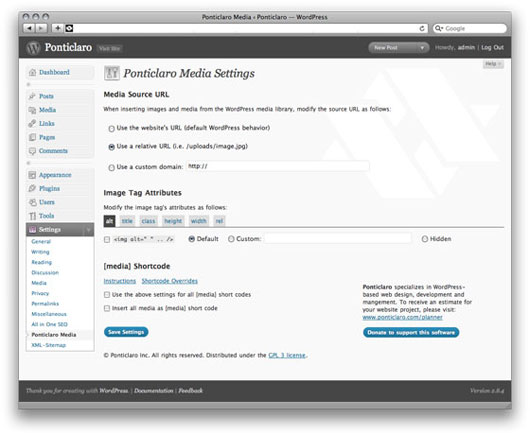
- Customize image and media HTML code site-wide
- Use the [media] shortcode to display images from the gallery at particular sizes
- Remove overbearing WordPress auto-code like class= » »
- Force WordPress to insert relative URLs to make testing on a dev server easier
Shortcode Documentation
Use the [media] shortcode to easily display images from the gallery. Here are some example uses:
Display 3 images from the gallery. The order is determined in the WordPress media gallery:
[media] [media] [media]
Display an image with id 123:
[media id= »123″]
Display a thumbnail, medium, or large sized image:
[media size= »small »]
[media size= »medium »]
[media size= »large »]
Display a clickable image. The click through URL will default to the WordPress « view page » for that image.
[media link=true]
Display a clickable image, linking to an arbitrary URL:
[media link=true url= »http://www.your-custom.url »]
Examples for setting custom class, title, width, or height attributes. These can be used to customzie the attributes on the generated HTML image tag
[media class= »custom-class » title= »title text » width= »100″ height= »100″]
Captures d’écrans
Installation
- Upload the entire folder « ponticlaro-media-settings » to your plugin’s directory.
- Activate the plugin.
- Click « Ponticlaro Media » under the « Settings » menu to configure the plugin.
Avis
Il n’y a aucun avis pour cette extension.
Contributeurs/contributrices & développeurs/développeuses
« Ponticlaro Media Settings » est un logiciel libre. Les personnes suivantes ont contribué à cette extension.
Contributeurs

Traduisez « Ponticlaro Media Settings » dans votre langue.
Le développement vous intéresse ?
Parcourir le code, consulter le SVN dépôt, ou s’inscrire au journal de développement par RSS.
Journal des modifications
- Version 1.0: Initial release
- Version 1.1: PHP4 compatibility
- Version 1.2: Minor bug fix
- Version 1.3: Fix shortcode bug
- Version 1.4: Fix issue with RSS feeds