
Description
Stop just chatting. Start solving problems and getting paid.
2ConnectMe transforms your WordPress website from a simple contact form into a powerful, interactive service hub. It’s the only plugin that combines live customer engagement with the tools to provide real-time support and automatically charge for your time.
Whether you’re a consultant, online tutor, tech support agency, or sales team, 2ConnectMe gives you a virtual storefront to connect with customers like you’re in the same room.
🚀 Get Started with a Generous Free Plan
Forget limited trials. Our Free Tier Account gives you a fully functional « GENERAL » chat room forever, with:
✅ Unlimited Agents
✅ Unlimited Websites & Chats
✅ Unlimited Screen Sharing, Voice & Video Calls (limited 40 minutes for each session)
✅ No credit card required to start
💡 Why Choose 2ConnectMe?
Unlike basic chat plugins, 2ConnectMe is built for action. Here’s what makes it different:
-
Get Paid Automatically for Your Time
- Perfect for online classes, consultations, or paid support. Pre-agree on a price with your customer and the plugin will automatically charge their card via Stripe at the end of the call based on the duration. No more invoicing or chasing payments.
-
See What They See (And Take Control)
-
For tech support, watch your customer’s screen in real-time to understand their issue instantly.
-
Premium Remote Control: With one click, you can request control of their mouse and keyboard to fix the problem yourself, just like you’re sitting at their desk.
-
-
Meet Your Customers Where They Are
- Your agents can answer customer chats directly from WhatsApp, or use our dedicated iOS and Android apps. You’re never tied to a desk.
-
Turn Browsers into Buyers
- See which products or pages a visitor is looking at before you even start a chat. This insight helps your sales team engage with the right message at the perfect moment.
-
Your Brand, Your Way
- With White Label branding, your customers only see your company logo and name in the chat window. It’s a seamless extension of your business.
🌍 Ready for Any Platform
– Works perfectly on desktop, tablets, and mobile.
-
Integrate your chat button into emails, social media, or marketing campaigns like MailChimp.
-
Use your unique Chat Room QR code on business cards or flyers for an offline-to-online contact channel.
Contact us
We love to hear from you to solve your issues or any comments / improvement areas in the future release. If you still cannot solve the issue after trying all FAQs, please contact us.
– 2ConnectMe
– Email support@2connectme.com
– Facebook
– Live Chat here
Captures d’écrans

Live chat with remote sharing screen keyboard mouse. 
Live chat with text, voice and video. 
Agent recording video chat with customer client. 
Service staff controls remote custoemr desktop. 
Soft-keyboard on agent console. 
Service staff gesture control remote customer desktop. 
Customer permission prior to sharing the controls. 
Agent answers an incoming chat. 
Remote control contact form in agent console traffic dashboard.
Installation
⚙️ Simple Setup, Powerful Integration
-
Register a Foerver Free account of ConnectMe Agent, either « Company » or « Solo » type. For your first trial, « Solo » is good to go with all the default settings done but it only comes with a narrow customisations designed. If you have a team of service staff agents, « Company » type account is recommended and with the most flexibile customsation allowed.
ConnectMe Agent can be registered through either browsers, Microsoft Store or Mac App Store below. For quick illustration, the following video shows « Solo » account registration. -
Install this plugin on your wordpress
- Though the video below is not the updated to the latest version of 2ConnectMe WordPress Plugin, it still provide a good reference for WordPress settings.
- Detail Installation documentation here
- Though the video below is not the updated to the latest version of 2ConnectMe WordPress Plugin, it still provide a good reference for WordPress settings.
-
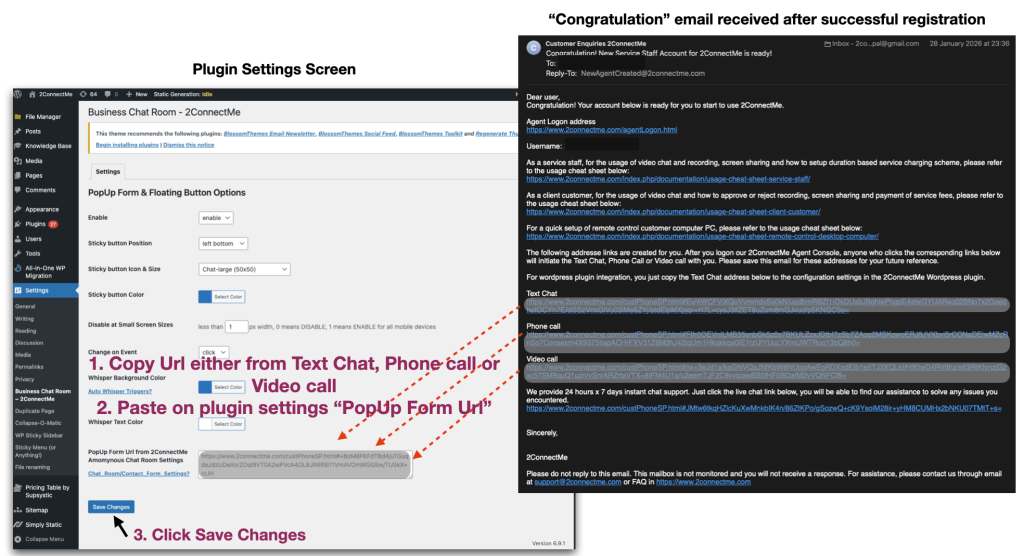
Copy your unique chat room URL from your 2ConnectMe dashboard.
- After successful registration on step 1 above, please refer to the « Congratulation » email sent from 2ConnectMe which are with default URL of text, voice and video chat room
-
Paste the URL into this plugin’s settings in WordPress.
-
Done! You may try to contact form pop up and chat now as video below
-
With these chat room URLs, you can now add chat, phone, or video buttons anywhere on your site.
For detail installation and other documentation, please refer to 2ConnectMe Documentation or FAQ.
- Quick basic setup in 5 minutes
- Initial Settings Wizard
- Integrations – How to
- Integrations – WordPress
- Integrations – WhatsApp Chats Distribution Setup
- Integrations – Click to Call button
- Integrations – Direct Contact Form / Voice Video Chat
- Business Revenue – InApp Payment allows your agents to accept payment from clients directly during chat conversation.
- Business Revenue – Activation & Setup
- Auto Whisper Triggers
- Notifications on Browsers
- White Label Branding
FAQ
-
Is 2ConnnectMe service FREE?
-
Those free-tier-account services with a default chat room « GENERAL » is provided for FREE for unlimited Agents, unlimited websites for lifetime. More than enough functions for a StartUp or personal usage.
We also have flexible pricing plan.
When your business grows and requires multiple chat rooms, e.g. for distributing the customer chats to Agents from different departments, we have limited budget pricing plan for growing business.
For large enterprise with high traffic call center operation and advance call distribution, we have affordable pricing plan.
-
Could I try the service before registration?
-
We have agent and website built for self-run demonstration. Please go to our 2ConnectMe self-run demo website.
-
Why I cannot hear ring tone for incoming calls
-
Ring Tone is supported in desktop browsers and mobile app. Ring tone is configured to « Off » by default. This can be modified in settings of 2ConnectMe, i.e. menu -> Account -> Profile -> Ring Tone. The other reason may be the security settings of browser not allowing 2connectme.com to play sound. Please refer to FAQ->Operation & Usage -> Ring Tone for detail settings required.
-
Could I just depoly different chat room Url on different pages and only happens on specific page instead of all pages?
-
Yes. Uninstall this plugin and paste the scripts on your required pages through « Custom HTML » block. The scripts for Contact Form in HTML pages details here
-
Why floating chat icon is not shown on mobile devices?
-
Refer to General settings of this plugin. Set « Disable at Small Screen » width to 1 px width. The default value is 767 px width. Set the value to 1 px width which means floating icon is shown on all devices regardless of screen width.
-
I want use my own icon. Can I change it?
-
From version 1.1 onwards, pre-defined icons for Chat, Phone, Video and Mail with different pre-defined sizes, Large (50×50), Medium (40×40) and Small (30×30) are provided. Reminders: If you need DIRECT Phone or Video call PopUp Form WITHOUT Contact Form, you have to select either Phone or Video icon. Otherwise, strange behaviour will happen. In other words, if you need Phone or Video buttons on Contact Form, you should still select either Chat or Mail icon because the PopUp is the Contact Form.
-
I want contact form pop up when website visitor hover the icon instead of click the icon. Any configuration for this?
-
Refer to General settings of this plugin. Set the « Change on Event » to « hover ».
-
Where can I configure the size of device to be determined as small devices so that this plugin is not shown?
-
Refer to General settings of this plugin. Set « Disable at Small Screen » width to 1 px width. The default value is 767 px width. Set the value to 1 px width which means floating icon is shown on all devices regardless of screen width.
-
Refer to « Chat » settings of this plugin. Set « Horizontal Position » to « left » or « right ».
-
Can I change the width of Contact Form?
-
It is automatically adjusted from ver 1.1 onwards. No width configuration is needed.
** Can I customize the contact Form such as header texts, adding my company name and hide the fields and action buttons (Chat, Phone, Video, Mail)?
Yes. It is new features provided in ver 1.1 Refer to here for details. -
What further settings are needed for Mobile « Business Chat Room – 2ConnectMe »
-
No further configuration needed. Mobile one shares the same user accounts information. Just use the same user account to logon through mobile.
-
I do not receive customer chat in mobile App, what should I do?
-
In order to ensure Mobile App is able to receive visitor enquiries, security settings « Allow Notification » and « Allow Auto-Start » must be enabled in Android phone. Since Android manufacturers make their own version of Android with different customisation, it is not possible to conduct test on each of them. If you are not able to receive customer chat, please contact us for support. We are happy here to solve any issues for you.
-
Can I use the same account to logon PC browsers and Mobile App of 2ConnectMe?
-
Yes. They can handle customer chat at the same time.
-
Where can I find more FAQ about WordPress Plugin and Mobile App?
Avis

Contributeurs/contributrices & développeurs/développeuses
« 2ConnectMe – Video Chat, Screen Share & Stripe Payments » est un logiciel libre. Les personnes suivantes ont contribué à cette extension.
Contributeurs
Traduisez « 2ConnectMe – Video Chat, Screen Share & Stripe Payments » dans votre langue.
Le développement vous intéresse ?
Parcourir le code, consulter le SVN dépôt, ou s’inscrire au journal de développement par RSS.
Journal des modifications
1.7.0
- add guidelines to setup the plugin and 2ConnectMe service.
1.6.9
- allow to have full screen in video chat and receving screen shared by the agent.
1.6.8
- Critical fixes on browser history sent to agent console.
- Must be upgraded to this release in order to work with latest agent console.
1.6.7
- Support White Label branding
1.6.6
- Support new language Arabic عربي
- Relocate the Full Screen button and Minimize Screen button to customer phone controls.
1.6.5
- Revise plugin name to comply guidelines of WordPress plugin.
1.6.4
- Ugent fixes on unexpected pop up contact form when the window is resized.
1.6.3
- Urgent fixes on the issues about incorrect height of pop up contact form on Firefox and Shopify.
1.6.2
- Urgent fixes on the issue on wordpress admin console.
1.6.1
- New sticky button position left-middle and right-middle.
- Fixes on incorrect height of contact form on FireFox browser.
- Fixes on voice chat and video chat on Firefox browser.
1.6.0
- Tight integration with WordPress Plugin Admin Page.
1.5.1
- Support WhatsApp Agent. Your agent can use the WhatsApp to answer customer chats.
1.5.0
- Fixes issue on insufficent height and width of pop up form displayed in the mobile device or slow speed in the data connection.
- Enahancement: Support Spanish Española Language
1.4.1
Minor changes in default configuration
* The default configuration of small screen device is changed to allow message icon shown on all small devices.
1.4.0
Enhancements
* Provide color settings on Whisper Text.
Fixes
* Solve mis-alignment of Whisper Text on the right.
* Solve admin console without color picker.
1.3.1
Improve documentations
1.3.0
Enhancements
* Support SEE customer browsing behaviours.
1.2.5
Fixes
* Solve the issue of some WordPress themes which overlap the full screen mode of 2ConnectMe.
* Update the screenshots of installation.
* Default of small screen size to disable 2ConnectMe was set to 500 which is configurable in plugin configuration.
1.2.4
Fixes
* Critical fixes on recent security restrictions newly imposed by Google Chrome (ver 65). The voice, video and screen share functions were affected by this new security restrictions. All websites are strongly suggested to update to this version to solve such issues.
1.2.3
Enhancements
* Support Apple Safari browsers (recent update in macOS High Sierra and iOS 11.2).
* Support Microsoft Edge browser (ver 40.15063 in the recent update Windows 10 creators)
* Support Firefox native screen sharing function WITHOUT extension.
* The contact form is down-sized to fit the smaller screen size devices.
Fixes
* Unexpected voice / video call popup in Firefox browser.
1.2.2
Enhancements
* Support Direct Phone / Video pop up form even WordPress website with http connection only, i.e. without https encrypted connection.
1.2.1
re-uploading the missing image icon files.
1.2.0
Enhancements
Support both http and https websites
* Even your website without https connection, 2ConnectMe will detect your website connection and, if needed, open a new browser window to have direct https connection with 2ConnectMe server.
Support Português language
* New language supported.
1.1.0
For the latest enhancements, please refer to here
2ConnectMe Enhancements
PopUp form with more functions
* It provide additional Direct Phone Call and Direct Video Call at initial PopUp. It means website visitors only need a single click the “PopUp” Phone or Voice call button to reach your company staff with voice and video communication as needed.
Contact form with new voice call and video call buttons
* Through these buttons at contact form, website visitors are able to initiate phone call and video call to reach your company staff.
Each hotline chat room comes with independent Contact Form
* Instead of a single contact form for all the hotlines / chat room, you are provided with a new contact form with independent styles and configured format for each of hotline chat room. That is the reason you have to reconfigure your existing hotline chat room GENERAL, e.g., with a new contact form.
PopUp form with more styles configurable.
It provides options to configure each of field of contact form. Also “mandatory” field choice is also configured.
Pre-configure website visitor call types allowed
* It provides option to configure what call types allowed for website visitors for each of hotline.
Business Chat Room (WordPress Plugin)
Enhancements
* The size of PopUp form is automatically adjusted according to its operation need. No size configuration needed from this release onwards.
* Icons are provided for Chat, Phone, Video and Mail with size Large (50×50), Medium (40×40) and small (30×30). You are free to select according to your nature of PopUp form.
* Support Popup direct Phone Call and Video Call.
Changes
* When mouse is not on the 2ConnectMe PopUp screen, it was automatically closed in the past release. With this release, a new button, Close window “-” buttons are provided at the upper right corner of window. Window will not be closed automatically once opened. User will have to click “-” button to close the windows. We believe such changes facilitate users inputing the contact form information.
1.0.1
Allow changes in the contact form width and height in plugin options menu.
1.0
First production release of « Business Chat Room – 2ConnectMe »