

Description
Monetize Me is a lightweight and developer-friendly advertisement management plugin for WordPress. It allows you to manage ads, organize them using taxonomies, and display them dynamically using shortcodes, PHP functions, widgets, or Gutenberg blocks.
The plugin is optimized for WordPress Multisite, enabling Network Administrators to centrally manage and synchronize taxonomy terms (adcategory, adsponsor) and Ad posts across subsites.
Core Features
- Custom Post Type for Ads
- Taxonomies:
- Ad Categories (
adcategory) - Ad Sponsors (
adsponsor)
- Ad Categories (
- Display ads using:
- Shortcodes
- PHP functions
- Widgets
- Gutenberg block
- Raw editor output for advertisement snippets without automatic
<p>tag injection - Google AdSense-friendly rendering that avoids premature responsive slot initialization
- Random ad display by category/group
- Lightweight and extensible architecture
- Admin-only Ad CPT management using plugin-specific capabilities
Multisite Features
When network activated:
- Dedicated Network Admin settings page
- Copy taxonomy terms across subsites
- Copy all
adCPT posts from one site to one or more selected subsites - Preserve Ad post title, slug, content, excerpt, status, menu order, custom fields, and assigned Monetize Me taxonomy terms
- Duplicate-safe copying using slug-based detection
- Summary report showing copied, skipped, and failed counts
Usage
Shortcode Usage
The main shortcode is:
[mmps]
Supported attributes:
-
id
Display one specific ad by post slug. -
adcategory
Either a single slug of ad Category or CSV IDs of Ad Category. -
adsponsor
One or more Ad Sponsor term IDs separated by commas. -
limit
Number of ads to display. Default: 1 -
wrapper
Wrap each ad in
<
div class= »ad-wrapper »>. Accepts 1 or 0. Default: 1
- class
Extra alignment or styling class for the outer wrapper.
Shortcode examples
Display a specific ad by ad slug:
[mmps id= »homepage-leaderboard »]
Display one random ad from category ID 12:
[mmps adcategory= »12″]
Display one random ad from the ad category with the slug « in-article-ad »:
[mmps adcategory= »in-article-ad »]
Display two random ads from category ID 12:
[mmps adcategory= »12″ limit= »2″]
Display ads from category 12 and sponsor 3:
[mmps adcategory= »12″ adsponsor= »3″]
Display an ad without wrapper markup:
[mmps id= »sidebar-ad-1″ wrapper= »0″]
Raw Ad Code Usage
For Google AdSense or other third-party advertisement snippets, paste the provider code into an Ad post using a Custom HTML block or the code editor. Monetize Me renders the ad content without wpautop(), so the saved markup is not wrapped in extra paragraph tags.
For AdSense responsive ads, the plugin keeps the AdSense loader script and delays the slot push until the slot has visible width. This helps avoid the browser console error: adsbygoogle.push() error: No slot size for availableWidth=0.
PHP Usage
<?php echo monetize_me_display_ad( array( 'adcategory' => 'homepage' ) ); ?>
Multisite Term Synchronization
- Go to Network Admin Settings Monetize Me.
- In Copy Ad Taxonomy Terms, select the source site.
- Select the destination subsite.
- Click Copy Terms to Selected Subsite.
The plugin will:
- Copy
adcategoryterms - Copy
adsponsorterms - Skip duplicate terms by slug
Multisite Ad Post Synchronization
- Go to Network Admin Settings Monetize Me.
- In Copy Ads, select the source site.
- Select one or more destination subsites.
- Click Copy Ads to Selected Subsites.
The plugin will:
- Copy all posts of the
adcustom post type - Skip destination Ad posts with the same slug
- Copy custom fields
- Copy and assign
adcategoryandadsponsorterms by slug - Report copied, skipped, and failed counts
License
This plugin is licensed under the GPLv2 or later.
Captures d’écrans
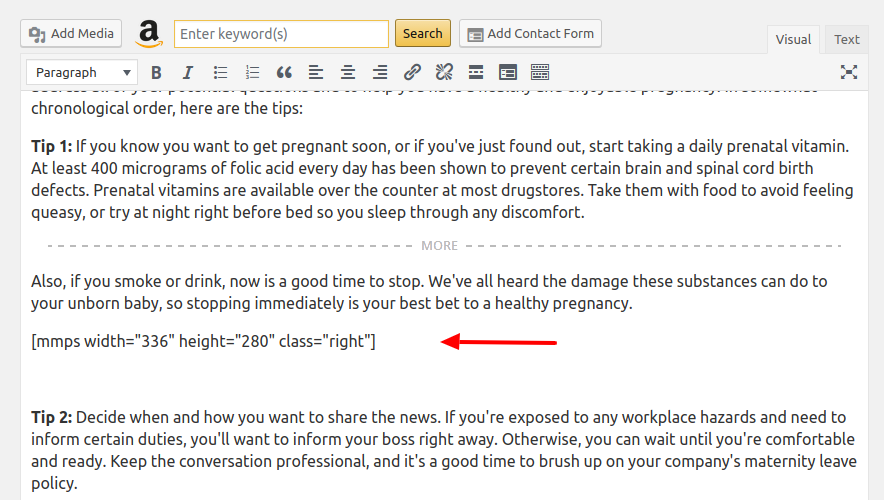
Ad management interface 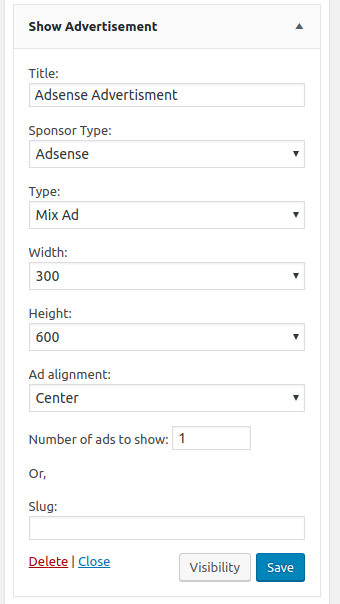
Taxonomy management for Ad Categories and Ad Sponsors 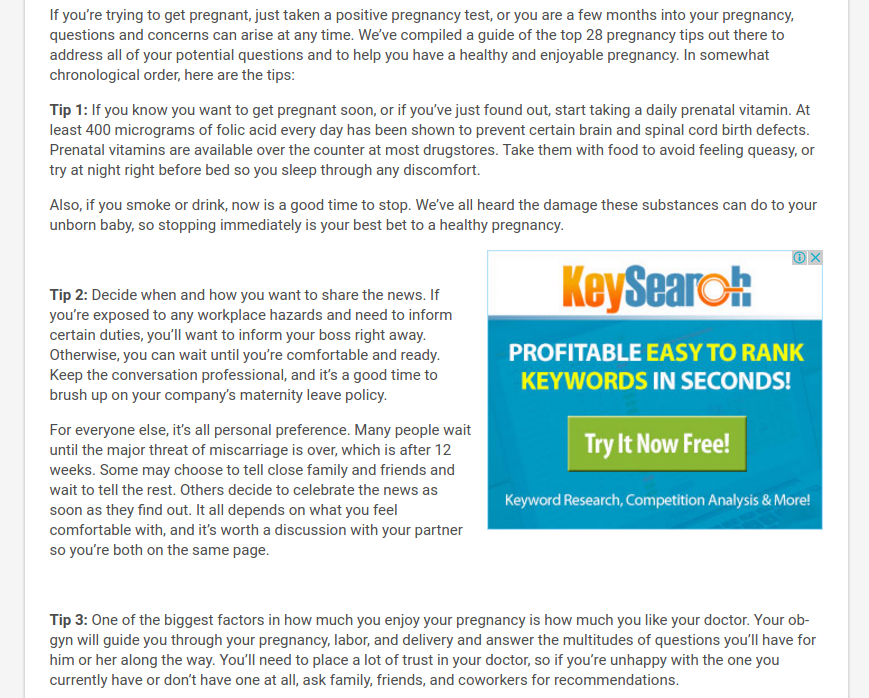
Network Admin settings page 
Term and Ad copy interfaces 


Blocs
Cette extension fournit 1 bloc.
- Advertisement Display an advertisement by slug or taxonomy filters.
Installation
- Upload the plugin to
/wp-content/plugins/. - Activate the plugin through the Plugins menu.
- Go to Ads in the WordPress admin area and create your advertisements.
Multisite Installation
- Network Activate the plugin.
- Go to Network Admin Settings Monetize Me.
- Use the available taxonomy and Ad copy tools.
FAQ
-
Does this plugin support WordPress Multisite?
-
Yes. When network activated, it provides a Network Admin panel for centralized control.
-
Where are the Network settings?
-
Go to Network Admin Settings Monetize Me.
-
Can I copy taxonomy terms between subsites?
-
Yes. You can copy all terms of
adcategoryandadsponsorfrom one site to a selected subsite. -
Can I copy Ad posts between subsites?
-
Yes. Network Administrators can copy all posts of the
adcustom post type from one source site to one or more selected destination subsites. -
What happens if an Ad post already exists on the destination subsite?
-
Ad posts are matched by slug. If a destination subsite already has an
adpost with the same slug, that post is skipped and is not overwritten. -
Are Ad taxonomy relationships copied with the Ad posts?
-
Yes. Assigned
adcategoryandadsponsorterms are copied by slug and assigned to the copied Ad posts. Missing destination terms are created automatically. -
Are custom fields copied with the Ad posts?
-
Yes. Custom fields are copied, except WordPress editor-only metadata such as
_edit_lockand_edit_last. -
Who can access the Network copy tools?
-
Only users with the
manage_network_optionscapability, usually Network Administrators. -
Will existing terms or posts be overwritten?
-
No. Existing destination terms and Ad posts with the same slug are skipped automatically.
-
Does the plugin output raw AdSense or custom ad code from the editor?
-
Yes. Ad post content is rendered without the full
the_contentfilter stack, so WordPress does not automatically add extra<p>tags around scripts, iframes, or AdSense markup. Gutenberg blocks and shortcodes inside the Ad content are still rendered. -
Why was my AdSense code showing a No slot size for availableWidth=0 console error?
-
That error can happen when AdSense responsive slots are pushed before the ad container has a visible width. Monetize Me removes simple inline AdSense push-only script blocks from the rendered ad content and initializes
.adsbygoogleslots from a guarded footer script after the slot has a measurable width.
Avis
Il n’y a aucun avis pour cette extension.
Contributeurs/contributrices & développeurs/développeuses
« Monetize Me » est un logiciel libre. Les personnes suivantes ont contribué à cette extension.
Contributeurs

Traduisez « Monetize Me » dans votre langue.
Le développement vous intéresse ?
Parcourir le code, consulter le SVN dépôt, ou s’inscrire au journal de développement par RSS.
Journal des modifications
2.0.3
- FIXED: Render Ad post content without WordPress automatic paragraph injection, preventing extra
<p>tags around raw advertisement snippets. - FIXED: Preserve raw Google AdSense, iframe, script, and custom HTML output from the editor while still supporting Gutenberg block rendering and shortcodes.
- FIXED: Added guarded AdSense frontend initialization to avoid
adsbygoogle.push() error: No slot size for availableWidth=0when responsive ad slots are initialized before layout width is available. - IMPROVED: Added full-width frontend wrapper styling for rendered ad containers and AdSense slots.
- UPDATED: Added documentation for raw ad-code rendering and AdSense responsive slot behavior.
2.0.2
- NEW: Added Network Admin tool to copy all
adCPT posts from one site to one or more selected destination subsites. - NEW: Ad copy operation skips destination posts when the same
adslug already exists. - NEW: Copied Ad posts preserve content, excerpt, status, menu order, custom fields, and assigned Monetize Me taxonomy terms.
- NEW: Missing destination
adcategoryandadsponsorterms are created automatically while copying Ads. - SECURITY: Restricted Ad copy workflow to Network Administrators using nonce verification and
manage_network_optionschecks.
2.0.1
- NEW: Network Admin settings page for Multisite environments.
- NEW: Copy taxonomy terms (
adcategory,adsponsor) from a source site to selected subsites. - NEW: Bulk subsite selection for term synchronization.
- IMPROVED: Duplicate detection using term slug (skip existing terms).
- IMPROVED: Operation summary showing copied, skipped, and failed counts.
- SECURITY: Restrict term synchronization tools to Network Admin only.
2.0.0
- Added a centralized Ad_Service class used by shortcode, widget, block, and renderer layers
- Added cache-aware ad queries with automatic cache purging on ad save, delete, and taxonomy changes
- Added public helper API functions: monetize_me_get_ad(), monetize_me_get_random_ads(), monetize_me_render_ad(), mm_get_ad(), mm_get_random_ad(), and mm_render_ad()
- Added internal filters and actions for query arguments and rendered output
- Preserved backward compatibility for existing shortcode, widget, block, and Renderer::render() usage
1.9.0
- Major internal refactor for maintainability
- Added modern plugin bootstrap structure
- Removed runtime rewrite flushing
- Improved shortcode normalization and rendering
- Fixed widget slug handling bug
- Modernized block registration structure
- Added safer uninstall behavior
- Updated readme and repository packaging
1.0.1
- Revert back the ad sponsor taxonomy
1.0.0
- Recreated the plugin by removing legacy width and height taxonomies
- Added Ad Category taxonomy
- Added Gutenberg block support