

Description
WP Crontrol enables you to take control of the scheduled cron events on your WordPress website or WooCommerce store. From the admin screens you can:
- View all scheduled cron events along with their arguments, schedule, callback functions, and when they are next due.
- Edit, delete, pause, resume, and immediately run cron events.
- Ajouter de nouveaux évènements cron.
- Suppression en masse d’évènements cron.
- Ajouter et retirer des planifications cron personnalisées.
- Export and download cron event lists as a CSV file.
WP Crontrol is aware of timezones, will alert you to events that have no actions or that have missed their schedule, and will show you a helpful warning message if it detects any problems with your cron system.
Utilisation
- Allez dans le menu
Outils Évènements Cronpour gérer les évènements cron. - Allez dans le menu
Réglages Fréquences Cronpour gérer les récurrences cron.
Documentation
For site owners
Owners of WordPress websites and WooCommerce stores use WP Crontrol to ensure that scheduled cron events run correctly and efficiently. By providing complete control over cron events, WP Crontrol helps you:
- Improve reliability: Address missed or failed cron events, ensuring your website or WooCommerce store continues to function as expected.
- Enhance security: Monitor and control cron events to ensure automatic update checks are performed as they should.
- Simplify management: Add, edit, delete, and pause cron events from a user-friendly interface, without needing to write any code.
- Gain insights: Export cron event data for analysis or reporting.
- Action Scheduler compatibility: Full support for the Action Scheduler system in WooCommerce, which is used to process recurring payments, subscriptions, and background orders.
- Clarity of times and timezones: All times are shown with a clear and accurate indication of which timezone applies. No more guesswork!
For developers
Developers use WP Crontrol to streamline and debug their WordPress development process:
- Enhanced debugging: Identify and troubleshoot issues with scheduled tasks, ensuring your scheduled events and their callbacks run as expected.
- Custom schedules: Create and manage custom cron schedules to fit the specific needs of your website, plugins, or themes, providing greater flexibility than just the core schedules.
- Efficient workflow: Add, edit, and delete cron events directly from the WordPress admin interface, saving time and reducing the need for manual coding.
- Insightful monitoring: Get insight into the performance and behavior of your scheduled tasks, allowing for optimization and better resource management.
- Accurate debugging: WP Crontrol goes to great lengths to ensure that running an event manually does so in a manner which exactly matches how WordPress core runs schdeuled events. This ensures that you can debug events accurately and with confidence.
Autres extensions
Je maintiens plusieurs autres extensions pour les développeurs/développeuses. Découvrez-les ici :
- Query Monitor est le panneau des outils de développement pour WordPress.
- User Switching permet de passer instantanément d’un compte à l’autre dans WordPress.
Privacy Statement
WP Crontrol is private by default and always will be. It does not send data to any third party, nor does it include any third party resources. WP Crontrol’s full privacy statement can be found here.
Accessibility Statement
WP Crontrol aims to be fully accessible to all of its users. WP Crontrol’s full accessibility statement can be found here.
Captures d’écrans
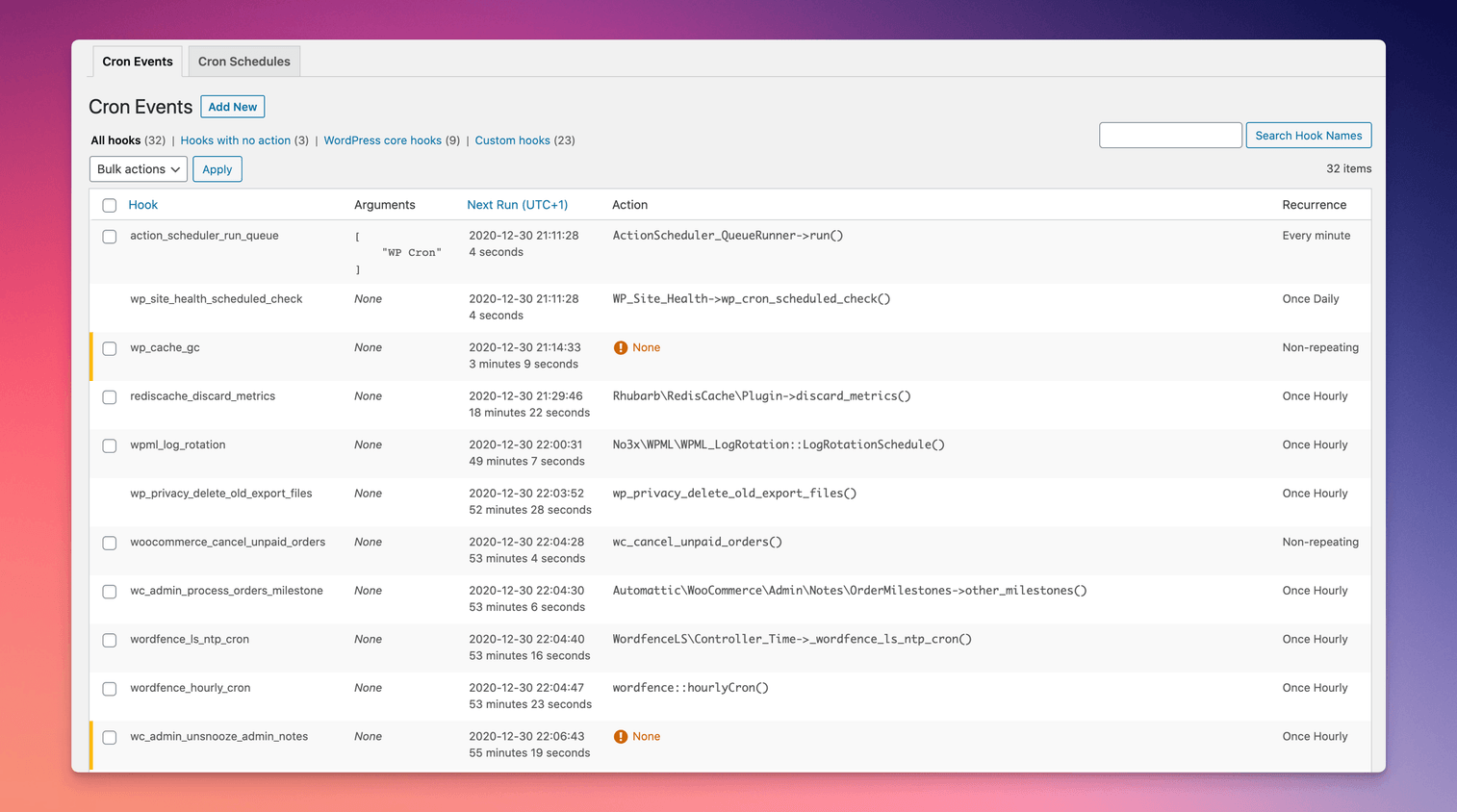
Cron events can be modified, deleted, and executed 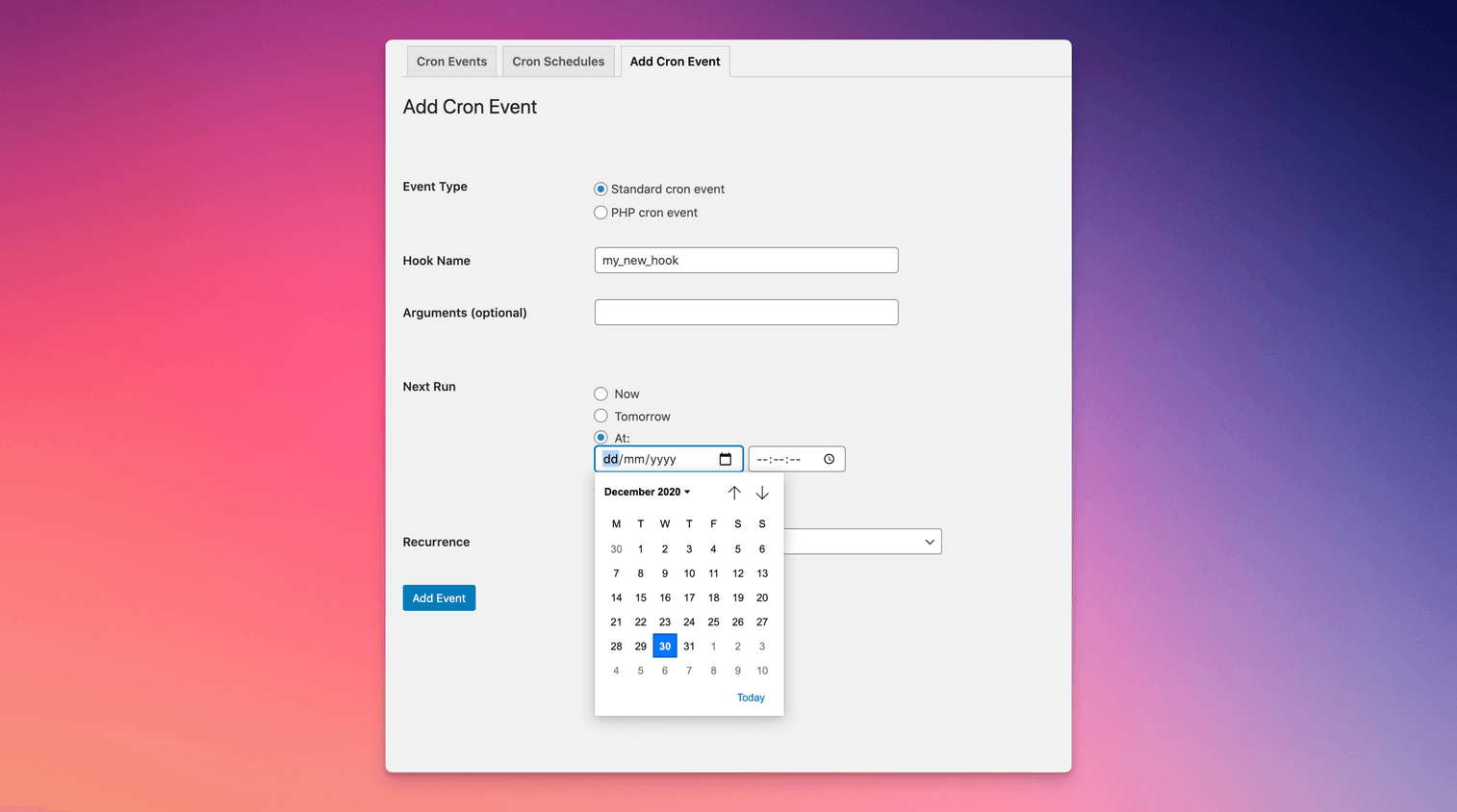
New cron events can be added 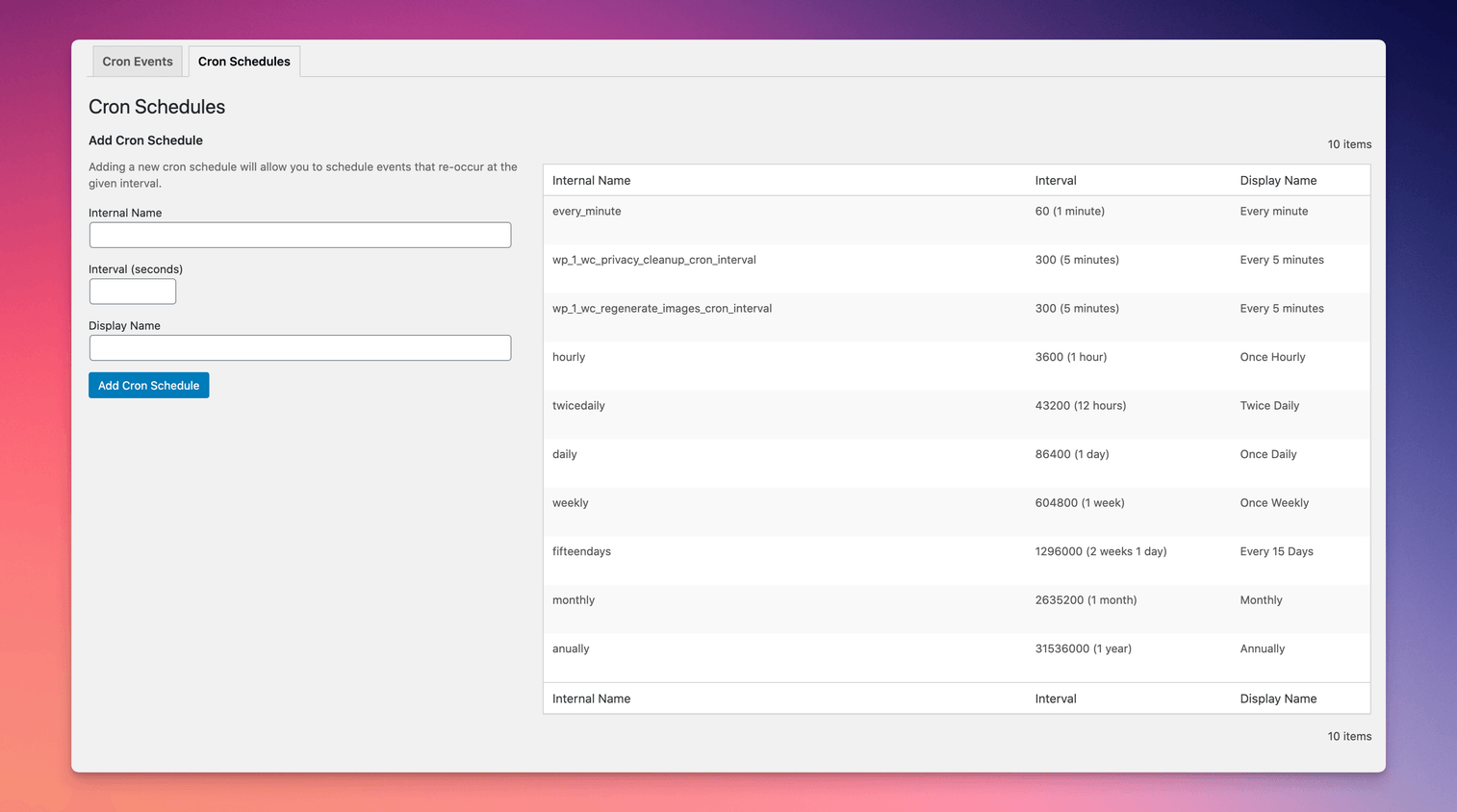
New cron schedules can be added, giving plugin developers more options when scheduling events
FAQ
-
L’extension fonctionne-t-elle avec PHP 8 ?
-
Yes, it’s actively tested and working up to PHP 8.4.
-
Je reçois l’erreur « Il y a eu un problème lors du déclenchement d’un appel au système WP-Cron sur votre site. ». Comment puis-je corriger ce problème ?
-
You can read all about problems spawning WP-Cron on the WP Crontrol website.
-
Pourquoi certains évènements cron manquent-ils leur planification ?
-
You can read all about cron events that miss their schedule on the WP Crontrol website.
-
Pourquoi certains évènements cron réapparaissent-ils peu après leur suppression ?
-
If the event is added by a plugin then the plugin most likely rescheduled the event as soon as it saw that the event was missing. To get around this you can instead use the « Pause this hook » action which means it’ll remain in place but won’t perform any action when it runs.
-
Est-il possible de supprimer les évènements cron en toute sécurité ?
-
Cela dépend entièrement de l’évènement. Vous pouvez utiliser votre moteur de recherche préféré pour rechercher le nom de l’évènement afin de trouver à quelle extension il appartient, et décider ensuite de le supprimer ou non.
Si l’évènement affiche « Aucune » comme action, il est généralement sans risque de le supprimer. Veuillez consulter les autres FAQ pour plus d’informations sur les évènements sans action.
-
Pourquoi ne puis-je pas supprimer certains évènements cron ?
-
Le cœur WordPress utilise des évènements cron pour certaines de ses fonctionnalités. La suppression de ces évènements n’est pas possible, car WordPress les re-planifierait immédiatement si vous les supprimiez. Pour cette raison, WP Crontrol ne vous permet pas de supprimer ces évènements persistants du cœur de WordPress.
If you don’t want these events to run, you can use the « Pause this hook » action instead.
-
What happens when I pause an event?
-
Pausing an event will disable all actions attached to the event’s hook. The event itself will remain in place and will run according to its schedule, but all actions attached to its hook will be disabled. This renders the event inoperative but keeps it scheduled so as to remain fully compatible with events which would otherwise get automatically rescheduled when they’re missing.
As pausing an event actually pauses its hook, all events that use the same hook will be paused or resumed when pausing and resuming an event. This is much more useful and reliable than pausing individual events separately.
-
What happens when I resume an event?
-
Resuming an event re-enables all actions attached to the event’s hook. All events that use the same hook will be resumed.
-
Que signifie « Aucune » pour l’action d’un évènement cron ?
-
Cela signifie que l’évènement cron est programmé pour s’exécuter à l’heure spécifiée, mais qu’aucune fonction ne sera déclenchée lorsque l’évènement s’exécutera, ce qui rend l’évènement inutile.
You can read all about events with no action on the WP Crontrol website.
-
How do I change the next run time or the schedule of a cron event?
-
You can change the time and schedule of a cron event by clicking the « Edit » link next to the event.
-
Pourquoi les modifications que j’apporte à certains évènements cron ne sont-ils pas enregistrées ?
-
You can read all about problems with editing cron events on the WP Crontrol website.
-
Puis-je exporter une liste d’évènements cron ?
-
Yes, a CSV file of the event list can be exported and downloaded via the « Export » button on the cron event listing screen. This file can be opened in any spreadsheet application.
-
Puis-je voir le journal des évènements cron qui ont été exécutés sur mon site ?
-
Pas encore, mais j’espère ajouter cette fonctionnalité bientôt.
-
Puis-je voir le journal des modifications, ajouts et suppressions d’évènements et planifications cron ?
-
Oui. L’excellente extension Simple History dispose d’un support intégré pour la journalisation des actions effectuées via WP Crontrol.
-
À quoi sert d’ajouter de nouvelles fréquences cron ?
-
Les fréquences Cron sont utilisés par WordPress et les extensions pour planifier des évènements à exécuter à intervalles réguliers. Les intervalles doivent être fournis par le cœur de WordPress ou par une extension pour pouvoir être utilisées. Par exemple, de nombreuses extensions de sauvegarde prennent en charge les sauvegardes récurrentes. Pour effectuer une sauvegarde hebdomadaire, une fréquence cron hebdomadaire doit d’abord être saisie dans WP Crontrol, une extension de sauvegarde peut alors l’utiliser comme fréquence d’exécution.
-
Comment créer un nouvel évènement cron ?
-
Il y a deux étapes pour obtenir un évènement cron fonctionnel qui s’exécute régulièrement. La première étape consiste à informer WordPress de l’existence du crochet. C’est l’élément que WP Crontrol a créé pour le déclenchement. La deuxième étape consiste à appeler une fonction lorsque votre crochet est exécuté.
Step One: Adding the event
From the Tools Cron Events menu, click on Add Cron Event. Fill out the details of the event. You’re best off using a hook name that conforms to normal PHP variable naming conventions. The schedule is how often the event will be executed. If you don’t see a good interval, then add one in the Settings Cron Schedules menu.
Deuxième étape : écrire la fonction
Cette partie se déroule dans le code PHP (par exemple, dans le fichier
functions.phpde votre thème). Pour exécuter votre crochet, WordPress exécute une action. C’est pourquoi, nous devons indiquer à WordPress quelle fonction doit être exécutée lorsque cette action est exécutée. La ligne suivante accomplit cela :add_action( 'my_hookname', 'my_function' );L’étape suivante consiste à écrire la fonction. Voici un exemple simple :
function my_function() { wp_mail( 'hello@example.com', 'WP Crontrol', 'WP Crontrol rocks!' ); } -
Comment puis-je créer un évènement cron qui sollicite une URL ?
-
From the Tools Cron Events menu, click on Add Cron Event. Select the « URL cron event » option, fill out the details, and press the « Add Event » button.
You can read all about the features and security of URL cron events on the WP Crontrol website.
-
Comment créer un nouvel évènement cron PHP ?
-
From the Tools Cron Events menu, click on Add Cron Event. Select the « PHP cron event » option and enter the schedule and next run time. The event schedule is how often your event will be executed. If you don’t see a good interval, then add one in the Settings Cron Schedules menu. In the « PHP Code » area, enter the PHP code that should be run when your cron event is executed. You don’t need to provide the PHP opening tag (
<?php).Creating, editing, and running PHP cron events is subject to restrictive security permissions. You can read all about the features and security of PHP cron events on the WP Crontrol website.
-
Quels comptes peuvent gérer les évènements et les planifications cron ?
-
Uniquement les comptes disposant de la capacité
manage_optionspeuvent gérer les évènements et les fréquences Cron. Par défaut, uniquement les administrateurs/administratrices disposent de cette capacité. -
Quels comptes peuvent gérer les évènements cron de PHP ? Est-ce dangereux ?
-
Only users with the
edit_filescapability can manage PHP cron events. This means if a user cannot edit files via the WordPress admin area (i.e. through the Plugin Editor or Theme Editor) then they also cannot add, edit, or delete a PHP cron event in WP Crontrol. By default only Administrators have this capability, and with Multisite enabled only Super Admins have this capability.If file editing has been disabled via the
DISALLOW_FILE_MODSorDISALLOW_FILE_EDITconfiguration constants then no user will have theedit_filescapability, which means adding, editing, or deleting a PHP cron event will not be permitted.Par conséquent, le niveau d’accès du compte requis pour exécuter un code PHP arbitraire ne change pas avec WP Crontrol activé.
If the
CRONTROL_DISALLOW_PHP_EVENTSconstant is defined and set totrue, then PHP cron events will be disabled completely. Any existing PHP cron events will remain in place (and can be deleted if user permissions allow) but their PHP code will not be executed when the event runs, and no PHP cron events can be added, edited, or run.You can read all about the features and security of PHP cron events on the WP Crontrol website.
-
Des commandes WP-CLI sont-elles disponibles ?
-
The cron commands which were previously included in WP Crontrol are now part of WP-CLI itself. See
wp help cronfor more info. -
What happens when I deactivate the WP Crontrol plugin?
-
You can read all about what happens when you deactivate the plugin on the WP Crontrol website.
-
How can I report a security bug?
-
You can report security bugs through the official WP Crontrol Vulnerability Disclosure Program on Patchstack. The Patchstack team helps validate, triage, and handle any security vulnerabilities.
-
Qui a pris la photo de l’image d’en-tête de l’extension ?
-
La photo a été prise par Michael Pardo. Elle est dans le domaine public.
Avis


Contributeurs/contributrices & développeurs/développeuses
« WP Crontrol » est un logiciel libre. Les personnes suivantes ont contribué à cette extension.
Contributeurs

“WP Crontrol” a été traduit dans 24 locales. Remerciez l’équipe de traduction pour ses contributions.
Traduisez « WP Crontrol » dans votre langue.
Le développement vous intéresse ?
Parcourir le code, consulter le SVN dépôt, ou s’inscrire au journal de développement par RSS.
Journal des modifications
1.21.0 (28 January 2026)
- Adds support for invalid args in cron events by relaxing the strict typing and showing a warning on the listing and editing screens.
1.20.0 (17 December 2025)
- Confirms support for WordPress 6.9
- Minor UI and UX improvements
- Some architectural changes to prepare for future enhancements
1.19.3 (23 October 2025)
- Corrects the handling of closures as cron event actions.
1.19.2 (19 August 2025)
- Security: Hardens the « URL cron event » functionality by rejecting disallowed URLs. More information see the security advisory.
- Tweaks the display of some non-persistent WordPress core hooks when Multisite is enabled.
1.19.1 (3 June 2025)
- Reinstates the ability to edit the Action Scheduler event.
1.19.0 (23 April 2025)
- Confirms support for WordPress 6.8
- Further improvements to the display of dates, intervals, and timezones for increased clarity
- Adds more contextual help links for problematic events
- Various UI and UX improvements
1.18.0 (13 January 2025)
- Introduces support for a
CRONTROL_DISALLOW_PHP_EVENTSconstant to fully disable the PHP cron event functionality. Full documentation here. - Further improvements to how time durations and timezone information is displayed.
1.17.1 (22 November 2024)
- Confirms support for WordPress 6.7
- Avoids some warnings when running on PHP 8.3 and 8.4
1.17.0 (15 July 2024)
- Introduces a new cron event type for sending a request to a URL
- Confirms support for WordPress 6.6
- Improves various aspects of the cron management interface and language
1.16.3 (19 April 2024)
- Corrects the displayed PHP cron event name if one is provided
Earlier versions
For the changelog of earlier versions, refer to the releases page on GitHub.