

Description
AcceGuru helps identify and address accessibility issues related to ADA, WCAG 2.0 / 2.1 / 2.2, Section 508, EN 301 549, the California Unruh Civil Rights Act, the European Accessibility Act (EAA), AODA, the UK Equality Act 2010, and other accessibility laws and standards. Automated testing cannot establish legal compliance or complete WCAG conformance; manual review is still required.
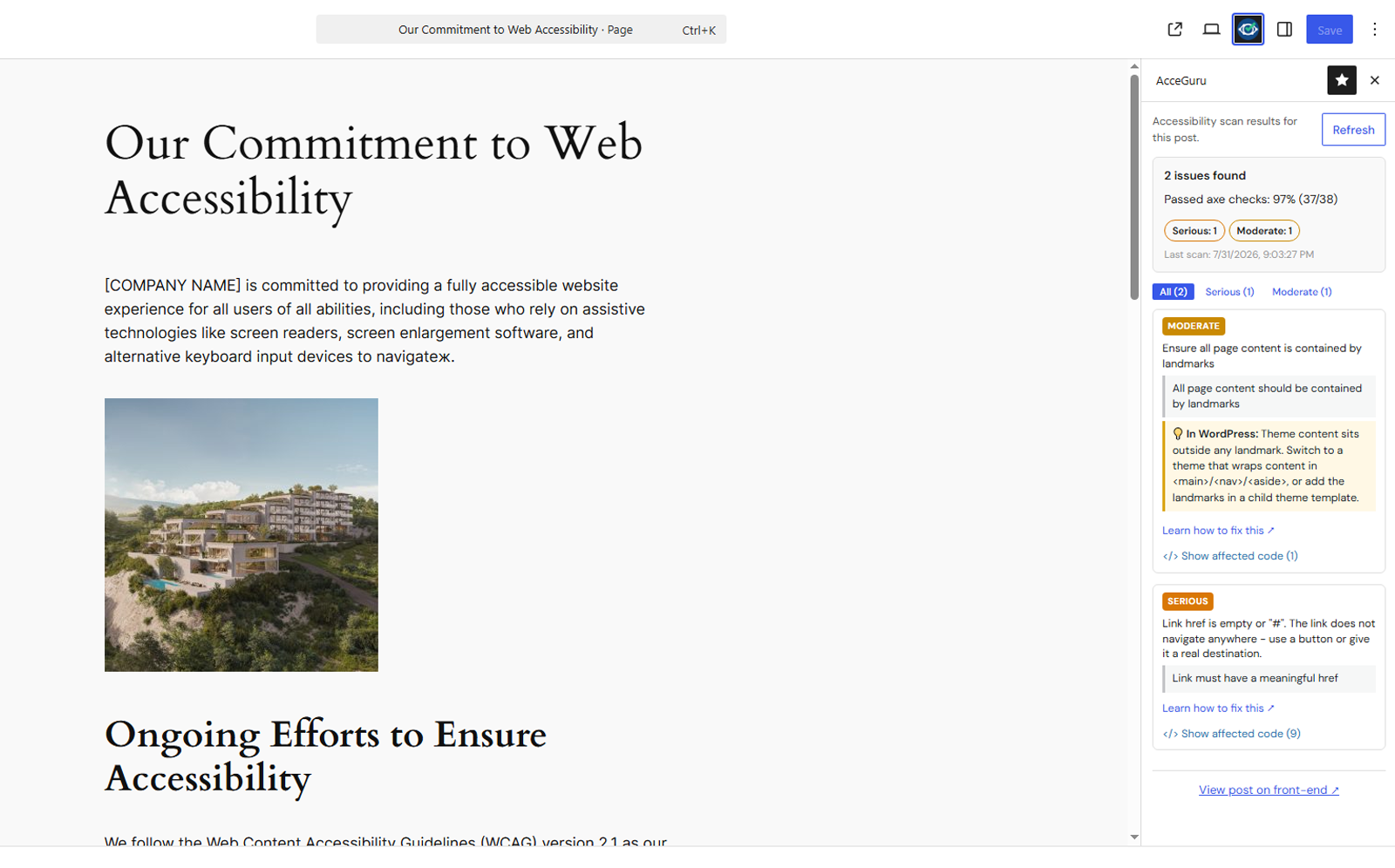
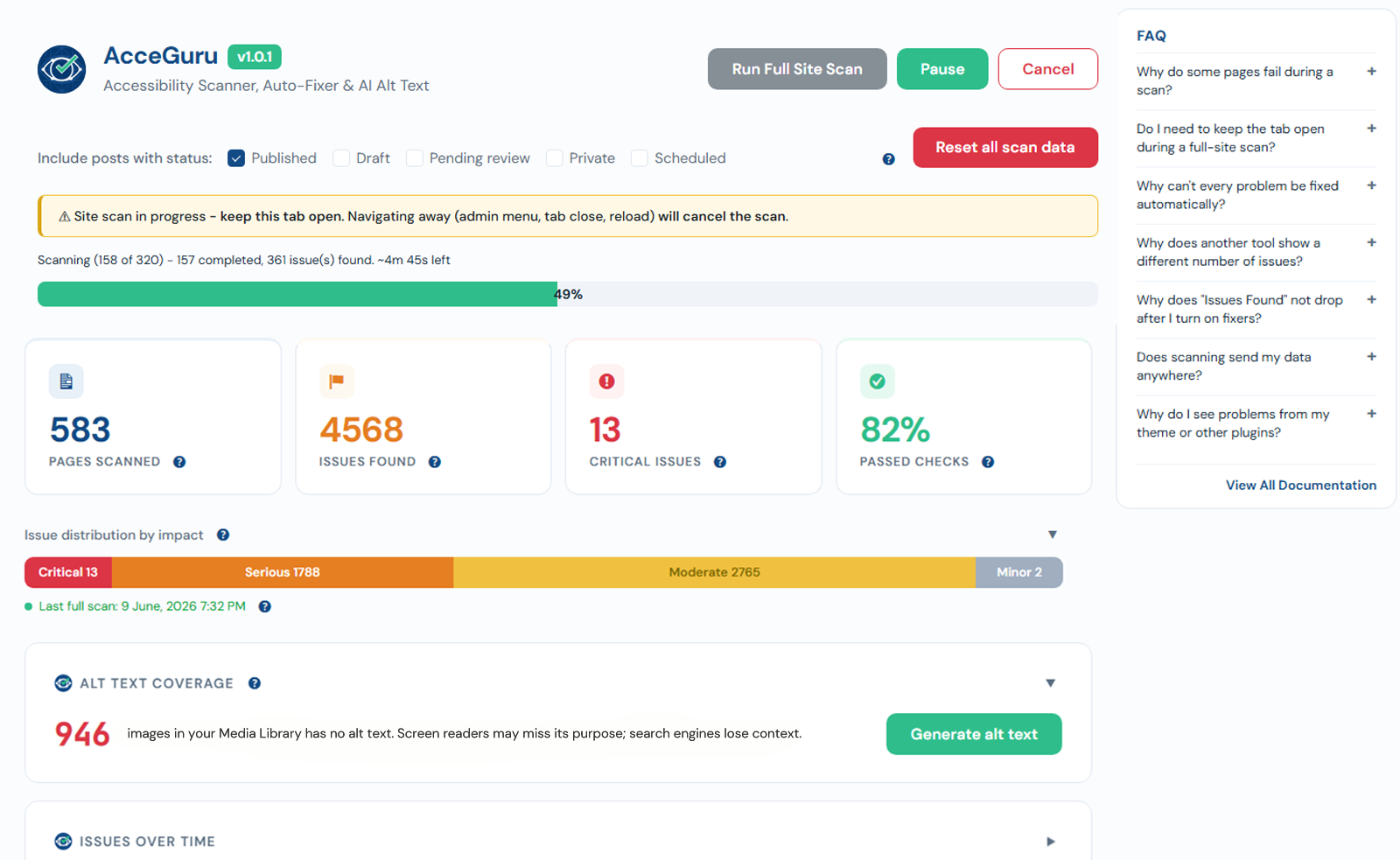
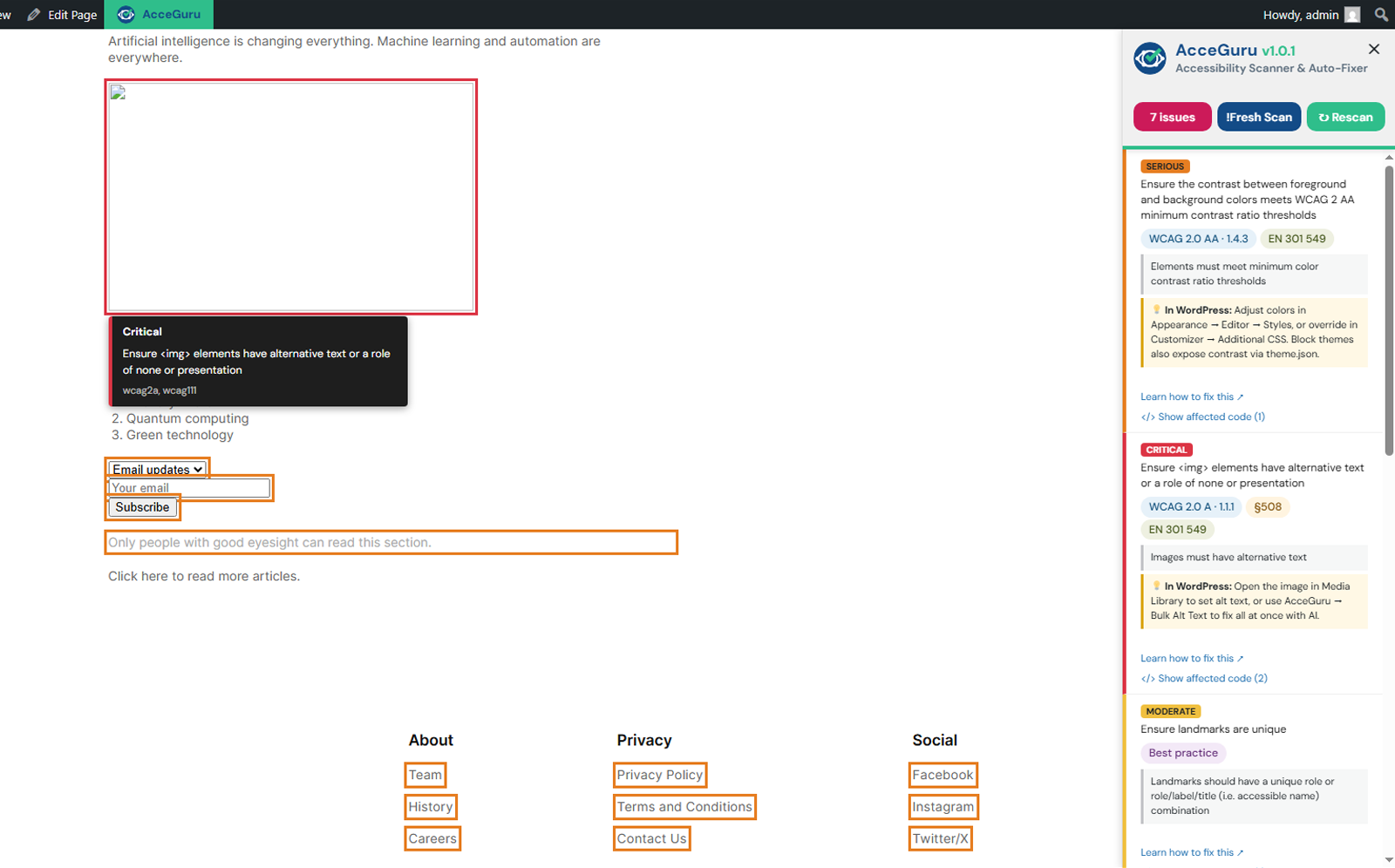
The axe-core scanner checks selected posts, pages and public custom post types from one dashboard. Saved results appear in the Block Editor sidebar and A11y post-list column, while the front-end overlay highlights affected elements on the live page.
AcceGuru also provides toggleable accessibility fixers, site-wide ignored rules, optional AI-generated alt text using your own provider key, and an accessibility statement generator.
Key features
- axe-core plus AcceGuru checks, filtered by the selected WCAG level and recommended-checks setting
- Dashboard scan with progress, pause/resume, failed-page retry, log export and content-type coverage
- Block Editor sidebar, A11y post-list column and front-end issue highlighter
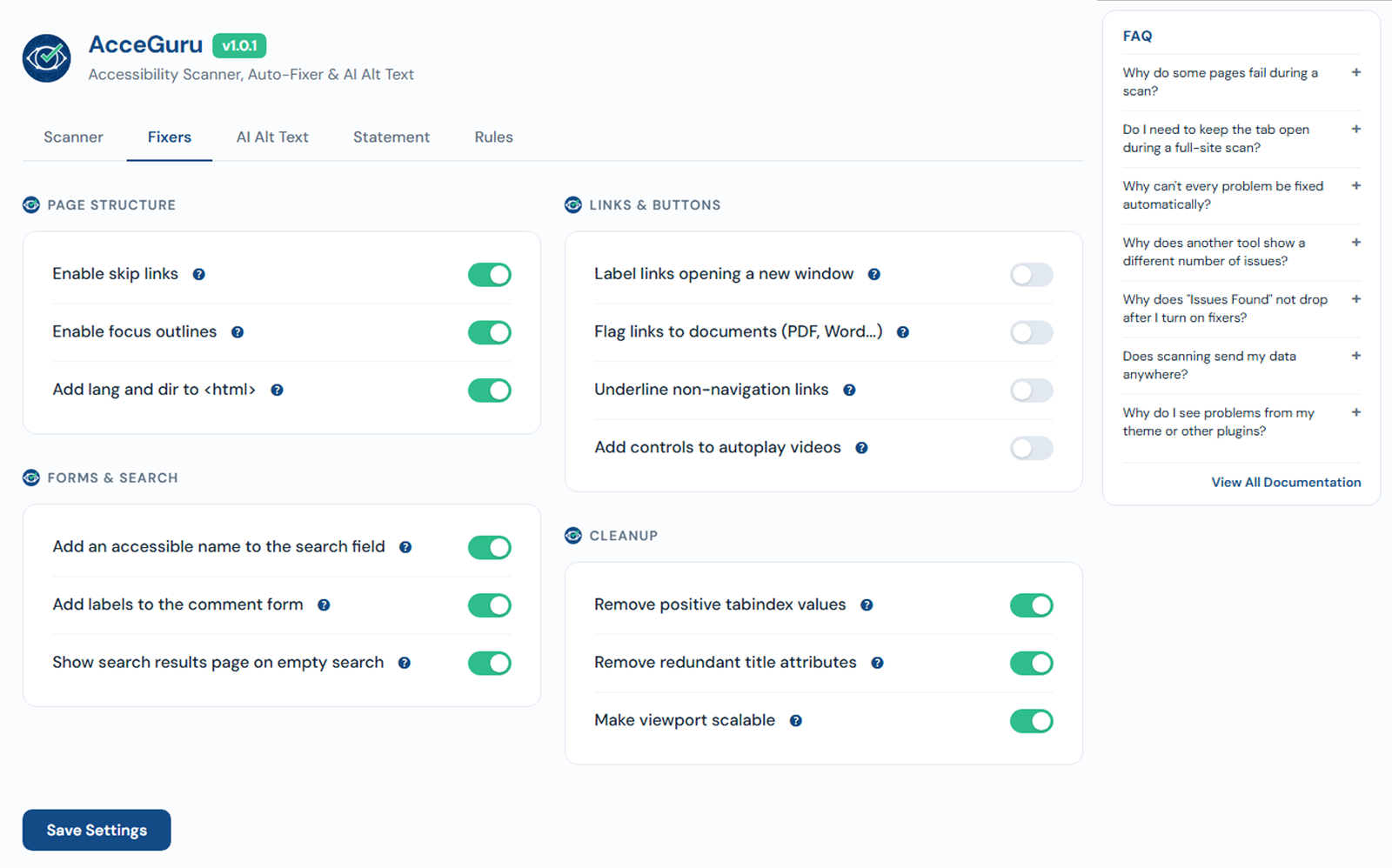
- 13 independently toggleable fixers and site-wide ignored rules
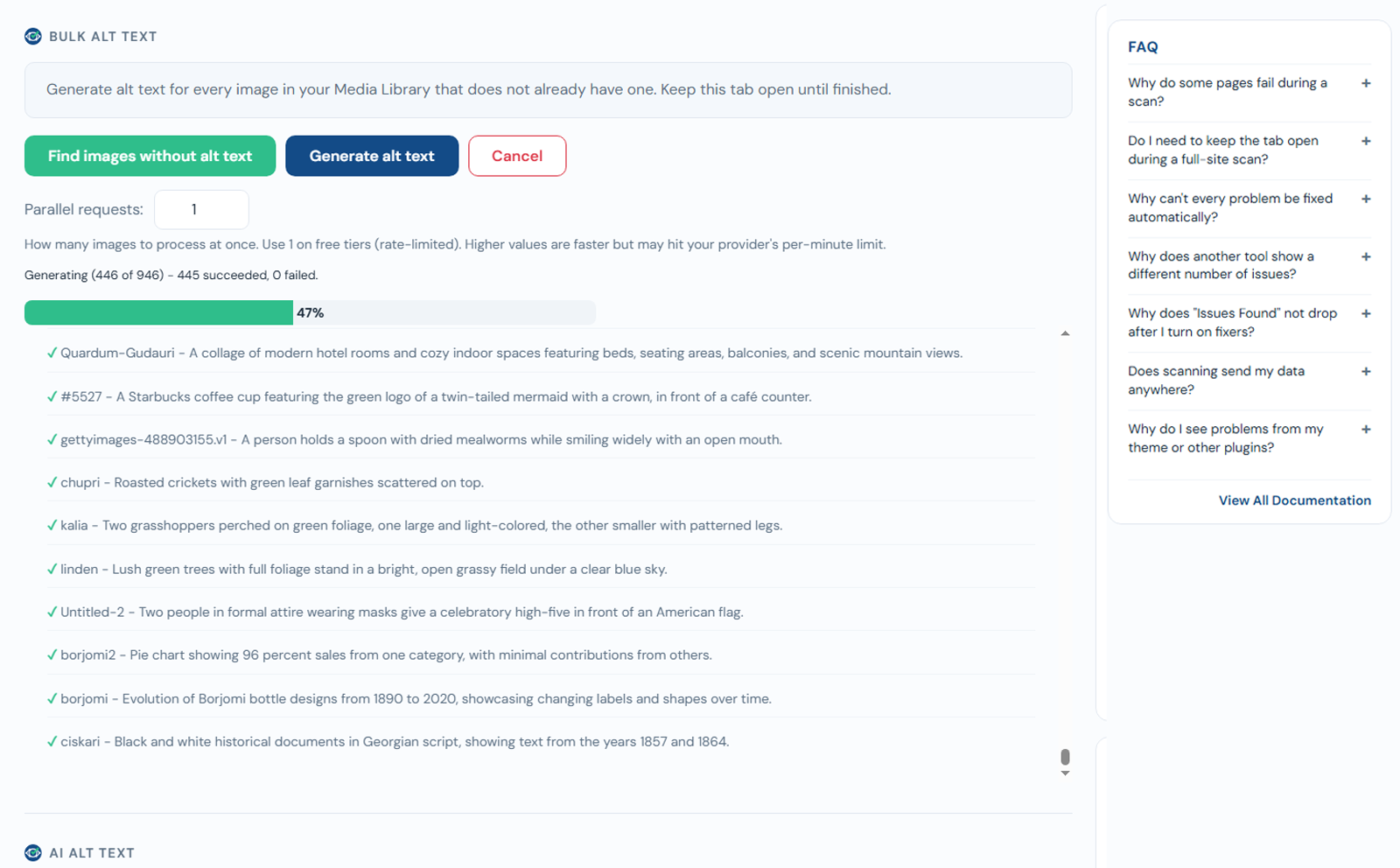
- Optional single, bulk and on-upload AI alt-text generation
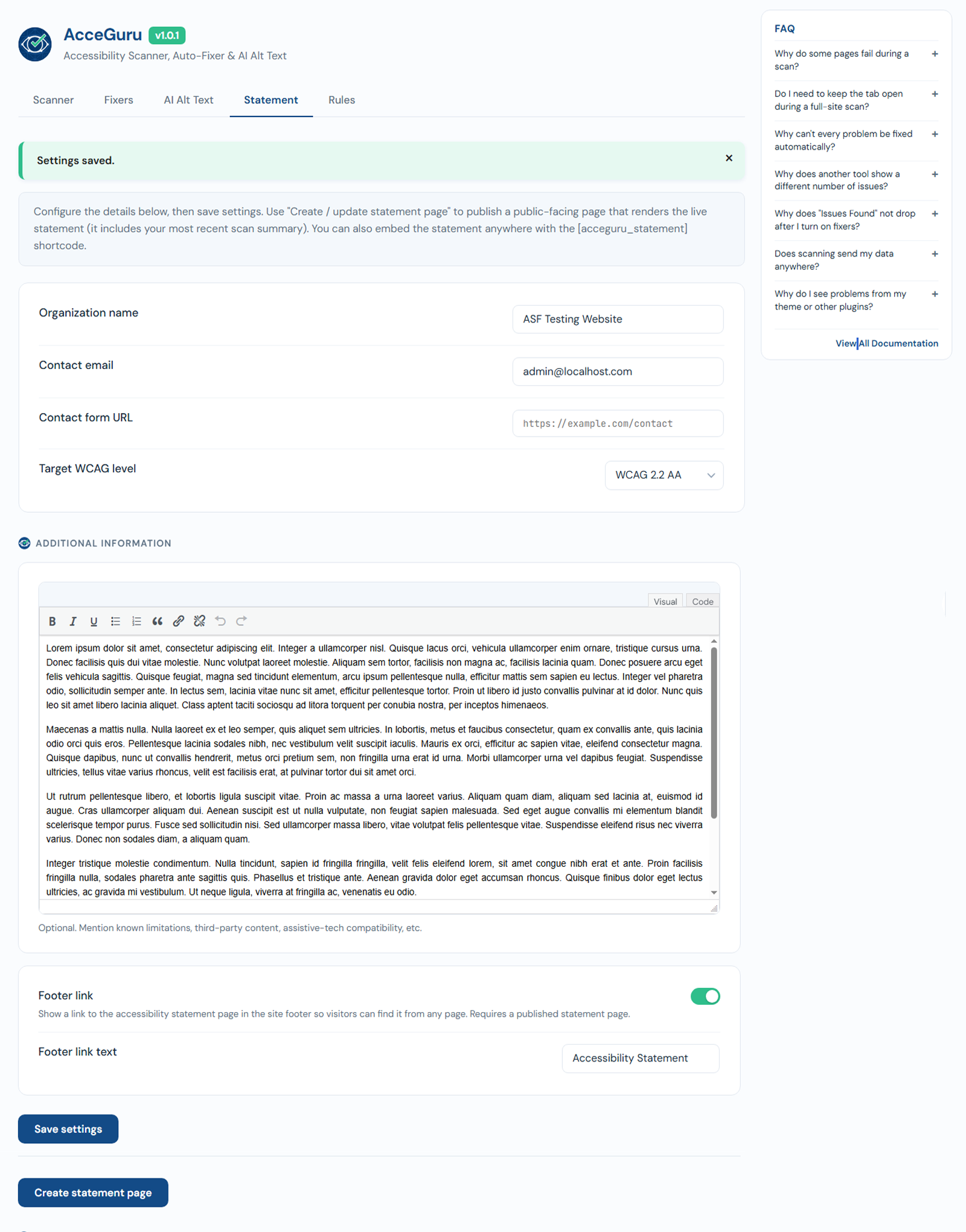
- Accessibility statement page, shortcode and optional footer link
- Translation-ready (text domain
acceguru)
Auto-fixers
Low-impact fixes are enabled on install. Appearance-changing fixes are off by default. Settings -> Fixers provides separate controls for skip links, focus outlines, language attributes, search and comment-form labels, empty searches, new-window and document-link labels, link underlines, video controls, positive tabindex, redundant titles and viewport scaling.
Standards & laws coverage
- WCAG 2.0 / 2.1 / 2.2 – selectable levels A, AA and AAA
- Recommended checks – optional axe-core and AcceGuru checks that are not formal WCAG failures
- Section 508 and EN 301 549 – optional axe-core tagged rules
- Accessibility laws – the ADA, the California Unruh Civil Rights Act, the EAA, AODA and the UK Equality Act, which point to the standards above rather than defining their own technical tests
Accessibility requirements vary by jurisdiction. AcceGuru does not determine or guarantee legal compliance or complete WCAG conformance.
AI providers
AI alt text is optional and uses an API key supplied by the site owner. Supported providers are OpenAI, Anthropic, Google Gemini and Mistral. Keys are encrypted at rest using the WordPress authentication salt. See Privacy below for exactly when data is sent and for provider terms and privacy policies.
Want more? AcceGuru Pro
Need faster scanning and additional review workflows? AcceGuru Pro extends the free plugin with:
- Fast and Faster parallel site scans; several pages at once
- Archive and taxonomy scanning – the category, tag, author and date list pages the free scan leaves out
- Five advanced auto-fixers for headings, form labels, landmarks, empty controls and duplicate IDs
- Dismiss and reopen workflow with reasons, comments, an audit log and role controls
- Issues-over-time history and scheduled email reports
- CSV and JSON export
- Automatic content checks after saving in the Block Editor
The free plugin remains fully functional without Pro. Pro is a separate add-on and requires AcceGuru Free.
Compare plans and get AcceGuru Pro
Privacy
AcceGuru does not phone home and has no analytics, telemetry, third-party trackers or remote license validation. The scanner runs in the browser and scan results stay on your site.
AI features are optional. When you request alt text for one image, run Bulk Alt Text, or enable automatic generation on upload, AcceGuru sends the image content and a text prompt from your server to the selected provider. Testing an API key sends only a short text prompt; Bulk Alt Text performs this test before processing images. When media is stored remotely or served through an offloaded-media/CDN URL, AcceGuru may first fetch that attachment URL. No provider request is made unless an administrator configures an AI provider and API key. Requests occur when an authorized user generates alt text, an administrator tests a key or starts bulk generation, or automatic generation on upload has been enabled.
Provider information:
- OpenAI – https://openai.com/ · https://openai.com/policies/services-agreement/ · https://openai.com/policies/privacy-policy/
- Anthropic – https://www.anthropic.com/ · https://www.anthropic.com/legal/commercial-terms · https://www.anthropic.com/legal/privacy
- Google Gemini – https://ai.google.dev/ · https://ai.google.dev/gemini-api/terms · https://policies.google.com/privacy
- Mistral – https://mistral.ai/ · https://mistral.ai/terms/ · https://legal.mistral.ai/terms/privacy-policy
Data stored in your database
wp_options– settings, ignored-rules list, encrypted AI API keys (underacceguru_*)wp_postmeta– per-post scan results and scan summary (under_acceguru_*)wp_optionstransients – dashboard aggregate cache (1 hour TTL)
On uninstall, data is preserved by default. The plugin replaces its shortcode on the tracked accessibility-statement page with a final static statement, so the published page remains readable without AcceGuru. Enable « Delete all data on uninstall » under Settings -> Rules, in the Advanced section, to remove plugin options, transients and post metadata and move the tracked statement page to the Trash. A page that no longer contains the AcceGuru shortcode is left untouched.
Credits
This plugin bundles axe-core (assets/js/axe.min.js, version 4.12.1), the accessibility testing engine by Deque Systems, licensed under the Mozilla Public License 2.0. Unminified source: https://github.com/dequelabs/axe-core/tree/v4.12.1
The bundled DM Sans and JetBrains Mono fonts are licensed under the SIL Open Font License 1.1. The full license is in assets/fonts/OFL.txt.
Captures d’écrans
Installation
- Upload the
accegurufolder to/wp-content/plugins/, or install via Plugins -> Add New. - Activate the plugin through the Plugins screen.
- Go to AcceGuru -> Settings to enable the fixers you want.
- (Optional) Add an API key under AI Alt Text if you want AI-generated alt text.
- Run a site scan from AcceGuru -> Dashboard.
- Open any scanned post or page in the Block Editor to review its saved results.
FAQ
-
Does this make my site WCAG compliant automatically?
-
No. Automated testing covers only part of accessibility. Manual review is still required for matters such as meaningful headings, link purpose, keyboard interaction and reading order. AcceGuru does not determine or guarantee legal compliance or complete WCAG conformance.
-
Where are AI API keys stored?
-
In
wp_options, encrypted with AES-256-GCM using a key derived fromwp_salt('auth'). If the server lacks the required OpenSSL support, the key is not saved unencrypted. It is sent only to the configured provider. -
Does the scanner slow down my site?
-
The scanner is not loaded for normal visitors. axe-core is lazy-loaded for an authorized user only when a dashboard scan or front-end overlay scan is requested.
-
Which post types does the A11y column appear on?
-
Posts, pages, and public custom post types that use the standard WordPress posts list table. Media Library attachments are not included.
-
Can I exclude specific issues or rules?
-
Yes. Use the « Ignore » button on the dashboard’s Most Common Issues panel to hide a rule site-wide; ignored rules are excluded from dashboard counts and per-page panels.
-
Does it work with block themes?
-
Yes. The fixers support block themes, including
theme.jsonstyles. -
Why does the dashboard count differ from what I see in the front-end overlay?
-
The site scan uses a desktop-sized viewport based on the administrator’s browser, with a minimum of 1024×768. The overlay uses the current live viewport, so layout-dependent results can differ.
-
How is Passed Checks calculated?
-
Passed Checks is the percentage of completed axe-core checks that passed. AcceGuru findings appear in issue totals and lists but are not mixed into that percentage. Results are marked for a new scan after relevant settings or rules change.
-
Why do some pages show « Timed out after 30s » in the scan log?
-
Each page has a 30-second limit. Slow hosting, heavy themes/plugins or third-party scripts can cause a timeout; use « Retry failed pages » after the server recovers.
Avis
Il n’y a aucun avis pour cette extension.
Contributeurs/contributrices & développeurs/développeuses
« AcceGuru – Accessibility Scanner, Auto-Fixer & AI Alt Text » est un logiciel libre. Les personnes suivantes ont contribué à cette extension.
Contributeurs
Traduisez « AcceGuru – Accessibility Scanner, Auto-Fixer & AI Alt Text » dans votre langue.
Le développement vous intéresse ?
Parcourir le code, consulter le SVN dépôt, ou s’inscrire au journal de développement par RSS.
Journal des modifications
1.0.4
- Tested with WordPress 7.1.
- Block Editor: clicking a finding in the AcceGuru panel scrolls to the element again and highlights it. The panel now also says when a finding belongs to the theme (header, navigation, footer) and has no counterpart in the editor.
- AI Alt Text: AVIF images are supported. They are counted, offered in Bulk Alt Text and converted to a temporary copy before being sent, so the file in the Media Library is never changed.
- AI Alt Text: an image is sent as WordPress’s ready-made « large » copy instead of the full-size original whenever that copy exists, so fewer bytes leave your server; images without a « large » copy are still sent in full size.
- AI Alt Text: automatic generation on upload waits for the resized copies and runs for new uploads only, so regenerating thumbnails never sends the Media Library to a paid service.
- Most Common Issues and ignored rules: rule names now link to a page that exists for AcceGuru’s own checks instead of a « no matching rule » page.
- Settings: item counts next to content types are back, with a line explaining that they are site totals and a scan usually covers fewer.
- Dashboard: the « Issues over time » block no longer closes when a chart line is switched on or off.
- A11y column: the routine recalculation after an update is now silent; a message appears only when it actually stops.
- « Upgrade to Pro » card and menu entry are back on the settings screen, and stay hidden when the add-on is active.
1.0.3
- Site scan: addresses that redirect elsewhere are recognised straight away, reported as « Redirected addresses » and never counted as failures or offered for retry.
- Site scan: redirected addresses no longer wait out the per-page deadline, so scans on sites with redirects finish in the usual time.
- Site scan: the downloaded log gains an « Ignored redirects » section listing the requested address and, where the browser allows it, the final one.
- Site scan: a result can no longer be stored under the wrong page when a redirect happens while the page is being checked.
- Site scan: list pages such as the WooCommerce Shop page and the assigned Posts page are checked properly instead of running into the deadline.
- Site scan: an address that answers with a not-found page is reported as a scan error and its result is not stored.
- Site scan: the selected post statuses are remembered instead of resetting to Published every time.
- Settings: removed the item counts next to content types, which could not match what a scan actually walks.
- A11y column: sorting now follows the displayed issue counts after ignored-rule and add-on filters, while stale and unscanned pages remain at the end.
1.0.2
- Fix saving scan results on multilingual sites and keep Media Library alt-text totals stable across languages and third-party plugins.
- Preserve the tracked accessibility-statement page when settings are saved and avoid creating duplicate statement pages.
- Make A11y column counts match visible issues, including ignored rules and issues hidden by add-ons.
- Explain likely decorative images before and after alt-text generation.
- Improve scan progress, retry totals and downloaded log labels.
- Protect plugin screens and the front-end issue list from conflicting plugin and theme behaviour.
1.0.1
- Update the bundled axe-core accessibility engine from 4.10.2 to 4.12.1.
- Apply WCAG level and recommended-check settings consistently to axe-core and AcceGuru checks.
- Correct rule classifications, remove duplicate findings and calculate Passed Checks from axe-core results only.
- Mark incompatible saved results for a new scan and prevent pause/resume or retry from mixing scan profiles.
- Preserve a readable static accessibility statement, or trash the tracked statement page when uninstall data removal is enabled.
- Add OpenAI and Anthropic alt-text providers alongside Gemini and Mistral.
- Add failed-page retry, bounded scan logs, iframe message validation, navigation warnings and content-type coverage information.
- Make the live overlay keyboard accessible and clean up highlights and event listeners after every scan.
- Improve the dashboard, settings, Block Editor links and alt-text handling.
Earlier release history is available in changelog.txt.