

Description
Seamless rollback of WordPress Core to latest release or any outdated, secure release using the Core Update API and core update methods. Only latest release and outdated, secure releases are offered. Refer to https://api.wordpress.org/core/stable-check/1.0/ Logo from a meme generator. Original artwork by Allie Brosh.
Utilisation
Depuis le menu Outils, sélectionnez Rollback Core, sélectionnez la version à laquelle vous souhaitez revenir dans le menu déroulant et cliquez sur Revenir en arrière. Vous serez redirigé·e vers la page update-core.php où vous verrez un bouton Réinstaller la version spécifiée. Si vous quittez la page update-core.php avant de cliquer sur le bouton Réinstaller, vous disposerez de 15 secondes pour revenir et terminer le processus, faute de quoi vous devrez recommencer.
Dans un multisite utilisez le menu Réglages.
Avertissement : rétrograder le cœur de WordPress peut rendre votre site inutilisable et nécessiter une réinstallation complète ou une réinstallation forcée à l’aide de WP-CLI, wp core update --force --version=5.5.3. Il se peut également que votre site ne fonctionne pas en raison d’une incompatibilité avec une extension ou un thème. Utilisez cette extension à vos risques et périls.
Les retours en arrière s’effectuent dans la langue locale actuelle.
Les PR sont bienvenues.
Captures d’écrans
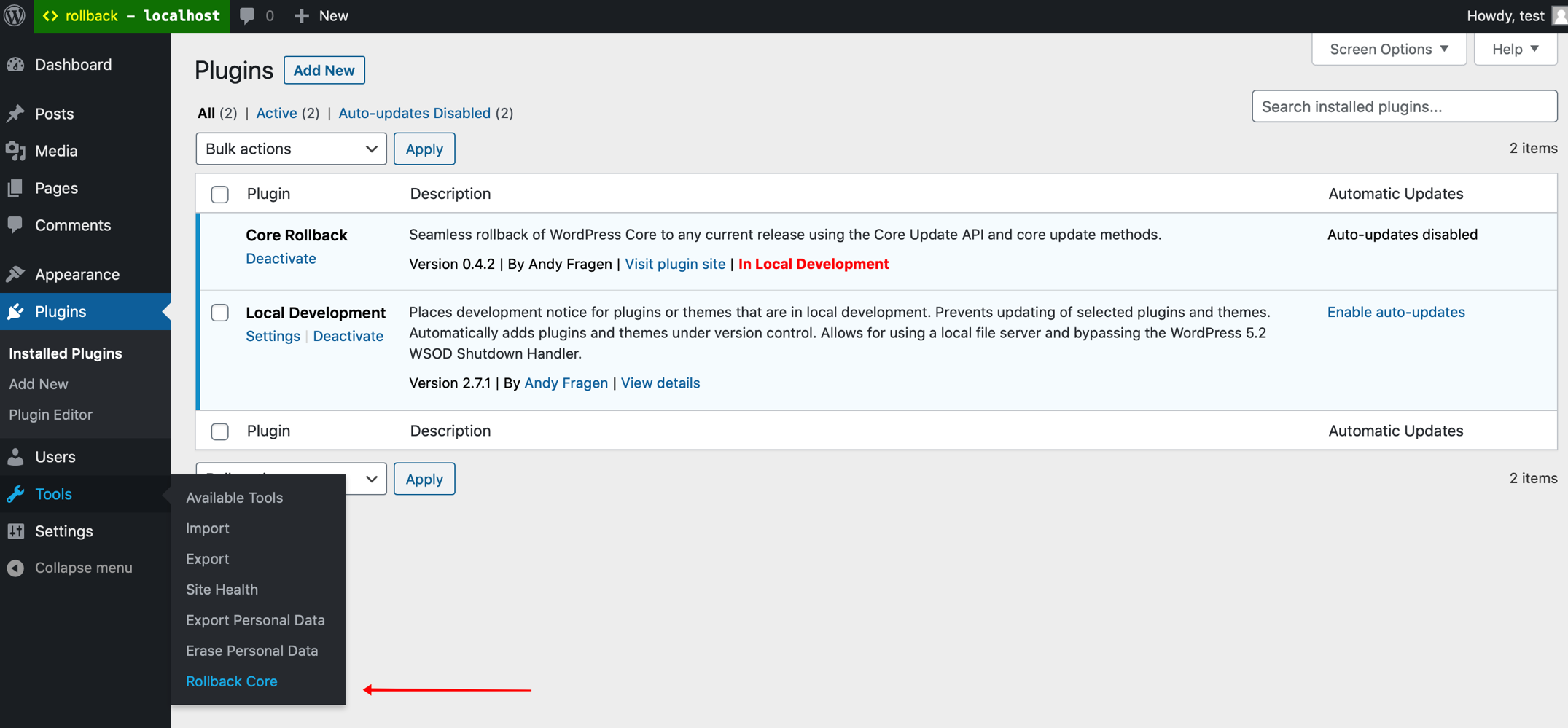
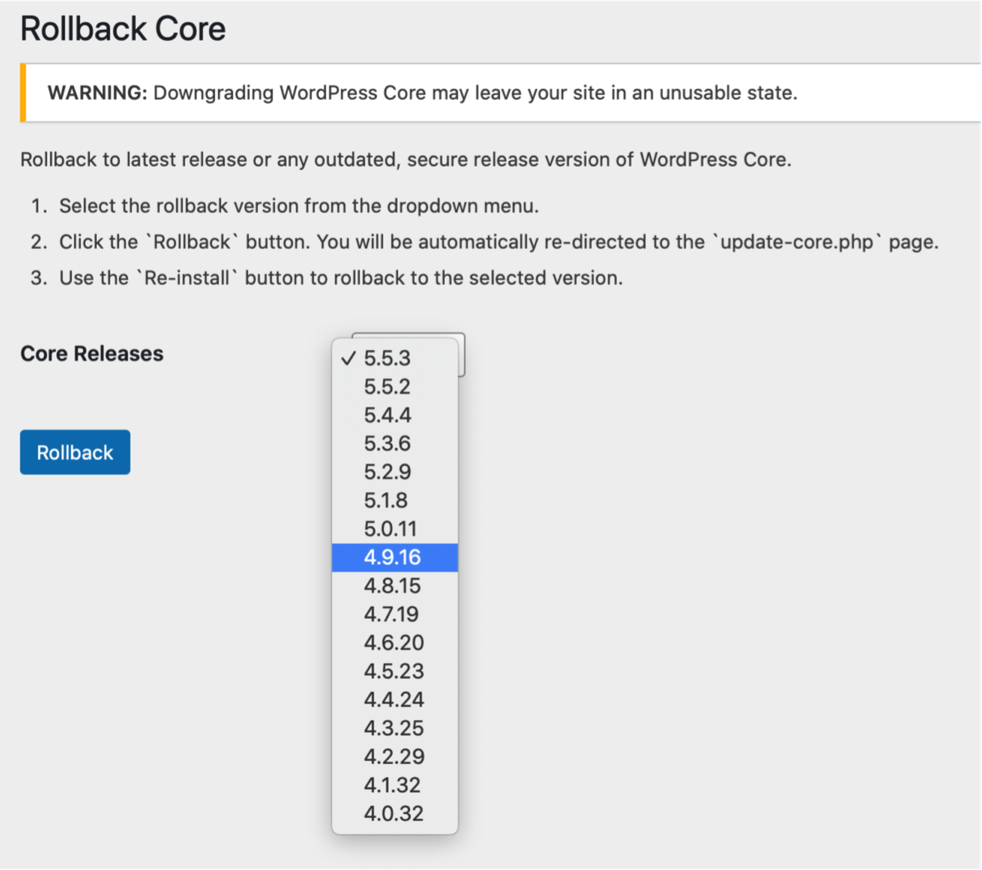

Avis


Contributeurs/contributrices & développeurs/développeuses
« Core Rollback » est un logiciel libre. Les personnes suivantes ont contribué à cette extension.
Contributeurs
“Core Rollback” a été traduit dans 11 locales. Remerciez l’équipe de traduction pour ses contributions.
Traduisez « Core Rollback » dans votre langue.
Le développement vous intéresse ?
Parcourir le code, consulter le SVN dépôt, ou s’inscrire au journal de développement par RSS.
Journal des modifications
1.4.2 / 2026-03-29
- remove null coalescing so works with PHP 5.6
1.4.1 / 2025-12-09
- add hardening to
get_core_versions() - account for
update_coretransient asfalse
1.4.0 / 2025-11-17
- return rollback offer with
update_coretransient - update POT GitHub Action
1.3.7 / 2024-12-02
- start in
inithook - add GitHub Action to generate POT
1.3.6 / 2024-11-01
- remove
load_plugin_textdomain() - composer update
1.3.5 / 2023-07-12
- update rollback choices for PHP version
1.3.4 / 2023-02-07
- composer update
1.3.3 / 2023-02-05
- update for PHP 8.1
1.3.2 / 2022-05-10
- use
wp_is_block_theme()for check
1.3.1 / 2022-02-08
- use
sanitize_key()for nonces
1.3.0 / 2022-01-28
- filter WP versions with significant deprecation notices/errors for newer PHP versions
- add notice about limiting of rollback options for PHP versions
1.2.4 / 2022-01-14
- proper nonce verification of settings page
- remove unneededd
version_comparecheck for notice
1.2.3 / 2022-01-11
- I suck and so do typos
1.2.2 / 2022-01-11
- need to use
method_existsin check to properly function
1.2.1 / 2022-01-11
- add
function_exists( 'is_block_theme' )check to avoid fatal
1.2.0 / 2022-01-10
- add method to return array of block capable WP versions for rollback
1.1.2 / 2022-01-10
- add notice if currently using block theme, thanks @costdev
1.1.1 / 2021-10-14
- use
sanitize_title_with_dashes()assanitize_file_name()maybe have attached filter that changes output
1.1.0 / 2021-07-07
- add @10up GitHub Actions for WordPress SVN
1.0.1 / 2020-12-4
- fix text-domain in string, thanks Alex
1.0.0 / 2020-11-17
- initial release to dot org repository
- add
Class Bootstrapto intiate process - updated instructions, etc
- add assets, screenshots, banners, icon
- add
readme.txtand clean upcreate_admin_page() - add warning notice to settings
- add
force-checkquery arg to redirect to more consistently display theRe-install Nowbutton. - limit rollbacks to WP > 4.0, I found some non-recoverable issue in my local testing
- initial release