
Description
Easy Dark Theme for Astra adds a light/dark mode switcher designed specifically for Astra themes.
Main features:
* Toggle control mode:
* Auto (system preference) using prefers-color-scheme
* Button mode (user switch)
* Optional “Remember preference” (persists user choice)
* Toggle placement options (floating):
* Bottom-right, bottom-left, top-right, top-left
* Horizontal and vertical spacing (positive values, automatically applied based on position)
* Toggle visibility options:
* Always show, hide on mobile, hide on desktop, always hide
* Toggle style options:
* Icon or Text
* Pill style:
* Capsule switch with sun/moon icons and animated knob
* Optional theme transition:
* Smooth transition applied only while switching between themes
* Multiple toggle outputs:
* Floating button (auto-injected)
* Widget
* Shortcode: [edta_toggle]
* Admin preview with live style switching
* Optional Astra Global Colors mapping:
* Free Preset Palette (included, not editable)
* Custom Palette (fully editable)
* Dark palette always applied in dark mode
* Light palette can be skipped to respect the theme’s own light colors (recommended)
* Accessibility options:
* Reduced motion support (respects prefers-reduced-motion)
* Optional focus ring improvements for keyboard navigation
* Tools:
* Export settings to JSON
* Import settings from JSON
* Reset settings to defaults (with confirmation)
* Admin UX improvements:
* Reduced flicker on initial load (palette + lock state handling)
* Improved state synchronization for preset/custom palettes
* Improved save-state detection in sidebar
Notes:
* This plugin is intended for Astra themes. If Astra is not active, the plugin’s frontend output is disabled. The admin page remains available.
Plugin page:
https://wordpress.org/plugins/easy-dark-theme-for-astra/
Captures d’écrans
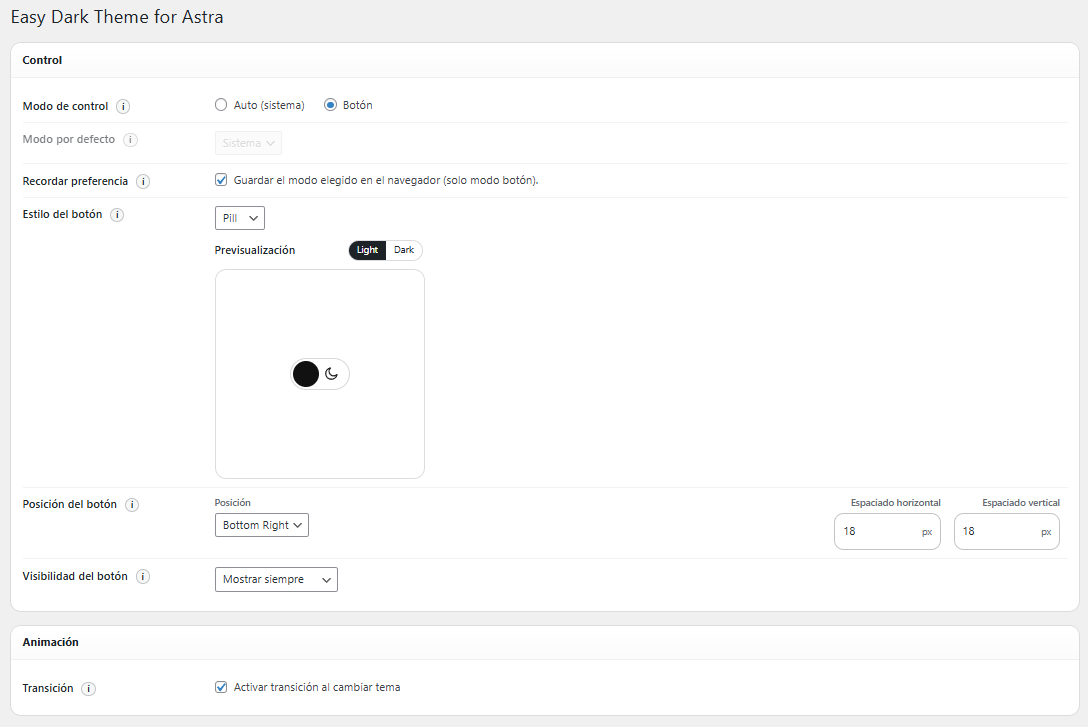
Control + Animation sections (complete view) 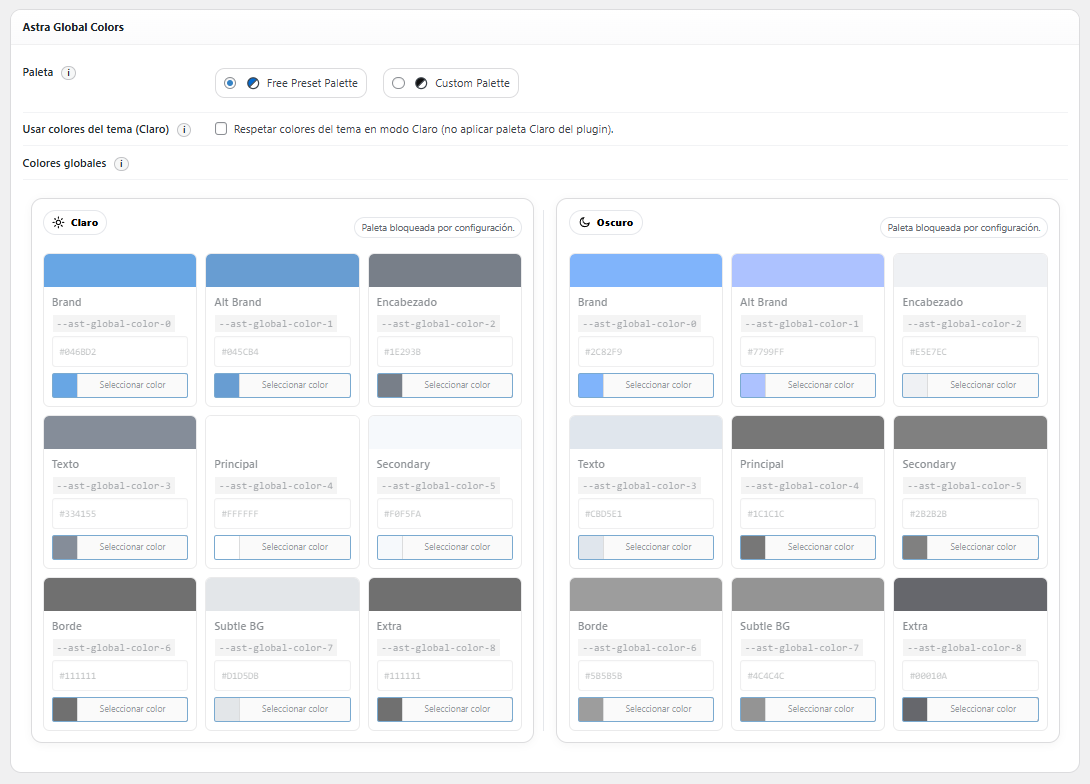
Astra Global Colors (Free Preset Palette selected) 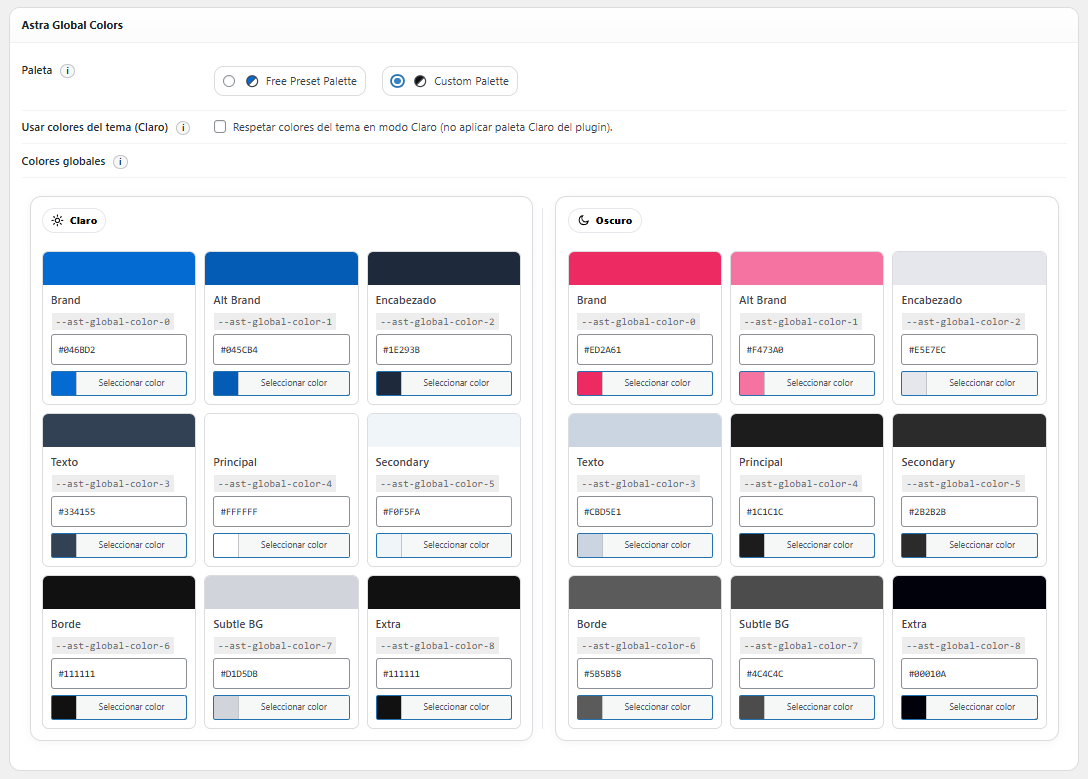
Astra Global Colors (Custom Palette selected) 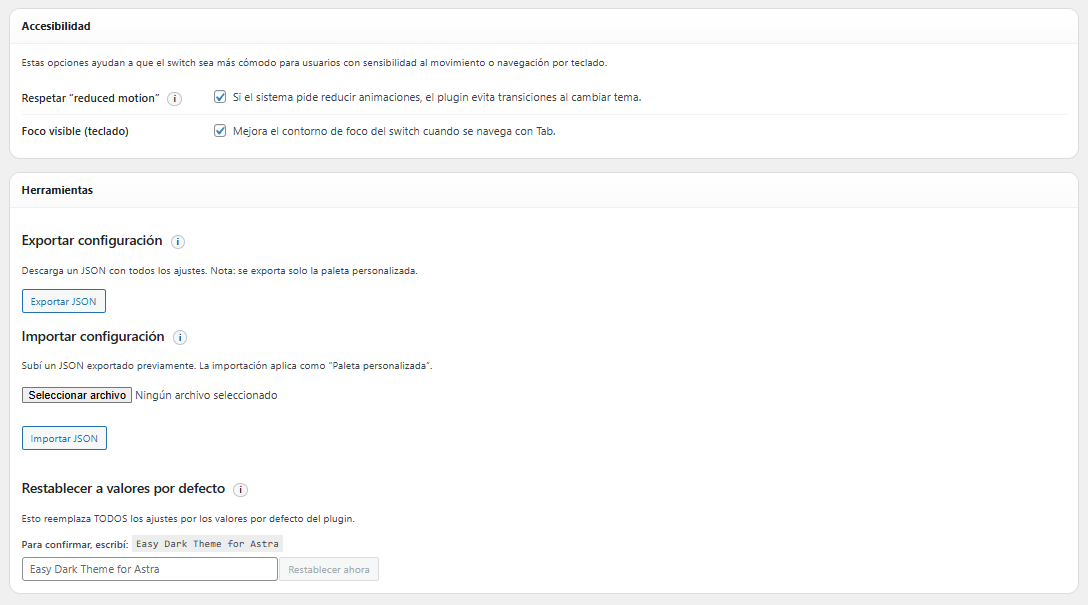
Accessibility + Tools sections
Installation
- Upload the plugin folder to /wp-content/plugins/ or install it via WordPress Plugins.
- Activate « Easy Dark Theme for Astra ».
- Go to WP Admin Easy Dark Theme to configure:
- Control mode (Auto / Button)
- Default mode (System / Light / Dark)
- Button style/position/visibility
- Theme transition
- Accessibility options
- Astra Global Colors palette options
- Tools (export/import/reset)
FAQ
-
Does it work without Astra?
-
No. The plugin is designed for Astra and the frontend is disabled if Astra is not active. The palette mapping relies on Astra Global Colors (–ast-global-color-*).
-
What classes does the plugin apply?
-
The plugin applies:
* body.edta-theme-dark
* body.edta-theme-light
* html.edta-pre-dark
* html.edta-pre-lightIn Auto mode, the initial state is set early to reduce flicker (pre-classes are applied before first paint).
-
Yes. Use the shortcode:
[edta_toggle]
Or add the widget in Appearance Widgets. -
Does the toggle sync between browser tabs?
-
Yes (in Button mode with “Remember preference” enabled), using localStorage storage events.
-
Will it break if localStorage is blocked?
-
No. The plugin uses safe fallbacks and continues working without persistence.
-
Can I export or import plugin settings?
-
Yes. All plugin settings can be exported and imported from the admin panel, allowing easy migration between sites.
-
Does the plugin detect my site colors automatically?
-
No. You should set your site colors using Astra Global Colors (Customizer). The plugin then replaces those global color values with the configured light/dark palettes.
Avis
Il n’y a aucun avis pour cette extension.
Contributeurs/contributrices & développeurs/développeuses
« Easy Dark Theme for Astra » est un logiciel libre. Les personnes suivantes ont contribué à cette extension.
Contributeurs
Traduisez « Easy Dark Theme for Astra » dans votre langue.
Le développement vous intéresse ?
Parcourir le code, consulter le SVN dépôt, ou s’inscrire au journal de développement par RSS.
Journal des modifications
1.1.1
- Added review notice in the admin panel after 7 days of use.
1.1.0
- Admin interface now defaults to English as the base language.
- Added full i18n support with translations for Spanish (Spain), Spanish (Argentina), Spanish (Mexico), French, German, and Portuguese (Brazil).
- All admin UI texts, tooltips, and select options are now fully translatable.
- Tested compatibility with WordPress 6.9.4.
1.0.1
- Tested compatibility with WordPress 6.9.1.
1.0.0
- Official public release on WordPress.org.
0.1.1
- Updated plugin URL to official WordPress.org page.
- Improved admin UI initialization to reduce palette flicker.
- Improved preset/custom palette state handling.
- Improved palette lock behavior consistency.
- Minor admin UX refinements and code cleanup.
0.1.0
- Initial release:
- Auto/system mode and Button mode.
- Floating toggle + shortcode + widget.
- Icon/Text/Pill styles, position and visibility options.
- Horizontal/vertical spacing based on position.
- Optional theme transition on switch.
- Free Preset Palette + Custom Palette.
- Astra Global Colors palette mapping.
- Export/Import settings (JSON) and Reset tools.
- Cross-tab sync, fallbacks, and accessibility improvements.