

Description
Limitez l’accès de votre site aux visiteurs connectés ou accédant au site depuis un groupe d’adresses IP spécifiques. Envoyez les visiteurs non autorisés vers la page de connexion, redirigez-les, ou affichez un message ou une page. Une excellente solution pour les extranets, les intranets hébergés publiquement ou les sites en développement.
Ajoute un certain nombre de nouvelles options de configuration au panneau des réglages de lecture ainsi qu’au panneau des réglages du réseau dans le cas d’un site multisite. À partir de ces panneaux, vous pouvez :
- Activer ou désactiver la restriction du site
- Modifier le comportement de la restriction : diriger vers la page de connexion, rediriger, afficher un message ou une page de site
- Ajouter des adresses IP pour entretenir des listes d’utilisateurs autorisés, fonctionne également avec des plages d’IP
- Ajouter rapidement votre adresse IP actuelle à la liste autorisée
- Personnaliser l’emplacement de la redirection, comprenant une option pour les envoyer au même chemin demandé et régler le code d’état HTTP pour respecter le SEO
- Définir un message simple à afficher aux visiteurs non autorisés ou sélectionner une page à afficher : super pour les accroches du type « Retrouvez-nous bientôt ici » !
Captures d’écrans
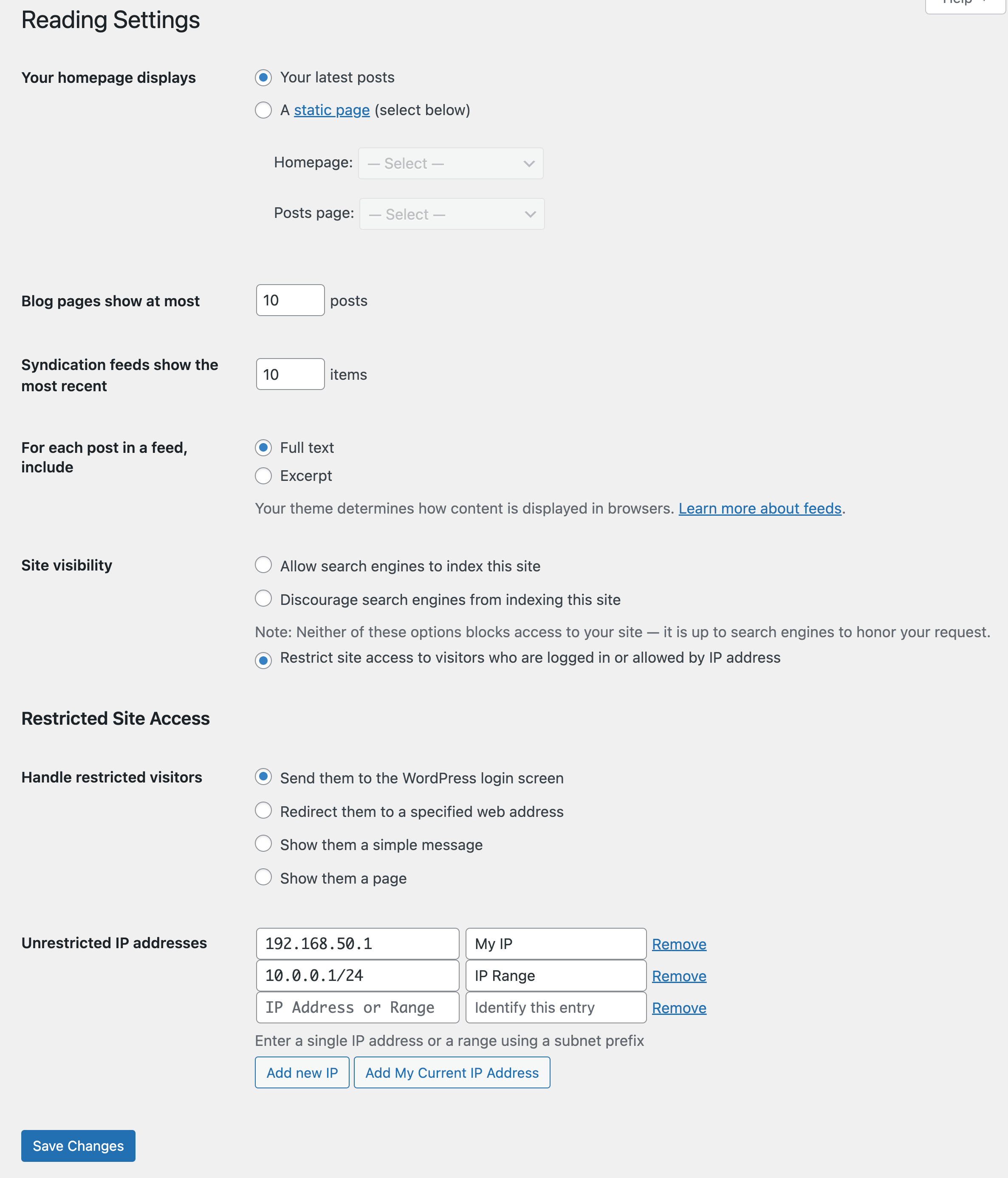
Capture d’écran des réglages présentant les options de restriction (Diriger vers la page de connexion) 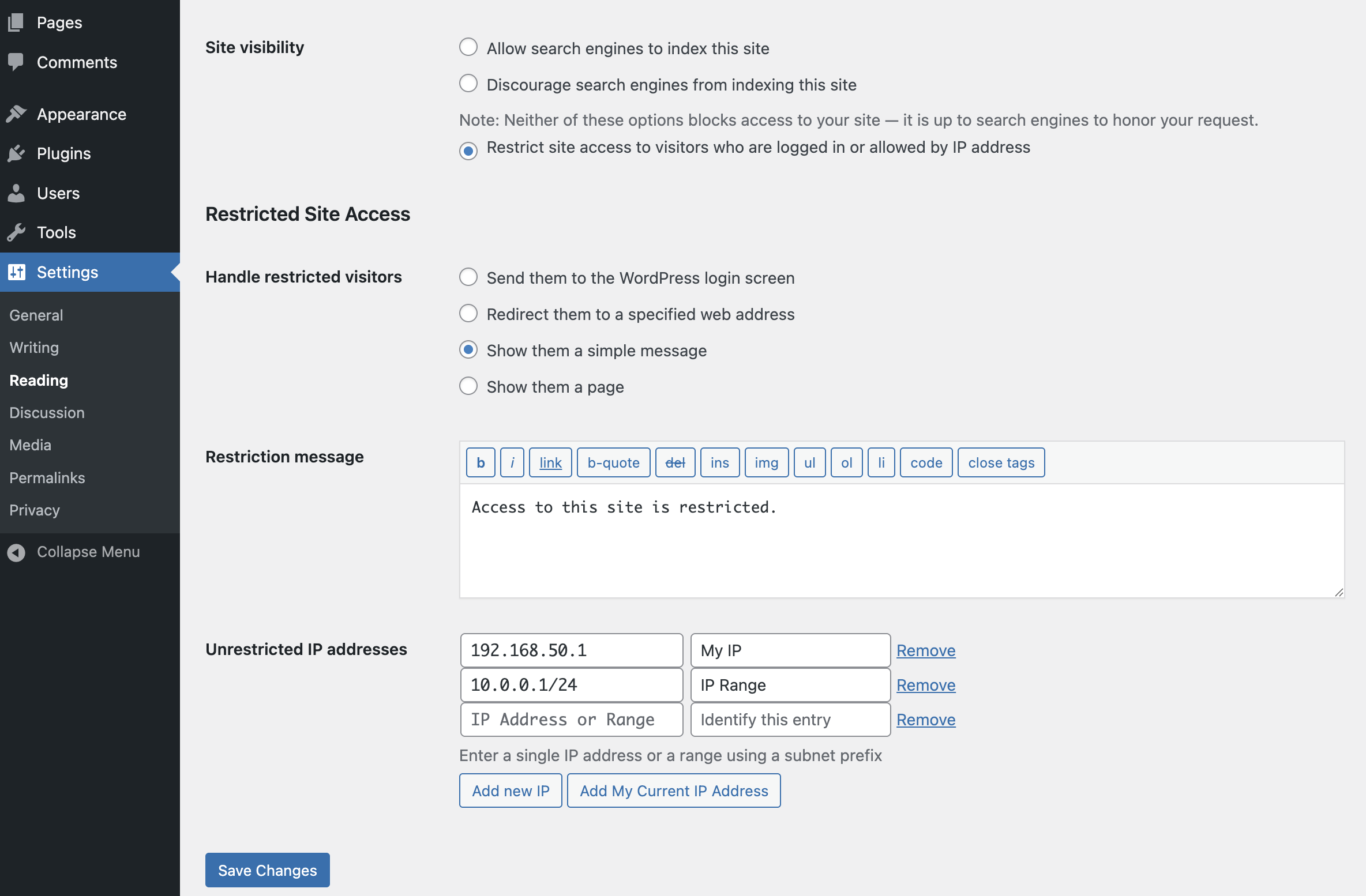
Capture d’écran des réglages présentant l’option de restriction via un message 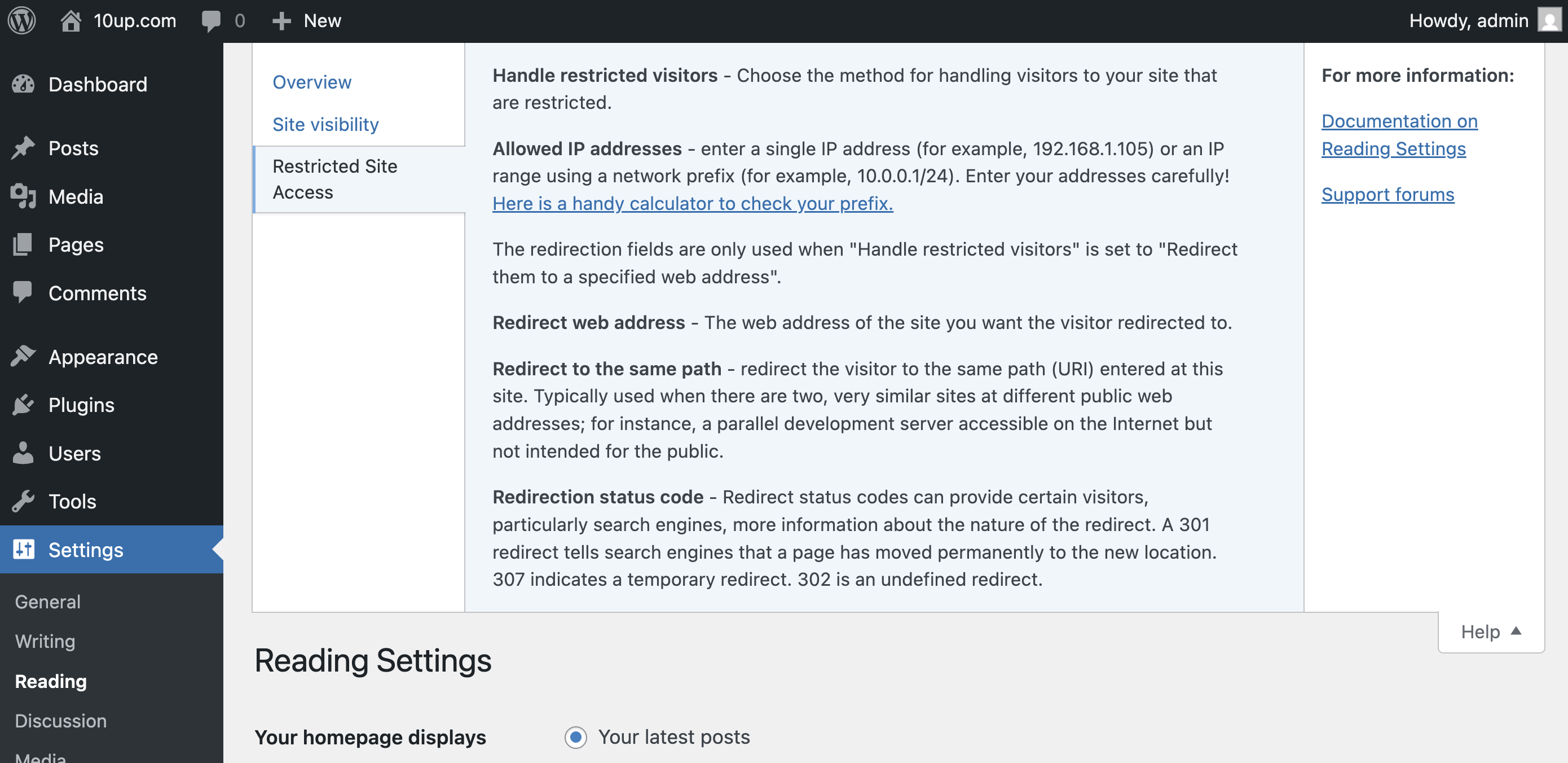
Énormément d’aide en ligne ! Cela ressemble et se comporte de la même manière que l’aide native de WordPress.
Installation
- Install easily with the WordPress plugin control panel or manually download the plugin and upload the extracted folder to the
/wp-content/plugins/directory. - Activez l’extension depuis le menu « Extensions » de WordPress.
- Configure the plugin by going to the « Reading » menu (WP3.5+) or « Privacy » (earlier versions) under « Settings ».
FAQ
-
Où puis-je modifier les réglages de restriction ?
-
Restricted Site Access settings are added to the Reading page, with WordPress’s built in site privacy options. (It was moved there from a separate Privacy settings page in 3.5.)
-
Ça ne fonctionne pas ! Mon site est grand ouvert !
-
Most commonly, Restricted Site Access is not compatible with some page caching solutions. While the plugin hooks in as early as it can to check visitor permissions, its important to understand that some page caching plugins generate static output that prevents plugins like Restricted Site Access from ever checking individual visitors.
To the extent that sites blocked by this plugin should not need to concern themselves with high scale front end performance, we strongly recommend disabling any page caching solutions while restricting access to your site. Keep in mind that most page caching plugins do not cache the “logged in” experience, anyhow. Also note that the plugin is fully compatible with other caching layers, like the WordPress object cache.
-
Comment puis-je autoriser l’accès à des pages ou parties spécifiques de mon site ?
-
Developers can use the
restricted_site_access_is_restrictedfilter to override normal restriction behavior. Note that restriction checks happen before WordPress executes any queries; it passes the query request from the global$wpvariable so developers can investigate what the visitor is trying to load.For instance, to unblock an RSS feed, place the following PHP code in the theme’s functions.php file or in a simple plug-in:
add_filter( 'restricted_site_access_is_restricted', 'my_rsa_feed_override', 10, 2 ); function my_rsa_feed_override( $is_restricted, $wp ) { // check query variables to see if this is the feed if ( ! empty( $wp->query_vars['feed'] ) ) { $is_restricted = false; } return $is_restricted; } -
Quel est le degré de sécurité de cette extension ?
-
Visitors that are not logged in or allowed by IP address will not be able to browse your site (though be cautious of page caching plugin incompatibilities, mentioned above). Restricted Site Access does not block access to your « real » files, so direct links to files in your media and uploads folder (for instance) are not blocked. It is also important to remember that IP addresses can be spoofed. Because Restricted Site Access runs as a plug-in, it is subject to any other vulnerabilities present on your site.
L’accès restreint au site n’est pas un coffre-fort de données top secret, mais simplement un moyen fiable et pratique de gérer les visites indésirables.
In 7.3.2, two new filters were added that can be utilized to help prevent IP spoofing attacks. The first filter allows you to set up a list of approved proxy IP addresses and the second allows you to set up a list of approved HTTP headers. For any sites that were using Restricted Site Access prior to version 7.5.0, a handful of HTTP headers are trusted by default. To change this, utilize the
rsa_trusted_headersfilter to modify the HTTP headers you want to trust. If your site is not running behind a proxy, we recommend doing the following:add_filter( 'rsa_trusted_headers', '__return_empty_array' );This will then only use the
REMOTE_ADDRHTTP header to determine the IP address of the visitor. This header can’t be spoofed, so this will increase security. Note that this is now the default for all new installs since version 7.5.0.If your site is running behind a proxy (like a CDN), you usually can’t rely on the
REMOTE_ADDRHTTP header, as this will contain the IP address of the proxy, not the user. If your proxy uses static IP addresses, we recommend using thersa_trusted_proxiesfilter to set those trusted IP addresses:add_filter( 'rsa_trusted_proxies', 'my_rsa_trusted_proxies' ); function my_rsa_trusted_proxies( $trusted_proxies = array() ) { // Set one or more trusted proxy IP addresses. $proxy_ips = array( '10.0.0.0/24', '10.0.0.0/32', ); $trusted_proxies = array_merge( $trusted_proxies, $proxy_ips ); return array_unique( $trusted_proxies ); }And then use the
rsa_trusted_headersfilter to set which HTTP headers you want to trust. Consult with your proxy provider to determine which header(s) they use to hold the original client IP:add_filter( 'rsa_trusted_headers', 'my_rsa_trusted_headers' ); function my_rsa_trusted_headers( $trusted_headers = array() ) { // Set one or more trusted HTTP headers. $headers = array( 'HTTP_X_FORWARDED', 'HTTP_FORWARDED', ); return $headers; }If your proxy does not use static IP addresses, you can still utilize the
rsa_trusted_headersfilter to change which HTTP headers you want to trust. -
J’ai reçu un avertissement concernant la mise en cache des pages. Que cela signifie-t-il ?
-
As of version 7.6.0, RSA attempts to prevent full page caching on sites with an IP address allow list. This is to prevent the page content from being stored at the caching level and displayed to unauthorized visitors.
Page caching plugins often hook into WordPress to quickly serve the last cached output of a page before we can check to see if a visitor’s access should be restricted. Not all page caching plugins behave the same way, but several solutions – including external solutions we might not detect – can ignore the no-caching headers set by WordPress and show cached content to unauthorized users.
-
Pourquoi les internautes connectés ne peuvent-ils pas voir tous les sites de mon instance multisite ?
-
In 6.2.0, the behavior in a multisite install changed from allowing any logged-in user to see a site to checking their role for that specific site. This is a safer default given the varying ways multisite is used; however, if you would prefer to rely on the previous behavior rather than explicitly adding users to each site, place the following PHP code in the theme’s functions.php file or in a simple plug-in:
add_filter( 'restricted_site_access_user_can_access', 'my_rsa_user_can_access' ); function my_rsa_user_can_access( $access ) { if ( is_user_logged_in() ) { return true; } return $access; } -
Existe-t-il un moyen de configurer cela avec [WP-CLI] (https://make.wordpress.org/cli/) ?
-
À partir de la version 7.0.0, l’intégration de CLI a été ajoutée. Pour voir les commandes disponibles, tapez ce qui suit dans votre répertoire WordPress :
$ wp rsa -
Comment puis-je définir par programme des adresses IP sur liste blanche ?
-
En 7.0.0, la capacité de définir un tableau d’adresses IP en liste blanche via une constante a été introduite.
Dans votre fichier
wp-config.php, vous pouvez définir ce qui suit :define( 'RSA_IP_WHITELIST', '192.0.0.1|192.0.0.10' );In 7.1.1, the capacity to programmatically add / remove / set access IPs programmatically was introduced.
Les déclarations suivantes sont valides :
Définir les IP, en ignorant toutes les valeurs stockées (mais pas les valeurs définies constantes), si vous allez utiliser l’approche avec les indices de tableau plutôt que de mélanger les deux.
Restricted_Site_Access::set_ips( array( '192.168.0.1', '192.168.0.2', '192.168.0.3' ) );
Restricted_Site_Access::set_ips( array( 'labelfoo' => '192.168.0.1', 'labelbar' => 192.168.0.2', 'labelbaz' => 192.168.0.3' ) );
Ajouter des adresses IP, si elles ne sont pas déjà ajoutées.
Restricted_Site_Access::append_ips( array( '192.168.1.5' => 'five', '192.168.1.6' => 'six' ) );Retirer des adresses IP, si elles figurent dans la liste.
Restricted_Site_Access::remove_ips( array( '192.168.1.2','192.168.1.5','192.168.1.6', ) ); -
Existe-t-il une constante que je peux définir pour m’assurer que mon site est (ou n’est pas) restreint ?
-
Depuis la version 7.1.0, deux constantes ont été introduites qui vous permettent de spécifier si le site doit être en mode restreint.
Vous pouvez forcer l’extension en mode restreint en ajoutant ce qui suit à votre fichier
wp-config.php:define( 'RSA_FORCE_RESTRICTION', true );Ou pour s’assurer que votre site ne sera pas en mode restreint :
define( 'RSA_FORBID_RESTRICTION', true );Make sure you add it before the
/* That's all, stop editing! Happy blogging. */line.Please note that setting
RSA_FORCE_RESTRICTIONwill overrideRSA_FORBID_RESTRICTIONif both are set. -
Que fait l’option « Décourager les moteurs de recherche d’indexer ce site » ?
-
When the ‘Discourage search engines from indexing this site’ option is enabled, it prevents search engines from indexing the site while still permitting access to regular visitors.
-
What does ‘Restrict site access to visitors who are logged in or allowed by IP address’ do?
-
When this option is activated, it serves as a barrier to all visitors except those who are authenticated (logged in) or whose IP addresses are included in the ‘Unrestricted IP addresses’ setting. This restriction applies universally, even to automated crawlers such as search engines.
Avis


Contributeurs/contributrices & développeurs/développeuses
« Restricted Site Access » est un logiciel libre. Les personnes suivantes ont contribué à cette extension.
Contributeurs


“Restricted Site Access” a été traduit dans 6 locales. Remerciez l’équipe de traduction pour ses contributions.
Traduisez « Restricted Site Access » dans votre langue.
Le développement vous intéresse ?
Parcourir le code, consulter le SVN dépôt, ou s’inscrire au journal de développement par RSS.
Journal des modifications
7.6.1 – 2025-10-29
- Fixed: Ensure field data is set properly before we use it. Resolves a fatal error with Elementor (props @ktorktor, Vishal Patel, fatjester, @dkotter, @peterwilsoncc via #371).
7.6.0 – 2025-10-27
- Added: New setting allowing you to hide the WordPress admin bar on the frontend for specific user roles (props @sanketio, @fabiankaegy, @jeffpaul, @dkotter via #362).
- Added: New
RSA_NETWORK_MODEconstant to define default setting for network mode for multisite (props @sanketio, @claytoncollie, @dkotter via #363). - Added: More details on how caching may impact the plugin (props @peterwilsoncc, @jakemgold, @jeffpaul, @dkotter via GHSA-jfqv-gvp2-qq5f).
- Fixed: Ensure IP addresses can be saved properly at the network level (props @dkotter, @peterwilsoncc via #367).
- Security: Prevent caching of page content when using an IP allow list (props @peterwilsoncc, @fabiankaegy, @joemcgill, @jakemgold, @jeffpaul, @dkotter via GHSA-jfqv-gvp2-qq5f).
- Security: Bump
cross-spawnfrom 7.0.3 to 7.0.6,@wordpress/scriptsfrom 29.0.0 to 30.16.0 andhttp-proxy-middlewarefrom 2.0.6 to 2.0.9 (props @dependabot, @iamdharmesh via #355). - Security: Bump
tar-fsfrom 3.0.8 to 3.0.9 (props @dependabot, @faisal-alvi via #359). - Security: Bump
brace-expansionfrom 1.1.11 to 1.1.12,on-headersfrom 1.0.2 to 1.1.0 andcompressionfrom 1.7.4 to 1.8.1 (props @dependabot, @iamdharmesh via #361).
7.5.3 – 2025-05-19
Note that this version bumps the WordPress minimum supported version from 6.5 to 6.6.
- Changed: Bump WordPress « tested up to » version 6.8 (props @kmgalanakis, @jeffpaul, @dkotter via #349, #352).
- Changed: Bump WordPress minimum from 6.5 to 6.6 (props @jeffpaul via #351, #352).
- Fixed: PHP Notice that the function
_load_textdomain_just_in_timewas called incorrectly (props @kmgalanakis, @dkotter via #350). - Security: Bump
axiosfrom 1.7.4 to 1.8.3 (props @dependabot, @iamdharmesh via #346).
7.5.2 – 2025-02-05
Note that this version bumps the WordPress minimum supported version from 6.4 to 6.5.
- Changed: Bump WordPress « tested up to » version 6.7 (props @sudip-md, @jeffpaul, @mehidi258 via #335, #336).
- Changed: Bump WordPress minimum from 6.4 to 6.5 (props @sudip-md, @jeffpaul, @mehidi258 via #335, #336).
- Fixed: Add missing textdomain to a few strings (props @NekoJonez, @dkotter via #338).
- Security: Bump
axiosfrom 1.6.7 to 1.7.4 (props @dependabot, @faisal-alvi via #326). - Security: Bump
webpackfrom 5.90.0 to 5.94.0 (props @dependabot, @faisal-alvi via #327). - Security: Bump
wsfrom 7.5.10 to 8.18.0 and@wordpress/scriptsfrom 27.1.0 to 29.0.0 (props @dependabot, @faisal-alvi via #328). - Security: Bump
expressfrom 4.19.2 to 4.21.2,sendfrom 0.18.0 to 0.19.0 andserve-staticfrom 1.15.0 to 1.16.2 (props @dependabot, @peterwilsoncc via #340). - Security: Bump
@wordpress/e2e-test-utils-playwrightfrom 1.7.0 to 1.16.0,nanoidfrom 3.3.7 to 3.3.8,mochafrom 10.2.0 to 11.0.1 and removescookie(props @dependabot, @peterwilsoncc via #341).
7.5.1 – 2024-07-09
Notez que cette version fait passer la version minimale prise en charge par WordPress de 5.7 à 6.4.
- Changed: Bump WordPress « tested up to » version 6.6 (props @sudip-md, @jeffpaul, @dkotter via #313, #318).
- Changed: Bump WordPress minimum from 5.7 to 6.4 (props @sudip-md, @jeffpaul, @dkotter via #313, #318).
- Security: Bump
tj-actions/changed-filesfrom 32 to 41 (props @dependabot, @iamdharmesh via #297). - Security: Bump
expressfrom 4.18.2 to 4.19.2 (props @dependabot, @Sidsector9 via #312). - Security: Bump
follow-redirectsfrom 1.15.5 to 1.15.6 (props @dependabot, @Sidsector9 via #312). - Security: Bump
webpack-dev-middlewarefrom 5.3.3 to 5.3.4 (props @dependabot, @Sidsector9 via #312). - Security: Bump
bracesfrom 3.0.2 to 3.0.3 (props @dependabot, @iamdharmesh via #319). - Security: Bump
pac-resolverfrom 7.0.0 to 7.0.1 (props @dependabot, @iamdharmesh via #319). - Security: Bump
socksfrom 2.7.1 to 2.8.3 (props @dependabot, @iamdharmesh via #319). - Security: Bump
wsfrom 7.5.9 to 7.5.10 (props @dependabot, @iamdharmesh via #319).
7.5.0 – 2023-12-14
Note: this release changes the default behavior for new installs in regards to IP detection. This shouldn’t impact existing installs but there are two filters that can be used to change this behavior. See the readme for full details.
- Fixed: Update code snippet in the readme (props @dkotter, @jeffpaul via #291).
- Security: For new installs, ensure we only trust the
REMOTE_ADDRHTTP header by default. Existing installs will still utilize the old list of approved headers but can modify this (and are recommended to) by using thersa_trusted_headersfilter (props @dkotter, @peterwilsoncc, @dustinrue, @mikhail-net, Darius Sveikauskas via #290). - Security: Bump
axiosfrom 0.25.0 to 1.6.2 and@wordpress/scriptsfrom 23.7.2 to 26.19.0 (props @dependabot, @dkotter via #293).