

Description
SecuSeek – Web Security Scanner & Vulnerability Assessment brings comprehensive security scanning and vulnerability management directly into your WordPress admin dashboard. Monitor, analyze, and manage security findings from multiple scans in a centralized, user-friendly interface.
🔍 Comprehensive Security Scanning
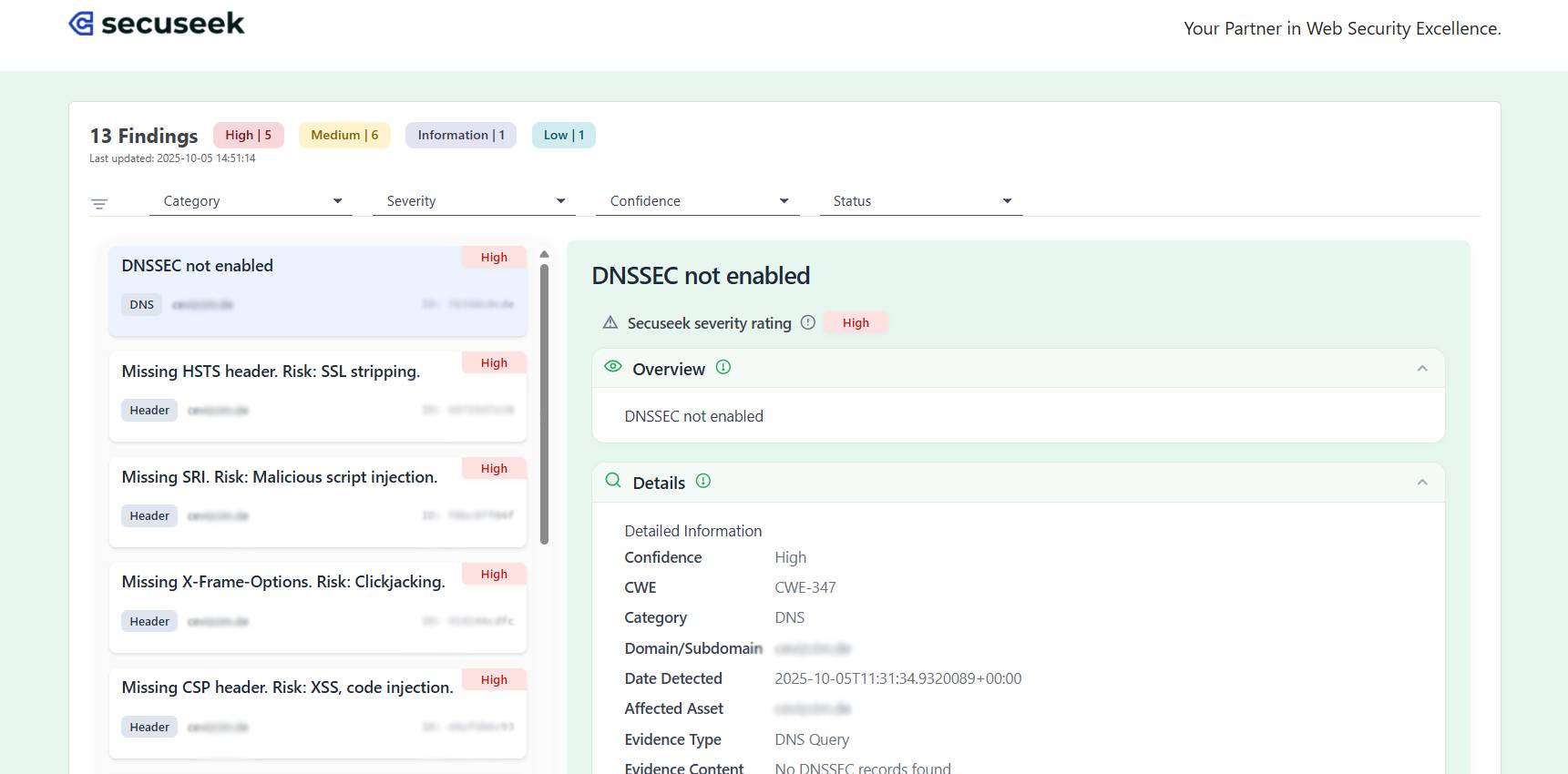
SecuSeek performs extensive security scans and aggregates all findings in one place. View vulnerabilities across your entire web infrastructure with detailed information about each security issue.
✨ Key Features
- Real-time Findings Dashboard – Monitor all security vulnerabilities with live updates
- Multi-Severity Classification – Findings categorized by Critical, High, Medium, and Low severity levels
- Advanced Filtering System – Filter by category, severity, confidence level, status, domain, and custom groups
- Detailed Vulnerability Information – Complete details including CVE/CWE identifiers, confidence scores, and evidence
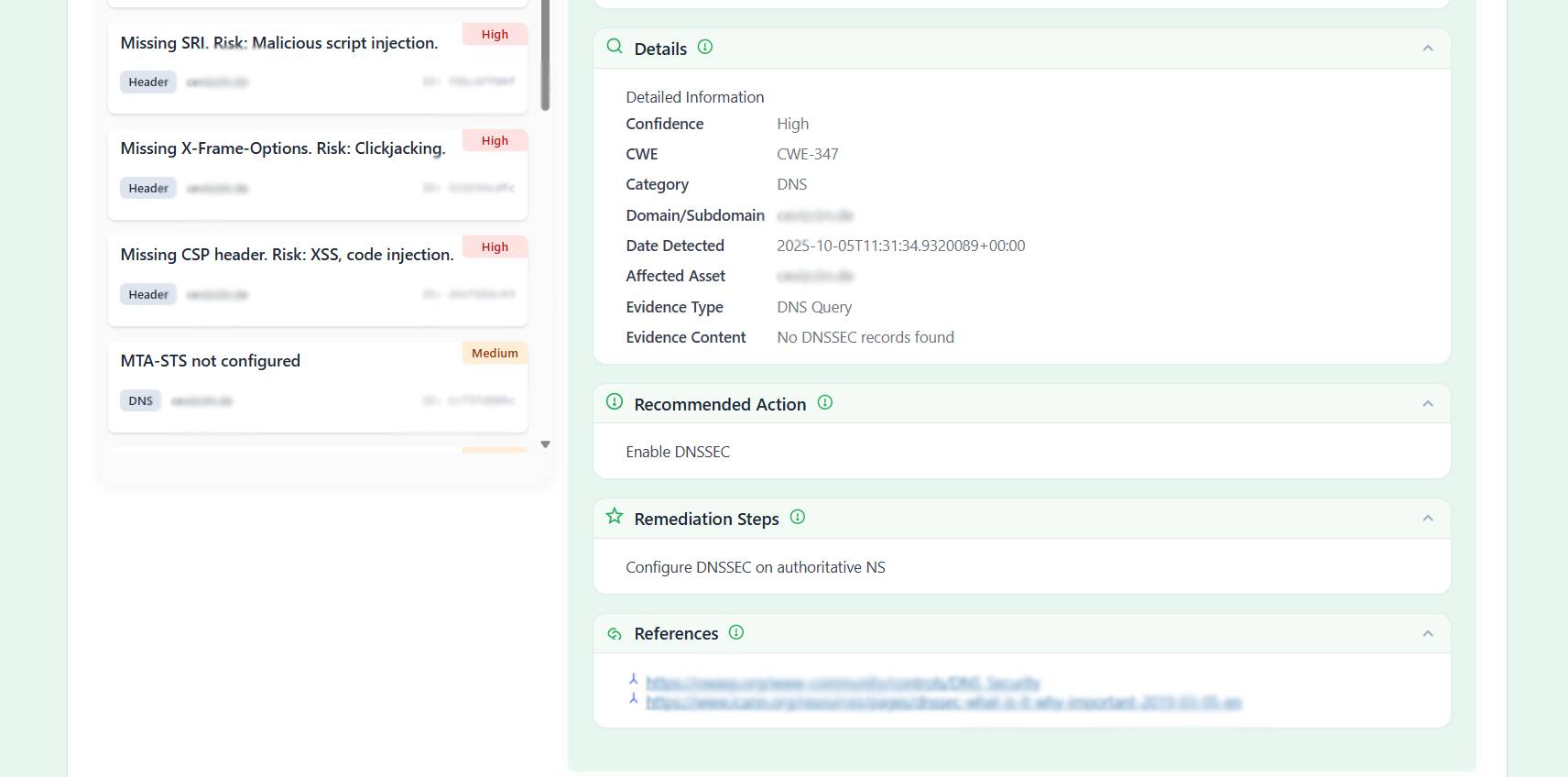
- Actionable Remediation Steps – Get specific guidance on how to fix each vulnerability
- Reference Links – Direct links to official security advisories and documentation
- Export Capabilities – Export findings for reports and documentation
📊 What You Get With Each Finding
- Overview – Clear explanation of the vulnerability
- Detailed Information – CVE/CWE codes, confidence level, category, affected assets
- Detection Details – When and where the vulnerability was detected
- Recommended Actions – Immediate steps to take
- Remediation Steps – Detailed instructions to fix the issue
- External References – Links to security advisories and technical documentation
🎯 How It Works
- Install and activate the SecuSeek plugin
- Enter your SecuSeek API key from your account
- SecuSeek automatically performs security scans on your configured domains
- View all findings organized by severity in your WordPress dashboard
- Filter and analyze vulnerabilities
- Follow remediation steps to fix security issues
- Export reports for documentation or compliance purposes
🛡️ Who Should Use This?
- Website Administrators – Monitor security across all your WordPress sites
- Security Professionals – Conduct regular security audits and vulnerability assessments
- Development Teams – Track and fix security issues during development
- Business Owners – Stay informed about your website’s security status
- Anyone using SecuSeek – Seamlessly integrate scan results into WordPress admin
🔗 External Services
This plugin connects to SecuSeek’s external API to fetch and display security scan results – for complete details about data handling, privacy practices, and service transparency, visit https://secuseek.com/.
💻 Modern Technology Stack
Built with modern web technologies for a fast, responsive experience:
* Alpine.js for reactive UI components
* Font Awesome for clean iconography
* WordPress HTTP API for secure external requests
* WordPress Cron for scheduled scans
All source code is human-readable and available in the plugin directory.
Terms and Privacy
- Terms of Service:
https://secuseek.com/terms-and-conditions/ - Privacy Policy:
https://secuseek.com/privacy-policy/
Captures d’écrans
Installation
- Upload the plugin files to the
/wp-content/plugins/secuseekdirectory, or install the plugin through the WordPress plugins screen directly. - Activate the plugin through the ‘Plugins’ screen in WordPress.
- Enter your SecuSeek API key in the plugin settings page.
FAQ
-
Where do I get an API key?
-
You can obtain an API key from your SecuSeek dashboard.
-
What does the plugin do?
-
It fetches and displays security findings from SecuSeek’s external scan services.
-
Does this plugin run security scans on my WordPress site?
-
No. All scans are performed externally. The plugin only retrieves verified security results and shows them in your admin panel.
-
Will this plugin slow down my website?
-
No. Since scanning happens outside your server, the plugin has no impact on site performance.
-
What kind of security issues can SecuSeek Security detect?
-
It identifies vulnerabilities, outdated components, configuration weaknesses, exposed assets, and CVE-related risks.
-
Do I need technical knowledge to use this security tool?
-
No. The plugin presents findings clearly, including severity levels and practical recommendations.
-
Does SecuSeek Security modify or change my WordPress files?
-
No. It never alters files or settings. It strictly reports security issues so you stay in control.
-
Is my data safe when using this security scanner?
-
Yes. Only technical data required for security analysis is processed. No personal or sensitive information is accessed.
-
How often should I check for security issues?
-
You can review findings anytime. Running checks regularly helps detect risks before they escalate.
-
Can SecuSeek Security fix vulnerabilities automatically?
-
It provides guidance and recommended actions, but applying updates or fixes is up to you.
-
Do I need to keep the plugin installed to monitor security findings?
-
Yes. Keeping the plugin active lets you view the latest security results directly inside WordPress.
Avis

Contributeurs/contributrices & développeurs/développeuses
« SecuSeek – Web Security Scanner & Vulnerability Assessment » est un logiciel libre. Les personnes suivantes ont contribué à cette extension.
Contributeurs
Traduisez « SecuSeek – Web Security Scanner & Vulnerability Assessment » dans votre langue.
Le développement vous intéresse ?
Parcourir le code, consulter le SVN dépôt, ou s’inscrire au journal de développement par RSS.
Journal des modifications
1.0.3
- Minor layout adjustments.
1.0.2
- Enhanced signup link visibility in login form
- Added subtle but prominent styling for « Sign In / Register at SecuSeek » link
- Improved visual hierarchy to encourage user registration
- Better user engagement with refined UI elements
1.0.1
- Improved filter interface with simplified chip display
- Enhanced user experience with better filter management
- Fixed filter removal functionality
- Updated plugin branding and SEO optimization
1.0
- Initial release.