

Description
Simple Custom Post Order is the easiest way to manually sort your WordPress content using drag-and-drop functionality. Whether you’re managing blog posts, portfolio items, WooCommerce products, team members, testimonials, or any custom post type, this plugin gives you complete control over your content order.
Why Choose Simple Custom Post Order?
- Zero Configuration – Works instantly after activation
- Drag & Drop Interface – Intuitive sorting directly in your admin post lists
- Universal Compatibility – Works with any post type and taxonomy
- Lightweight & Fast – No bloat, minimal impact on site performance
- Developer Friendly – Clean code with action hooks for customization
Key Features
Sort Any Content Type
- Posts – Reorder your blog posts in any sequence you prefer
- Pages – Organize pages beyond alphabetical or date order
- Custom Post Types – Perfect for portfolios, team members, testimonials, products, events, FAQs, services, and more
- WooCommerce Products – Manually sort products in your shop
- Taxonomies – Reorder categories, tags, and custom taxonomies
Intuitive Admin Interface
- Drag-and-drop sorting directly in the WordPress post list table
- Visual feedback while reordering items
- Changes saved automatically via AJAX – no page refresh needed
- Works seamlessly with the default WordPress admin experience
Smart Query Integration
- Automatically applies custom order to front-end queries
- Respects custom
orderbyparameters when explicitly set - Does not interfere with search results (maintains relevance sorting)
- Compatible with
get_posts(),WP_Query, and standard loops
Reset & Restore
- One-click reset to restore default ordering
- Reset individual post types without affecting others
- Useful when you need to start fresh with your content organization
Perfect For
- Bloggers – Feature important posts at the top of your blog
- Business Websites – Showcase key services or team members first
- Portfolio Sites – Display your best work in a specific order
- Online Stores – Highlight featured or seasonal products
- Membership Sites – Organize course content or resources
- News Sites – Pin important stories or announcements
- Event Websites – Arrange events in your preferred sequence
- Documentation Sites – Structure help articles logically
Use Cases
Portfolio Management
Arrange your portfolio items to showcase your best work first, group similar projects together, or create a visual narrative of your creative journey.
Team Page Organization
Display team members by hierarchy, department, or seniority rather than by when they were added to the system.
Product Highlighting
Feature seasonal items, bestsellers, or new arrivals at the top of your WooCommerce shop without relying solely on sorting by date or price.
Content Curation
Create curated reading lists by manually ordering posts in the exact sequence you want readers to discover them.
FAQ Organization
Sort frequently asked questions by importance or topic, ensuring the most relevant questions appear first.
Testimonial Display
Show your most compelling testimonials first to maximize their impact on potential customers.
Developer Features
Action Hooks
scp_update_menu_order– Fires after post order is updatedscp_update_menu_order_tags– Fires after taxonomy term order is updated
Filter Hooks
scpo_post_types_args– Modify which post types appear in settings
Advanced View Mode
Enable the advanced view in settings to see all registered post types, including those normally hidden from the admin menu.
Supported Post Types
Simple Custom Post Order works with:
- WordPress Posts
- WordPress Pages
- WooCommerce Products
- Easy Digital Downloads Products
- Portfolio items (Jetpack, custom)
- Team member post types
- Testimonial post types
- Event post types (The Events Calendar, etc.)
- FAQ post types
- Any custom post type with
show_uienabled
Supported Taxonomies
- Categories
- Tags
- WooCommerce Product Categories
- WooCommerce Product Tags
- Custom taxonomies with
show_uienabled
How It Works
- Install & Activate – Install the plugin from WordPress.org or upload manually
- Configure – Go to Settings > SCPOrder and select which post types and taxonomies to enable
- Reorder – Visit any enabled post type list and drag items to reorder
- Done – Your custom order is automatically applied everywhere on your site
The plugin uses WordPress’s native menu_order field for posts and pages, and adds a term_order column for taxonomy terms. This approach ensures compatibility and data persistence.
Performance Optimized
- Targeted cache invalidation (only clears cache for modified items)
- Efficient database queries using prepared statements
- Scripts loaded only on relevant admin pages
- No front-end performance impact
Security First
- All database queries use prepared statements
- AJAX requests protected with nonce verification
- Capability checks ensure only authorized users can reorder
- Input sanitization on all user data
Additional Information
Support
For support questions, please use the WordPress.org support forum.
Bug Reports
Report bugs on our GitHub repository.
Contributing
Contributions are welcome! Please submit pull requests to our GitHub repository.
Credits
This plugin is made with love by the team at Colorlib.
Captures d’écrans
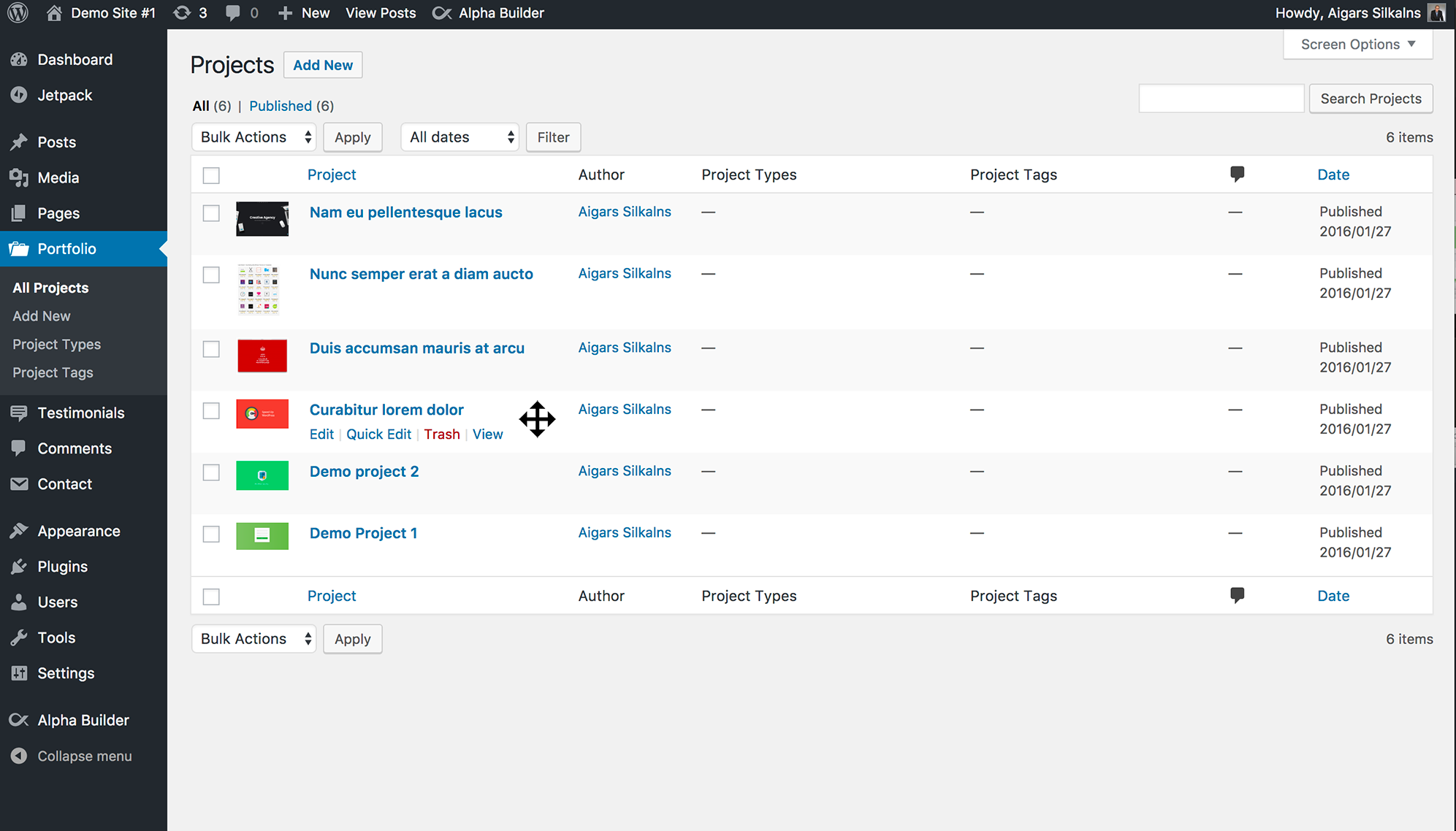
Drag-and-drop reordering of posts in the admin list table 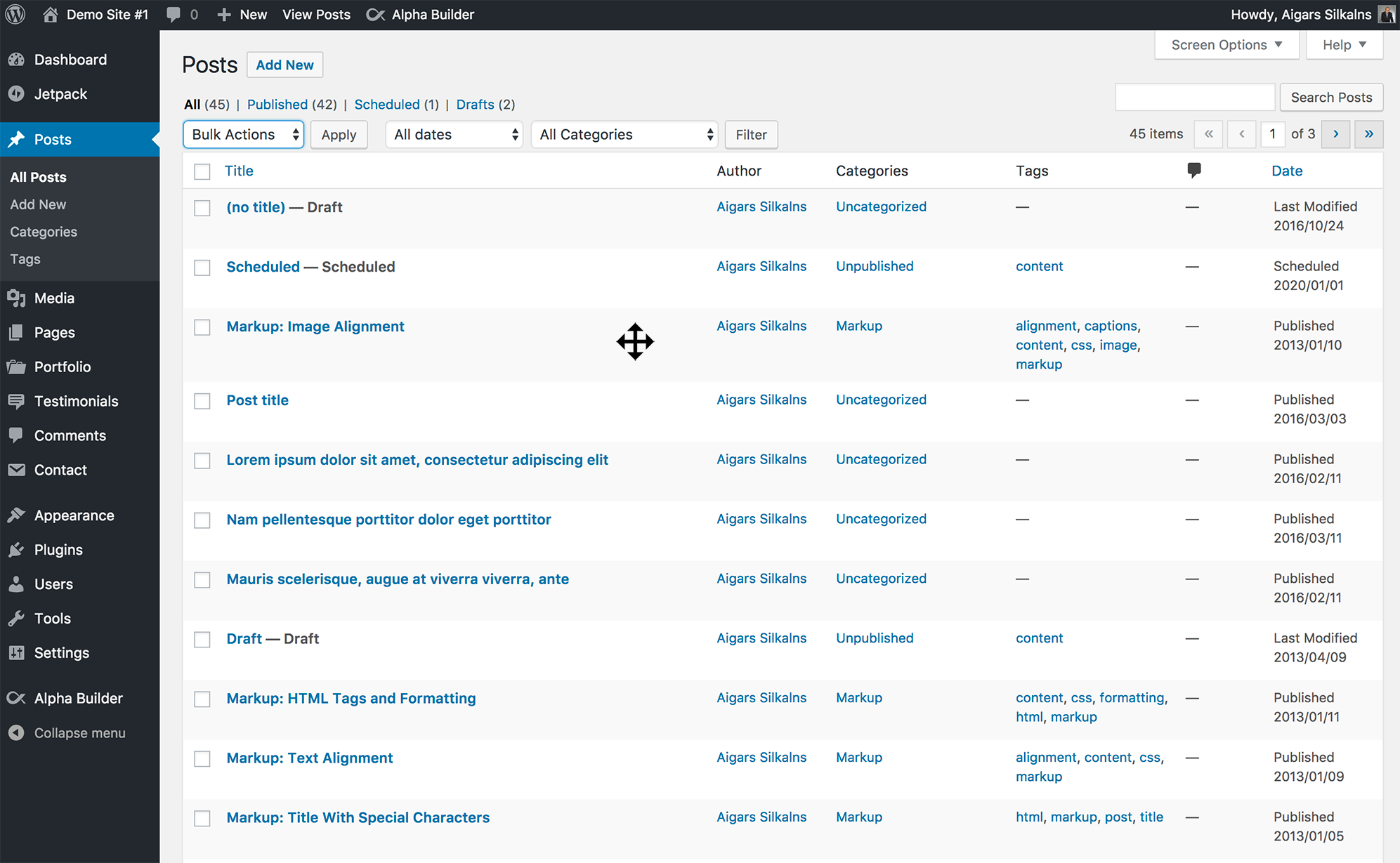
Drag-and-drop reordering of custom post types 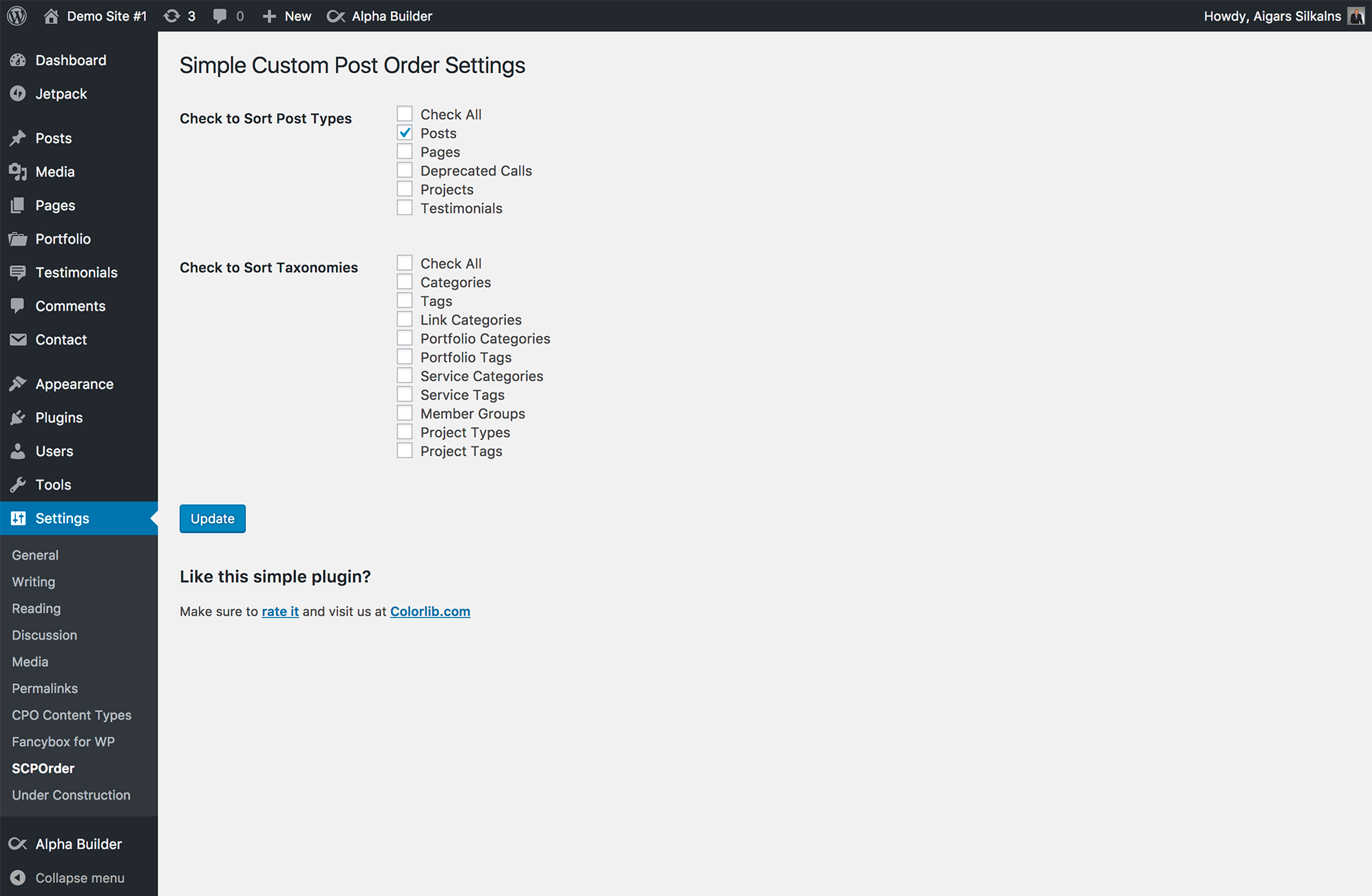
Plugin settings page – select post types and taxonomies to enable
Installation
Automatic Installation
- Log in to your WordPress admin panel
- Go to Plugins > Add New
- Search for « Simple Custom Post Order »
- Click « Install Now » and then « Activate »
- Go to Settings > SCPOrder to configure
Manual Installation
- Download the plugin ZIP file
- Log in to your WordPress admin panel
- Go to Plugins > Add New > Upload Plugin
- Choose the downloaded ZIP file and click « Install Now »
- Activate the plugin
- Go to Settings > SCPOrder to configure
Configuration
- Navigate to Settings > SCPOrder
- Check the boxes next to post types you want to enable sorting for
- Check the boxes next to taxonomies you want to enable sorting for
- Click « Update » to save your settings
- Visit any enabled post type list to start reordering with drag-and-drop
FAQ
-
Does this plugin work with custom post types?
-
Yes! Simple Custom Post Order works with any custom post type that has
show_uienabled. This includes post types from popular plugins like WooCommerce, Easy Digital Downloads, Jetpack, and any custom post types you’ve created. -
Will the custom order appear on my website’s front-end?
-
Yes, the custom order is automatically applied to all front-end queries for enabled post types. Your posts, pages, and custom content will display in your chosen order throughout your site.
-
Does it work with page builders like Elementor or Divi?
-
Yes, as long as the page builder uses standard WordPress queries, your custom order will be respected. Most major page builders are compatible.
-
Can I reset the order back to default?
-
Yes! Go to Settings > SCPOrder and use the « Reset Order » section at the bottom of the page. Select the post types you want to reset and click « Reset order ». This will clear the custom ordering for selected post types.
-
Does it affect search results?
-
No, the plugin automatically preserves WordPress’s relevance-based sorting for search results. Your search functionality will work exactly as expected.
-
Is it compatible with WooCommerce?
-
Yes, you can use Simple Custom Post Order to manually sort WooCommerce products, product categories, and product tags.
-
Will it slow down my website?
-
No, the plugin is highly optimized. It only loads scripts on relevant admin pages and uses efficient database queries. There is no impact on front-end performance.
-
Can multiple users reorder at the same time?
-
While technically possible, we recommend coordinating reordering activities to avoid conflicts. The last save wins if two users modify the same list simultaneously.
-
Does it work with multisite?
-
Yes, Simple Custom Post Order is compatible with WordPress multisite installations. Each site can have its own ordering configuration.
-
How do I reorder items?
-
Simply go to the post list for any enabled post type (Posts, Pages, Products, etc.), click and hold on a row, then drag it to the desired position. The new order is saved automatically.
-
Can I programmatically override the custom order?
-
Yes, if you explicitly set
orderbyandorderparameters in your custom queries, those will take precedence over the plugin’s custom order.
Avis


Contributeurs/contributrices & développeurs/développeuses
« Simple Custom Post Order » est un logiciel libre. Les personnes suivantes ont contribué à cette extension.
Contributeurs

“Simple Custom Post Order” a été traduit dans 17 locales. Remerciez l’équipe de traduction pour ses contributions.
Traduisez « Simple Custom Post Order » dans votre langue.
Le développement vous intéresse ?
Parcourir le code, consulter le SVN dépôt, ou s’inscrire au journal de développement par RSS.
Journal des modifications
2.6.0 – 2026-01-09
Settings Page Overhaul
- Complete rewrite using WordPress Settings API for native admin experience
- Replaced custom toggle switches with standard WordPress checkboxes
- Removed 100+ lines of custom CSS – now uses native WordPress admin styles
- Improved accessibility with proper ARIA roles and screen reader text
- Settings now integrate seamlessly with WordPress core admin UI
- Added « Settings » link to plugin action links on the Plugins page
Security Enhancements
- Fixed potential SQL injection vulnerabilities with prepared statements
- Added proper output escaping (XSS prevention) throughout the plugin
- Improved input sanitization for all user data
- Added nonce escaping in JavaScript contexts
Performance Improvements
- Replaced blanket cache flushing with targeted cache invalidation
- Only affected posts/terms have their cache cleared after reordering
- Reduced unnecessary database operations
PHP 8.4 Compatibility
- Added type declarations to all class methods
- Fixed null safety issues for PHP 8.1+
- Added explicit property declarations
- Minimum PHP version now 7.4
Code Quality
- Converted to modern PHP syntax (short arrays, spaceship operator)
- Replaced loose comparisons with strict comparisons
- Removed legacy French comments and TODO markers
- Fixed code formatting issues
- Improved AJAX responses with proper JSON structure
Bug Fixes
- Fixed potential fatal error when
get_current_screen()returns null - Fixed reset order JavaScript to handle JSON responses correctly
- Fixed TypeError when plugin options are not yet set (fresh installs)
2.5.11 – 2025-06-23
- Deactivated custom sort order on search results pages
2.5.10 – 2024-12-04
- Fix Notice: _load_textdomain_just_in_time
2.5.9 – 2024-11-29
- Allow editors to change posts order
2.5.8 – 2024-10-10
- Security update
2.5.7 – 2023-09-20
- Security update fixing multiple issues
- Code cleanup for better performance
2.5.6 – 2021-05-27
- Changed: Revert to 2.5.4
2.5.5 – 2021-05-11
- Changed: Code cleaning
- Changed: Allow custom orderby in Block Preview
2.5.4 – 2021-03-05
- Changed: Improved performance
2.5.3
- Modified deprecated jQuery functions
2.5.2
- Modified deprecated jQuery function for WordPress 5.5 compatibility
- Fixed an issue where posts would be in reverse order after resetting
2.5.1
- Improved fix for post list table width when sorting is enabled
- Fixed admin AJAX overriding queries
2.5.0
- Fixed post list table width when sorting is enabled
- Review dismiss fix
2.4.9
- Fixed « Post order not saving »
2.4.8
- Added ability to reset order for post types
2.4.7
- Fixed undefined index when ordering terms
- Added filter for post types args shown in settings page
- Added extra option for advanced view of post types
2.4.6
- Removed dashboard news widget
2.4.5
- Added action hooks for update_menu_order_tags and update_menu_order
- Fixed issue with sorting
- Fixed edit page layout when no items found
2.4.4
- Fixed slow JavaScript in admin
- Fixed database error
2.4.3
- Minor UI update with toggles
2.4.2
- Fixed potential bug with other plugins
- Fixed table breaking on reordering when Yoast SEO installed
2.4.1
- Fixed translations
2.4.0
- Optimized database queries
2.3.9
- Added button to dismiss admin notice
2.3.8
- Fixed white screen issue
2.3.7
- Fixed white screen issue
2.3.6
- Bug fixes
2.3.5
- Bug fixes
2.3.4
- Removed deprecated function « screen_icon »
2.3.2
- Minor documentation and readme tweaks
2.3
- Fixed major bug on taxonomy and post order
2.2
- Fixed bug: Custom query order/orderby parameters now take precedence
- Improved parameter handling
- Removed taxonomy sort (re-added in later versions)
2.1
- Prevent breaking autocomplete
2.0
- Fixed undefined notice error in WordPress 3.7.1
- Taxonomy activate checkbox removed
1.5
- Bug fixes
- Added taxonomy sort
- Added taxonomy sort option in settings
1.0
- Initial release