Description
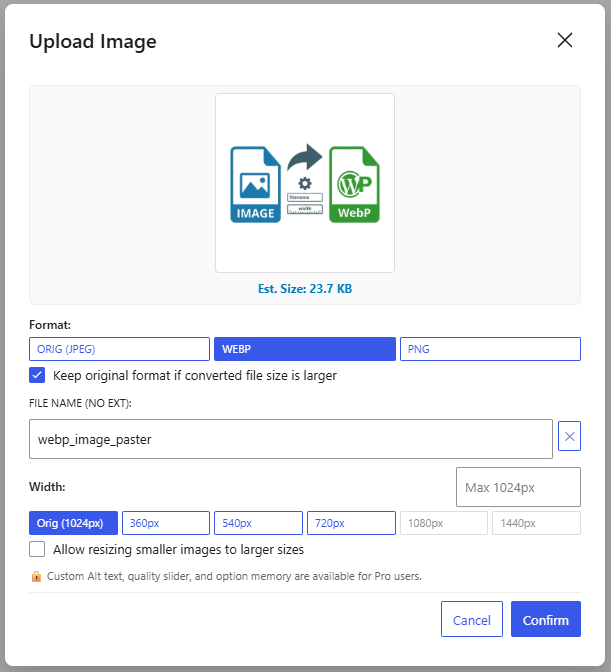
WebP Image Paster streamlines your media workflow within the WordPress Gutenberg Block Editor. Simply paste from your clipboard or drag and drop any image directly into the editor, set a filename, choose your preferred format (ORIG, WebP, PNG), and it will be processed and uploaded directly to your media library.
Key Features
- Clipboard Paste & Drag-and-Drop: Seamlessly catches images pasted or dropped into the Gutenberg editor.
- Direct Featured Image Drag-and-Drop: Drop photos directly onto the Gutenberg sidebar ‘Featured Image’ panel to automatically convert to WebP and set as the post’s featured image.
- HEIC / HEIF Format Support: Easily drag & drop or paste photos from Google Photos and Apple iOS devices; automatically decoded and converted on-the-fly to WebP/JPG/PNG.
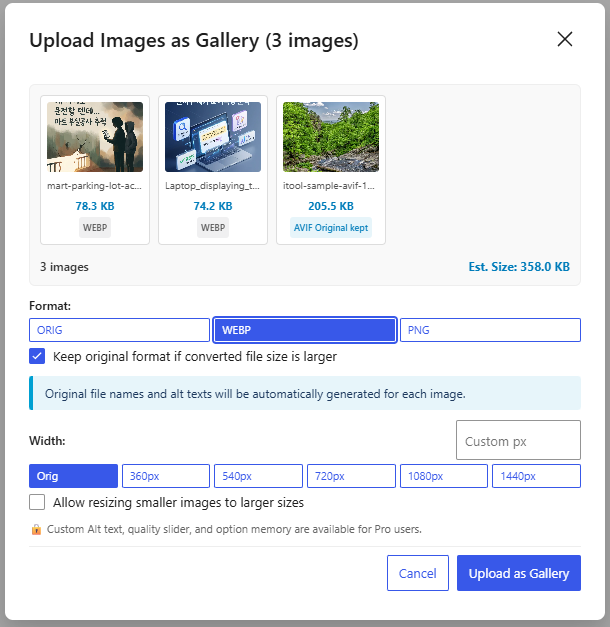
- Multi-Image Drag-and-Drop Gallery: Drop multiple images at once to batch process them and insert them as a Gutenberg Gallery block.
- Keep Original Format (ORIG): Supports an ‘ORIG’ option to upload files directly without re-compression, preserving GIF animations, AVIF compression, and original qualities.
- Smart Block Placement & Replacement: Inserts images at exact drop locations, replaces empty paragraph blocks, or updates existing image blocks upon drop.
- Smart Dimension Detection & Upscaling Control: Detects and displays natural image width directly on the Orig button, prevents accidental blurriness by disabling larger presets by default, and includes a toggle to allow upscaling when needed.
- Client-side Image Conversion: Converts raw image data directly in your browser using HTML5 Canvas for ultra-fast processing.
- Format Selection: Choose between ORIG, WebP, and PNG formats with dynamic format detection.
- Smart Size-Guard & Auto Fallback: Automatically preserves the original format if converting would increase file size, preventing unnecessary bloat and quality loss.
- Custom Filename & Alt Text: Easily specify filenames and automatically generate SEO-friendly Alt text.
- Preset Widths: Choose quick width presets (360px, 540px, 720px, 1080px, 1440px) or upload original dimensions.
- Automatic Block Insertion: Automatically uploads the processed file to the Media Library and inserts an Image Block into your post.
Captures d’écrans
Installation
- Upload the
webp-image-pasterfolder to the/wp-content/plugins/directory, or install the plugin directly through the WordPress plugins screen. - Activate the plugin through the ‘Plugins’ screen in WordPress.
- Open the Gutenberg editor and paste (
Ctrl+V/Cmd+V) or drag and drop any image directly into the editor.
FAQ
-
Does this plugin modify existing images in the Media Library?
-
No, this plugin only processes new images that are pasted or dropped directly into the Gutenberg Block Editor.
-
Where does the image conversion happen?
-
The image conversion is performed on the client-side (inside your web browser) before the file is uploaded to your WordPress server, saving server memory and CPU resources.
Avis
Il n’y a aucun avis pour cette extension.
Contributeurs/contributrices & développeurs/développeuses
« WebP Image Paster » est un logiciel libre. Les personnes suivantes ont contribué à cette extension.
Contributeurs

“WebP Image Paster” a été traduit dans 1 locale. Remerciez l’équipe de traduction pour ses contributions.
Traduisez « WebP Image Paster » dans votre langue.
Le développement vous intéresse ?
Parcourir le code, consulter le SVN dépôt, ou s’inscrire au journal de développement par RSS.
Journal des modifications
1.0.3
- Added Featured Image direct drag-and-drop: Drag photos directly onto the Gutenberg sidebar ‘Featured Image’ panel to convert and register as the featured image.
- Added HEIC/HEIF image support: Intercepts and converts HEIC/HEIF photos (Google Photos, Apple iOS devices) on-the-fly directly in the browser to WebP/JPG/PNG.
- Added multi-image drag-and-drop support to batch upload images as a Gutenberg Gallery block.
- Fixed a conflict with the native WordPress Media Library where the blue drag overlay would freeze.
- Fixed an issue where the image drop feature would occasionally fail to respond.
- Optimized internal code structure and performance.
1.0.2
- Added dynamic ‘ORIG’ format option: Preserve original formats (GIF animations, AVIF, SVG, pre-compressed JPEG/WebP) with 100% lossless bypass.
- Added Drag and Drop support: Drop images directly into the Gutenberg editor between blocks, replacing empty blocks, or replacing existing image blocks.
- Added smart natural dimension detection: Displays original width on the ‘Orig’ button (e.g., Orig (640px)).
- Added upscaling prevention: Presets larger than the original image are disabled by default with dynamic max-width placeholders to avoid accidental quality degradation.
- Added ‘Allow resizing smaller images to larger sizes’ toggle checkbox (with option memory in Pro).
- Added smart format detection and automatic quality/dimension fallback for pre-optimized images.
- Fixed an issue where pasted/dropped images were always inserted at the end of the document instead of the target position.
1.0.1
- Added option to choose image output format (PNG or WebP).
1.0.0
- Initial public release.