
Description
Convert to Blocks est une extension WordPress qui transforme le contenu de l’éditeur classique en blocs à la volée. Après avoir installé Gutenberg ou mis à jour vers WordPress 5.0+, votre contenu sera affiché dans des « Blocs de l’Éditeur Classique ». Bien que ces blocs soient entièrement fonctionnels et s’affichent correctement sur l’interface publique de votre site, ils ne permettent pas aux éditeurs de profiter pleinement de l’expérience de modification par blocs. Afin de le faire, vos publications de l’éditeur classique doivent être converties en blocs. Cette extension le fait pour vous « à la volée ». Lorsqu’un éditeur modifie une publication classique, le contenu sera analysé en blocs. Lorsque l’éditeur enregistre la publication, la nouvelle structure sera enregistrée dans la base de données. Cette stratégie réduit le risque car vous ne modifiez que les valeurs de la base de données pour le contenu qui doit être changé.
Notez que les transformations des blocs internes sont uniquement prises en charge avec l’extension Gutenberg 10.9.0+.
Captures d’écrans
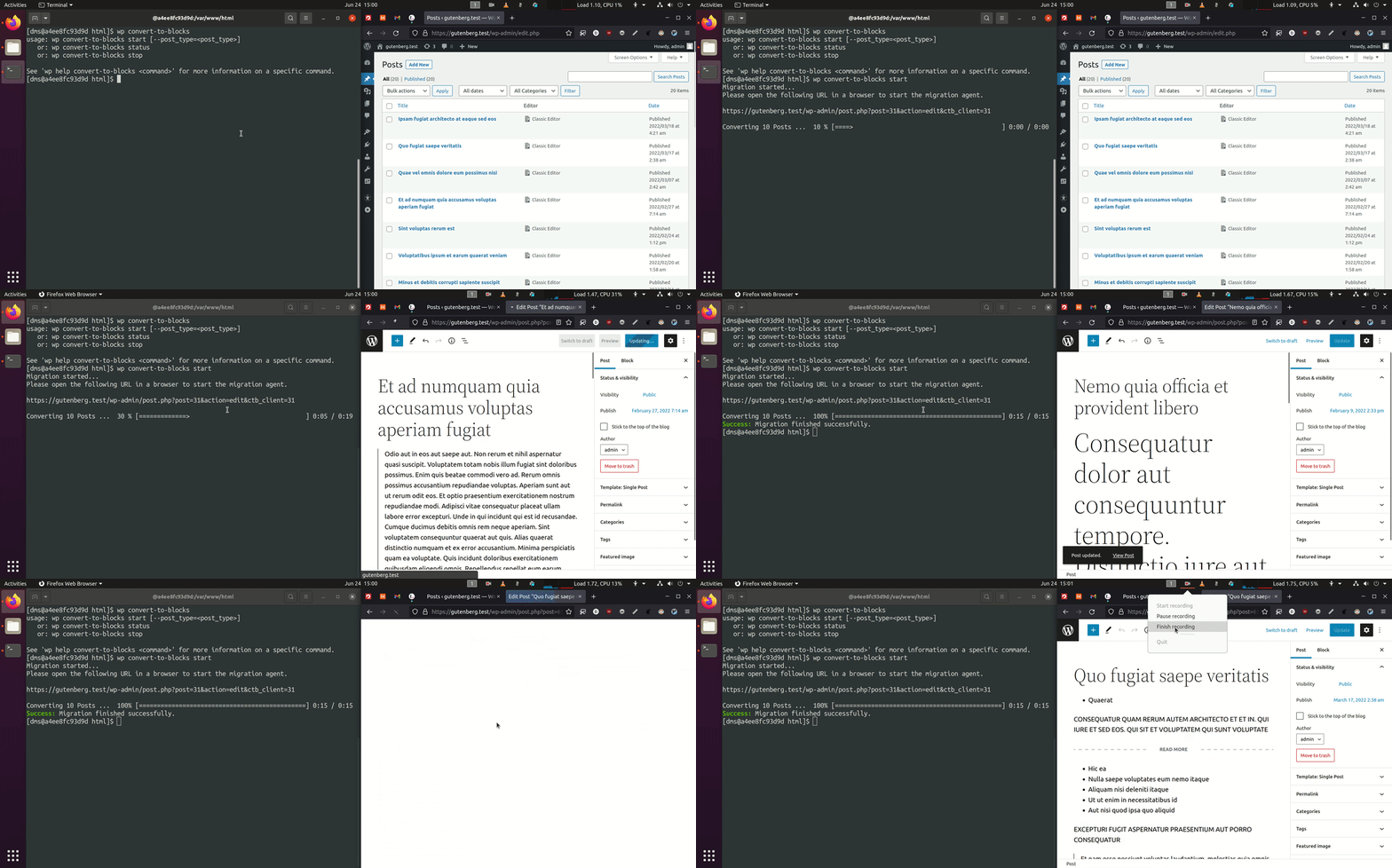
La migration en masse à l’aide de la commande WP-CLI wp convert-to-blocks startqui convertit les publications de manière itérative dans le navigateur sans nécessiter d’intervention manuelle.
Installation
Installation manuelle
- Téléversez l’intégralité du répertoire
/convert-to-blocksdans le répertoire/wp-content/plugins/. - Activez Convert to Blocks via le menu « Extensions » dans WordPress.
FAQ
-
Comment savoir si ça fonctionne ?
-
Trouvez un éditeur classique dans la publication, essayez de naviguer loin de la page. Vous recevrez une erreur indiquant que vos modifications seront perdues. Cela est dû au fait que Convert to Blocks a converti votre contenu en blocs à la volée et ces modifications seront enregistrées lorsque vous mettrez à jour la publication.
-
Est-ce que Convert to Blocks gère mes blocs personnalisés ?
-
Par défaut, il ne le fera pas.
-
Est-ce que Convert to Blocks gère les blocs imbriqués ?
-
Le support des blocs imbriqués/internes ne fonctionne pas avec Gutenberg inclus dans le cœur de WordPress <=5.7.2. Cette fonctionnalité nécessite l’extension Gutenberg >=10.9.0.
Avis


Contributeurs/contributrices & développeurs/développeuses
« Convert to Blocks » est un logiciel libre. Les personnes suivantes ont contribué à cette extension.
Contributeurs


“Convert to Blocks” a été traduit dans 7 locales. Remerciez l’équipe de traduction pour ses contributions.
Traduisez « Convert to Blocks » dans votre langue.
Le développement vous intéresse ?
Parcourir le code, consulter le SVN dépôt, ou s’inscrire au journal de développement par RSS.
Journal des modifications
1.3.4 – 2025-07-15
- Fixed: Ensure no PHP error is thrown on the plugin list screen when running PHP 8.0 (props @dinhac, @dkotter, @faisal-alvi via #210).
1.3.3 – 2025-07-14
- Added: Link to settings page from the plugin list page (props @badasswp, @dkotter via #195).
- Changed: Bump WordPress « tested up to » version 6.8 (props @jeffpaul via #199, #200).
- Changed: Bump WordPress minimum supported version to 6.6 (props @jeffpaul via #199, #200).
- Fixed: Fix PHP warning due to undefined array key (props @sksaju, @dkotter via #202).
- Fixed: i18n functions being called too early, causing PHP Notices (props @stormrockwell, @dkotter, @dsawardekar via #203).
- Security: Bump
cookiefrom 0.4.2 to 0.7.1,expressfrom 4.21.0 to 4.21.2,@wordpress/e2e-test-utils-playwrightfrom 1.7.0 to 1.18.0,serialize-javascriptfrom 6.0.0 to 6.0.2 andmochafrom 10.4.0 to 11.1.0 (props @dependabot, @Sidsector9 via #194). - Security: Bump
axiosfrom 1.7.4 to 1.8.3 (props @dependabot, @iamdharmesh via #196). - Security: Bump
http-proxy-middlewarefrom 2.0.6 to 2.0.9 andtar-fsfrom 3.0.8 to 3.1.0 (props @dependabot, @dkotter via #206).
1.3.2 – 2025-02-03
- Changed: Bump WordPress « tested up to » version 6.7 (props @colinswinney, @jeffpaul via #188, #190).
- Security: Bump
axiosfrom 1.6.8 to 1.7.4 (props @dependabot, @dkotter via #180). - Security: Bump
webpackfrom 5.91.0 to 5.94.0 (props @dependabot, @faisal-alvi via #181). - Security: Bump
wsfrom 7.5.10 to 8.18.0 and@wordpress/scriptsfrom 27.8.0 to 30.4.0 (props @dependabot, @faisal-alvi via #182, #189). - Security: Bump
expressfrom 4.19.2 to 4.21.0 (props @dependabot, @iamdharmesh via #185).
1.3.1 – 2024-08-20
- Changed: Bump WordPress « tested up to » version 6.6 (props @sudip-md, @jeffpaul, @Sidsector9, @ankitguptaindia via #174).
- Changed: Bump WordPress minimum from 6.3 to 6.4 (props @sudip-md, @jeffpaul, @Sidsector9, @ankitguptaindia via #174).
- Fixed: Issue with saving a post before the convert to blocks transform was completed (props @mdesplenter, @Sidsector9, @dsawardekar via #173).
- Security: Bump
bracesfrom 3.0.2 to 3.0.3 (props @dependabot, @Sidsector9 via #168). - Security: Bump
wsfrom 7.5.9 to 7.5.10 (props @dependabot, @Sidsector9 via #169).
1.3.0 – 2024-05-14
- Added: Block Catalog integration, and pagination support (props @dsawardekar, @iamdharmesh via #164).
- Changed: Adjust
enable_block_editormethod only to alter posts that support the gutenbridge (props @stormrockwell, @Sidsector9, @jeffpaul, @dsawardekar via #136). - Changed: Bump WordPress « tested up to » version 6.5 (props @QAharshalkadu, @jeffpaul, @Sidsector9, @sudip-md, @dkotter via #146, #161).
- Changed: Replaced lee-dohm/no-response with actions/stale to help with closing no-response/stale issues (props @jeffpaul via #159).
- Changed: Bump Node version from 16 to 20 (props @aaronjorbin, @Sidsector9, @dkotter via #160).
- Changed: Bump
actions/upload-artifactfrom v3 to v4 (props @iamdharmesh via #162). - Security: Bump
follow-redirectsfrom 1.15.2 to 1.15.4 (props @dependabot, @dkotter via #153). - Security: Bump
browserify-signfrom 4.0.4 to 4.2.2 (props @dependabot, @dkotter via #145). - Security: Bump
@babel/traversefrom 7.11.5 to 7.23.7 (props @dependabot, @dkotter via #155). - Security: Remove old dependencies in favor of using
@wordpress/scriptsin our build workflow (props @Sidsector9, @dkotter via #167).